
A cancelled booking doesn’t have to leave an empty spot in your schedule. An automated waitlist management system tracks people hoping to book a full class or appointment and helps offer them a place when one becomes available. It turns a cancellation into a clear next step for your business and the...

A cancelled booking doesn’t have to leave an empty spot in your schedule. An automated waitlist management system tracks people hoping to book a full class or appointment and helps offer them a place when one becomes available. It turns a cancellation into a clear next step for your business and the person waiting.
That can reduce the need to scan messages, contact people one by one, and track who’s next. But waitlist tools handle booking rules, payments, and cancellations differently, so the right fit depends on how you run your services. This guide explains what waitlist software does, how it manages openings and payment steps, and what to consider when choosing a system. You’ll be better equipped to decide whether automation can make your schedule easier to manage.
• Understand how waitlist software organizes requests and what can affect its pricing.
• See how online sign-ups and staff-added requests can be handled in one workflow.
• Learn how cancellation alerts and clear booking steps can help fill schedule gaps.
• Use practical criteria to assess whether a system’s payment and waitlist processes fit your business.
• Explore how digital check-in and virtual queues can make arrival and service flow easier to manage.
Waitlist software records requests from people who want to book a full class, appointment, or service slot. A platform can organize requests, apply your business’s workflow, and notify eligible people when a place opens up. For example, a yoga studio could maintain a list for a full evening class, while a clinic might track patients waiting for an earlier appointment. The software helps manage requests, but it doesn’t create extra capacity or guarantee that every opening will be filled.
An automated waitlist management system typically links a request to a specific service, date, or time. You set the rules, such as whether to offer the next place to the earliest request or to someone available at short notice. When a cancellation creates an opening, the system can follow those rules to offer it. Workflows vary by platform, so assess the full process from sign-up through confirmation, expiry, and removal from the list.
Waitlist pricing depends on how a provider packages its management software. Plans may vary by account, location, staff access, message volume, or access to broader scheduling features. Some providers offer monthly plans, while others use annual billing or tiers. Compare what each plan includes, not just its headline price. Check whether it covers online and staff-entered requests, automated notifications, reporting, and the booking tools your team already uses.
Before choosing a plan, map the tasks you need it to handle. A small service business may need a simple list and notifications when a place opens. A multi-location operation may need separate schedules, staff permissions, and reporting across locations. Check how upgrades, message limits, and additional users affect the plan. A low-cost tier may not fit if essential workflows require a higher tier. Choose based on what your team will use, not a long list of unused extras.
For text messages in the United States, requirements depend on the message type and applicable federal and state rules. Build the workflow around clear, documented permission, identify your business in messages, and provide an easy way to stop texts. Confirm which rules apply to your use case.
Automation has limits. Incorrect contact details, outdated availability, unclear queue rules, or delayed replies can leave an opening unfilled. Staff still need a process for exceptions, such as a service change or a customer who needs assistance. Review message wording, eligibility rules, and the cancellation workflow before relying on automation for live bookings.
Decide how the system handles priority, response windows, and unclaimed openings.
Match each tier’s users, locations, notifications, and reporting to your daily workflows.
Submit a request, create an opening, send an offer, and confirm the booking.
It can, if the waitlist platform connects to the business’s booking and payment workflows. For example, a customer might join a full pottery class online, receive an offer after a cancellation, then pay while confirming the new place. Payment could happen through an integrated checkout, a payment link, or a separate staff process. The exact flow depends on the platform and its payment setup.
Keep the waitlist request separate from the confirmed booking. Joining a queue shows interest, but it doesn’t necessarily reserve a place or charge the customer. Set a clear rule for when payment is due, such as after the customer accepts an opening. Make sure the confirmation explains the amount, payment method, and deadline before the customer completes the booking.
Online sign-up gives customers a direct way to request a place. A form can collect the service, preferred time, contact details, and relevant booking preferences. For QR-code sign-up, display the code at reception or on a class notice. Customers can scan it and complete the same online form. Keep the fields focused so each request is accurate and easy to process.
Manual requests still matter. A staff member might add someone who calls about a full haircut appointment or asks in person after a yoga class. Record the same details as for online requests, including the service and contact method. Consistent entries keep the queue accurate, whether someone joins by QR code, web form, phone, or at reception.
Compared with paper lists or spreadsheets, automated waitlists can organize requests and trigger notifications through a shared workflow. Paper lists and spreadsheets rely more on staff to update entries, check availability, and contact people manually. A spreadsheet can still work for a small, simple queue, but it needs careful management when several staff members edit it.
To set up a customer waitlist, choose the service and opening rules, create a sign-up form, and decide how customers will hear about available places. Add online and staff-entered requests, then test a cancellation from notification through payment and confirmation. Review reports to see which services attract requests and where customers drop out.
For a dance studio, for example, a waitlist can capture class preferences while booking software handles the wider schedule. Explore studio scheduling workflows as you map how queue requests, openings, and confirmed bookings fit together.
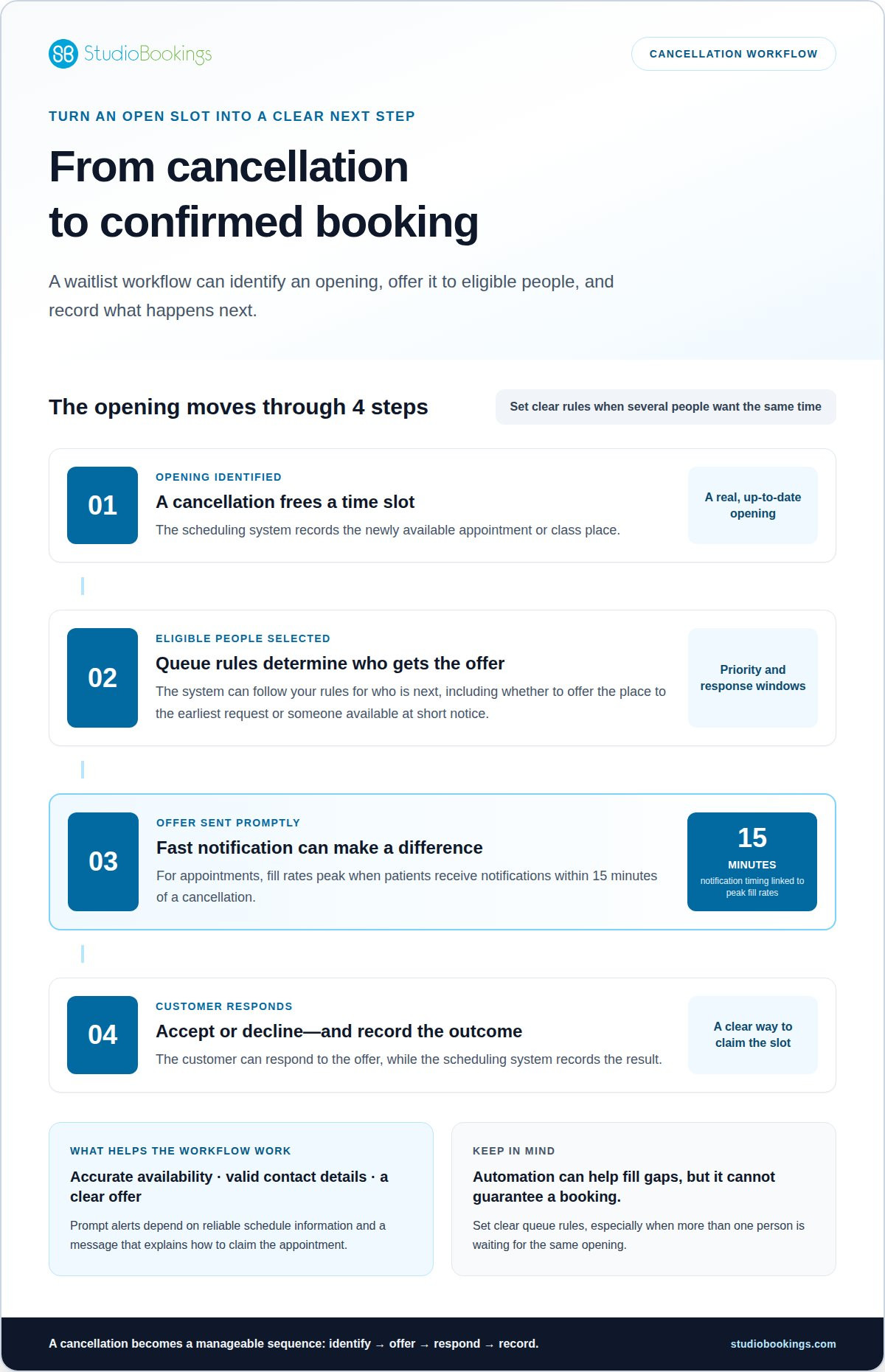
A cancellation creates a short window to offer an appointment to someone waiting. An automated workflow can identify the newly available time, find eligible people, and send an offer. The customer can accept or decline, while the scheduling system records the outcome. Set clear rules for each step, especially when several people want the same opening.
Timing matters. Appointment fill rates peak when patients receive notifications within 15 minutes of a cancellation. A system can trigger messages promptly, rather than waiting for a staff member to notice a gap and contact people manually. That speed still depends on accurate availability, valid contact details, and a message that clearly explains how to claim the appointment.
Healthcare illustrates the scale of the scheduling challenge: inefficient waitlist management results in an estimated 3.6 million appointments wasted annually. Manual appointment replacement can take 4-6 hours, while an automated workflow can take 4-6 minutes. These figures describe different processes, not a guaranteed outcome for every practice. The practical value is in reducing repetitive coordination so staff can focus on exceptions and patient needs.
Consider the clinic example: 8% of 320 weekly appointments are cancelled with 24-48 hours’ notice, amounting to 25.6 appointments. Traditional manual processes fill 40% of those cancelled slots, or 10.2 appointments. That leaves 15.4 cancelled appointments unfilled each week. A waitlist workflow can help staff reach suitable patients sooner, but its rules must match appointment length, service, and availability.
Automated waitlist systems are associated with average schedule utilization increases of 15-23%. To make the workflow useful, define who receives an offer first, how long the offer remains open, and what happens after a decline or no response. For example, a clinic could offer an opening to the first eligible patient, then move to the next person when the offer expires.
Use reports to see where gaps persist. Track cancellation timing, offers sent, acceptances, declines, and unfilled appointments. If a service often has late cancellations, adjust its notification workflow. If customers frequently decline certain times, review how the waitlist collects availability preferences. These checks can help distinguish a messaging problem from a mismatch between openings and customer schedules.
A reliable process also needs a human fallback. Staff should be able to correct schedule changes, help customers who need assistance, and prevent duplicate bookings. Automation supports the workflow, while clear operating rules keep each opening accurate from cancellation through confirmation.
Choose software based on the work your team needs to do, not a long feature list. Start with a realistic example, such as a full Pilates class or a cancelled appointment. Trace the customer’s path from joining the queue to receiving an offer and confirming a place. The right fit should make each step clear to customers and staff.
For a practical comparison, use a six-criteria scorecard and rate each item from 1 to 5. Consider queue rules, signup options, notifications, booking connections, reporting, and ease of use. A high score matters only if the feature supports your operations. For example, a studio that takes requests at reception needs a straightforward way to add them alongside online signups.
Can you set priority, offer expiry, and what happens after a customer declines?
Can customers join online while staff add requests received in person?
Can messages explain the opening and the action needed to claim it?
Does an accepted offer update the schedule without duplicate entries?
Can you review requests, responses, and unfilled openings?
Can staff handle a cancellation without switching between several tools?
Which systems integrate with POS, booking, and CRM software? Look for waitlist software that connects with the systems your business already uses. Confirm what information moves between them, such as customer details, availability, and booking status. If a connection isn’t available, account for the extra manual steps and the risk of mismatched records.
Compare monthly plans by the features and limits that affect daily use. A plan’s value depends on whether it includes the users, locations, notifications, and reports your workflow requires. List essential features separately from optional ones. This makes it easier to see whether a lower tier supports the complete process or leaves staff handling key steps manually.
Test the software with a realistic cancellation before deciding. Add an online request and a staff-entered request, then create an opening and follow the offer through confirmation. Check that the schedule reflects the result and that staff can resolve a declined offer. This walkthrough can reveal friction that a feature page won’t show.
Finally, consider who will maintain the queue rules and review results. Clear ownership helps keep customer records and availability current. A scorecard, trial workflow, and monthly plan comparison give you a grounded way to judge whether the software fits your operations while customers are waiting.
Digital check-in records that a customer has arrived, while a virtual queue organizes people waiting for service. They address different moments in the visit. For example, one customer checks in for a booked Pilates class while another joins a virtual queue for a full session. Clear status updates help staff see who has arrived, who is waiting, and which place becomes available next.
A digital check-in can start with a booking confirmation, reception tablet, or QR code. The customer identifies their booking and confirms their arrival, and staff see the updated status in the schedule. This can reduce repeated questions at arrival, but it depends on a simple process and accurate booking details. Keep a staff-assisted option for customers who need help or arrive without a reservation.
Virtual queues work best when customers understand their position and next step. A business might let walk-ins join a list, then notify the next eligible person when staff are ready to serve them. At a fitness studio, that could mean joining a standby list for a full class. At a repair desk, it could mean joining a queue for the next available consultation.
Separate booked arrivals from walk-ins waiting for an opening.
Tell customers whether the queue follows arrival time, service type, or another rule.
Decide how customers learn that their turn is approaching.
Give staff a way to handle a missed notification or changed availability.
Keep customer updates practical. A message should identify the business, explain the next action, and say whether the customer should stay onsite or respond remotely. For example, “Your class place is ready” is clearer than a vague status alert. Useful updates keep customers informed rather than guessing about their booking.
Digital queues also need a staff view. A receptionist should be able to see arrivals, waiting customers, and completed service in sequence. If two people check in for the same appointment, the team needs a clear way to resolve the mismatch. Reviewing queue activity can show where customers wait, where check-in stalls, and which services attract the most demand.
Check-in and virtual queues can support smoother service, but they don’t replace capacity planning. A queue can’t create another instructor, consultation room, or class place. Use the information to guide schedule and staffing decisions. A well-managed arrival process can help protect the customer experience and support revenue by making available booking opportunities easier to see and act on.
StudioBookings brings class scheduling, memberships, payments, and staff management together in one cloud-based dashboard. For yoga, Pilates, barre, fitness, HIIT, pole, or dance studios, this shared view helps manage the booking operations around customer demand and schedule changes.
Choose StudioBookings when you want studio management software that connects core scheduling and payment tasks. The StudioBookings Mobile App supports studio owners and members. Explore how its studio tools can fit the way your team manages classes and customer bookings.
If you’d like to discuss your studio’s booking needs, contact StudioBookings.
Map how a waitlist should fit into your booking process. Identify who can join, how an opening is offered, and what confirms a place. Then consider whether your existing tools keep scheduling, payments, and staff tasks together or create extra manual work. A clear picture of that workflow will help you assess whether an automated waitlist management system suits your business.
For studio owners, StudioBookings offers software for yoga, Pilates and barre, and fitness and HIIT businesses. Its scheduling, membership, payment, and staff management tools support the wider operations around class bookings. Start with your studio’s needs and the way your team serves members.
Contact StudioBookings to discuss your needs and explore a practical next step for your studio. You can build a booking process that feels clearer for your team and your members.
Yes, if the software supports shared access across staff and locations. Check whether each team member can see the relevant queue and update a request without creating duplicates. For a business with multiple branches, decide whether customers join a central list or a location-specific one. Clear permissions and location labels help staff offer the right opening and avoid sending someone to the wrong place.
Yes. A sign-up form can let customers request a place through your booking flow without calling or visiting reception. For example, a customer could select a full class and submit their contact details online. StudioBookings includes online class bookings and waitlists for studios. Keep the sign-up steps brief and explain that joining a waitlist is a request, not a confirmed booking.
It’s software that organizes requests for unavailable appointments or classes and helps manage what happens when space opens. A dance studio, for example, can collect interest in a full class and use the list to identify people who may want a newly available place. The system follows configured rules, while staff remain responsible for maintaining accurate availability and handling unusual requests.
Customers or staff add a request for a service, and the software stores the relevant details. When availability changes, the system follows its queue rules to contact eligible people or update the request. The customer then responds or completes the booking. For example, an instructor’s schedule change may create a place that staff can offer to someone waiting for that class.
Prioritize features that match how your business takes bookings: customer sign-up, staff-added requests, adjustable queue rules, clear notifications, and an accurate record of booking status. Consider access controls, customer communication preferences, and reports that help identify recurring demand. For a studio, make sure the waitlist fits class scheduling and member bookings rather than creating a separate tracking task.
There isn’t one best system for every US business. The right choice depends on its booking process and service type. A fitness or wellness studio may prefer a platform that combines class scheduling, memberships, payments, and waitlists. StudioBookings provides cloud-based management software for studios, including online class bookings and waitlists. Compare systems by how well they support your customer journey, not by feature count alone.
Pricing varies by provider and plan structure, so compare included features and usage limits rather than relying on a headline price. StudioBookings offers contract-free pricing. Consider how the software fits your booking workflow and what the plan includes before deciding.