What if a studio platform that looks cheaper costs more once you add the features your business actually needs? If Mindbody’s pricing feels hard to predict as your membership or software needs change, it’s reasonable to ask whether a cheaper alternative to mindbody can still handle the workflows you...

What if a studio platform that looks cheaper costs more once you add the features your business actually needs? If Mindbody’s pricing feels hard to predict as your membership or software needs change, it’s reasonable to ask whether a cheaper alternative to mindbody can still handle the workflows your studio relies on.
The key isn’t choosing the lowest advertised price. Compare the full cost, including relevant add-ons and fees, with the booking, billing, membership, and staff tools you use every day. You shouldn’t have to pay for extra complexity that doesn’t help your studio run smoothly.
This guide explains which cost factors to compare, how to separate must-have features from optional extras, and what to plan for when switching. You’ll also see how StudioBookings fits as a cloud-based option, with core studio management tools in one dashboard and plans based on active members or features. Use the steps below to assess your options and test whether a new system suits your studio before committing.
• A cheaper alternative to mindbody should fit your studio’s actual needs, not just advertise a lower starting price.
• Rank scheduling, memberships, payments, staff access, and member booking as essential, useful, or unnecessary before comparing plans.
• Compare platforms using the same locations, staff access, active-member levels, and required features.
• Reduce switching risk by auditing records and workflows, reviewing available exports, and mapping data before changing live operations.
• StudioBookings brings scheduling, memberships, payments, and staff management together, with plans tiered by active members or required features.
Reassessing studio software makes sense when recurring costs rise, your membership changes, or your current plan no longer matches how your business operates. A platform can be valuable and still include tools you rarely use. The goal isn’t simply to spend less. It’s to understand what you pay for and whether those costs suit your studio’s current needs.
Mindbody’s pricing depends on plan and location, and optional services or usage-based charges can affect the overall bill. Its Starter plan starts at $79 per month per location in North America and Asia, while higher plans require a sales quote. For background on the company and its role in wellness software, see the Mindbody Inc. Wikipedia page. For a fair comparison, look beyond the headline subscription price.
Total software cost is the recurring plan fee plus any relevant usage-dependent charges, payment-processing costs, and optional services needed for your setup.
Check whether your price changes as your member count grows or fluctuates.
Identify optional services, such as a branded app or virtual-class tools, that carry separate charges.
Separate software charges from card-processing costs and any transaction-based fees.
Review renewal dates, billing frequency, and cancellation conditions to understand your commitment.
Start with your current plan details, renewal terms, and latest invoices. Sort each charge into software subscription, payment processing, or optional service. Then note the billing frequency, included users, member limits, and cancellation conditions. If an invoice combines multiple charges, separate them before comparing alternatives. This audit shows which costs are fixed, which may vary with use, and which pay for features your studio has chosen.
A lower-cost platform may be a better fit when its workflows match your studio’s size, class volume, membership model, and staff responsibilities without requiring paid extras you don’t need. A solo instructor may prioritize straightforward booking and billing, while a multi-instructor studio may rely more on staff access and membership administration. Neither setup needs every available tool. Mark features as essential, useful, or unnecessary, then compare alternatives against that list. The boutique studio management guide can help you think through the systems and processes that support day-to-day operations.
If you’re searching for a cheaper alternative to mindbody, use your feature and cost audit to define what “cheaper” means for your business. A lower advertised plan may not reduce your total spend if key workflows require extra services. Conversely, a broader plan may make sense if its included tools replace separate systems you currently rely on. Compare the complete setup, not just the monthly starting figure.
Start with the tasks your team and members do repeatedly, not the longest feature list. A cheaper alternative to mindbody should support the booking and membership routines your studio relies on, while making it clear which extras you can leave behind.
Feature fit depends on the workflows your studio uses daily, not on how many tools a platform can advertise. Use this table as a starting point, then adjust each priority to match your setup.
| Workflow | Typical priority | What to compare |
|---|---|---|
| Class scheduling | Essential | Recurring classes, capacity, and cancellation handling |
| Memberships | Essential for recurring plans | How staff administer the membership options you sell |
| Payments | Essential if collected through the platform | How members pay and how payment tasks fit your routine |
| Staff access | Useful, or essential for a team | Whether owners and staff can manage their relevant tasks |
| Member booking | Essential for online reservations | How easily members find a class and complete a booking |
Test each shortlisted platform against realistic scenarios. Schedule a recurring class, fill it to capacity, cancel a reservation, and administer a membership. Then follow the member journey from finding a class to completing a reservation. Note unnecessary steps or confusing handoffs. Finally, check whether owners and staff can access the tasks they need from the dashboard, rather than relying on a workflow that only works for the account owner.
Judge optional functions by actual use, not by how impressive they look in a plan comparison. If a separate tool already handles scheduling, payments, or member communication, a similar feature may add little value unless bringing it together solves a real problem. For yoga-specific workflows, the yoga studio Mindbody alternative comparison can help focus your evaluation on that studio type.
Make a short test script and run the same steps on every platform: book a recurring class, check capacity, complete a membership task, and locate the staff controls you use. Record whether each workflow is essential, useful, or unnecessary for your operations. A clear booking experience also matters to the member relationship. The University of Rhode Island’s guidance on customer retention offers broader context on keeping small-business customers engaged.
Once you know which workflows matter, try them in StudioBookings’ free trial. Test how scheduling, memberships, payments, and staff management work together. Explore StudioBookings for your studio as one way to assess the fit.
A useful comparison starts with the same assumptions for every platform. Use your actual studio setup, not a hypothetical business or a headline plan that leaves out the workflows you need. This makes it easier to judge whether a cheaper alternative to mindbody would genuinely fit, rather than simply look less expensive at first glance.
Work through the evaluation in order:
Record locations, staff access, active-member levels, class volume, membership setup, and essential workflows.
Note which plan includes each required feature and whether you would need optional modules or third-party tools.
Record subscription charges separately from payment-processing costs, transaction-related charges, add-ons, and tools you’d continue paying for.
Use the same booking, membership, payment, and staff tasks on each shortlisted platform.
Check billing frequency, renewal conditions, contract commitments, and cancellation terms in current vendor documentation.
Keep locations, staff access, member counts, and feature requirements consistent across the comparison. If one platform includes a feature that another charges extra for, show that difference rather than comparing plan prices alone. Add transaction-related charges and outside services as separate line items where they apply. For competitor pricing, use current plan details directly. Prices and terms can change, so avoid relying on old figures or unsupported market averages.
Build a simple worksheet with a column for each platform and rows for the subscription, optional modules, payment-related charges, third-party tools, billing frequency, and contract commitment. Apply the same member count and operating assumptions to every option. Mark unknown figures for follow-up in current vendor documentation instead of filling gaps with estimates. This keeps the comparison transparent and useful.
A trial is only useful if you can test the workflows that matter. Record its length, included functionality, any payment requirements, and what happens when it ends. Then compare renewal and cancellation terms alongside the price. StudioBookings offers a free trial and no-contract pricing, so studios can evaluate fit without a contract commitment.
Use the worksheet to compare both cost and day-to-day fit. A platform may look affordable but require separate tools or extra services to cover your routine. Another may include capabilities you don’t use. A complete comparison makes those trade-offs visible, so your choice reflects how your studio operates and what you need to manage, not just the number shown on a plan page.
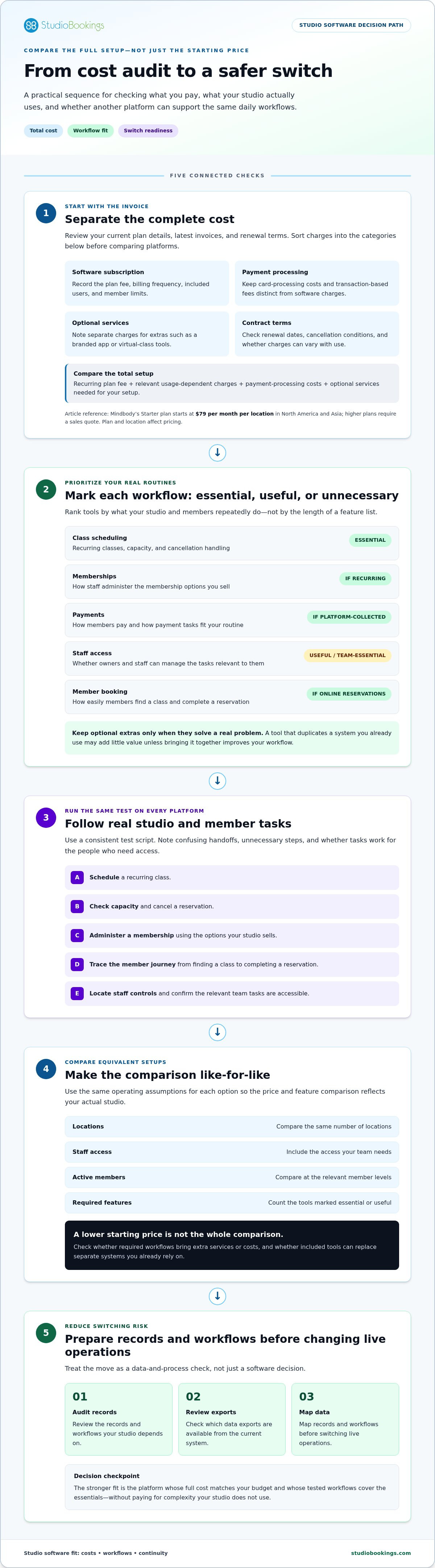
A software change affects more than the owner’s login. Member records, class schedules, recurring memberships, staff responsibilities, and payment routines all need attention. A transition plan helps you spot gaps before they affect a live class or a member’s next booking. Switching to a cheaper alternative to mindbody should improve the fit without leaving your team guessing about what happens next.
Start by listing the information and routines your team relies on. Audit member records, active memberships, upcoming classes, staff roles, and regular payment tasks. Document booking rules, capacity limits, cancellation policies, membership types, and staff permissions. This gives you a clear reference for setting up and checking the new system. Review available data exports and map their fields to corresponding records in the new system before changing live operations.
Build a transition calendar around your studio’s schedule. Where practical, avoid a peak booking period or a major membership billing date. Assign an owner to each preparation task and record what must be checked before the change takes effect. Keep a list of unresolved items, such as records that need manual review, so they don’t disappear in the rush to launch.
Test with a small internal group first. Run sample class bookings, membership changes, payment steps, and staff tasks using scenarios that reflect your actual policies. Check member-facing instructions on desktop and mobile devices, and ask team members to flag confusing steps or missing information. Resolve friction points before inviting the full membership to use the new system.
Then plan member communication. Share the change date, where and how to book, any steps members need to take, and the best contact details for questions. Send clear instructions ahead of the transition and make them easy to find again. If members have upcoming classes or active memberships, explain how those will be handled based on your tested transition plan. Don’t announce a process until the team has tested it and can explain it consistently.
Use a launch checklist to coordinate the final checks:
• Confirm that the required member and membership records are accounted for.
• Check upcoming classes, booking capacity, cancellation rules, and staff access.
• Run through the member booking journey and payment steps.
• Make sure the transition date and member instructions are consistent across communications.
• Set out who on your team will handle questions and review issues after launch.
Thoughtful preparation can make a switch easier to manage, but no checklist removes every operational risk. Keep your old process available until the new workflow has been tested and the team is ready to use it. If StudioBookings is on your shortlist, explore the platform and test its workflows as part of your transition planning.
A practical alternative should match the work your studio handles every day, not simply offer a different price structure. StudioBookings brings scheduling, memberships, payments, and staff management into one dashboard, so you can manage core studio tasks together. If you’re assessing a cheaper alternative to mindbody, compare those capabilities with the workflows you marked essential and see how they fit your operation.
StudioBookings provides cloud-based management software for fitness, yoga, Pilates, barre, dance, and cycling studios. Its dashboard brings core management tasks together, and mobile apps are available for studio owners and members. Studios in different disciplines can use the platform to manage their operations while choosing the workflows that match their needs.
Plans are tiered by active members or required features, so those factors shape the pricing structure. StudioBookings also offers no-contract pricing and a free trial. Use the trial to assess how the platform fits your workflows and plan needs before deciding whether it’s right for your studio.
Return to your shortlist of must-have workflows. During the free trial, test the tasks your team and members use: set up a class schedule, work through a membership task, review payment steps, and check staff management. Consider whether the owner and member mobile apps fit your needs, too. Use the same scenarios you used to assess other platforms, and note where the process feels clear or creates friction.
For Pilates studios, include discipline-specific routines in your assessment, such as how your team schedules sessions and manages memberships. The Pilates studio management software guide can help you identify relevant needs to include in that review.
Compare your trial experience with the plan structure. Consider whether your active-member level or required features align with the available tiers. Then weigh the included core management tools against the tasks your studio actually needs to manage. That’s a more useful basis for choosing than comparing platforms by feature count alone.
Ready to put your own workflows to the test? Start a free StudioBookings trial and evaluate the fit for your studio.
The right software should feel manageable today and remain sensible as your studio’s routines evolve. Before making a decision, write down what success would look like for your team: a booking process members can follow, clearer staff workflows, or fewer disconnected admin steps. Agree on a few priorities together so the final choice reflects the people who will use the system, not just the person comparing plans.
That keeps your search for a cheaper alternative to mindbody grounded in how your studio works. During your evaluation, invite a staff member to try the tasks they handle most and note any points of confusion. Use that feedback to decide whether the platform is a practical fit now and whether its plan structure makes sense for your expected needs.
Take the time to test your priorities, listen to your team, and choose with confidence. Start your free StudioBookings trial and put your studio’s priorities to the test.
There’s no universal cheapest option because plans differ by active-member limits, included features, and payment needs. A small studio that runs a few weekly classes may need a different setup from a larger operation with multiple instructors and membership types. Compare current plan details using the same assumptions for each platform, then test the workflows you rely on. StudioBookings has member-based or feature-based tiers and a free trial to help you evaluate fit.
That depends on your studio’s setup, so don’t assume a price advantage without a current, like-for-like comparison. StudioBookings uses pricing tiers based on active members or required features and offers no-contract pricing. Compare the plans against your actual needs, including the workflows included and any additional charges relevant to your setup. Weigh the full cost and day-to-day fit rather than deciding from starting prices alone.
Data continuity depends on which records you can access, the available export formats, and how carefully fields are mapped in the new system. Before changing live workflows, make a secure backup and list the member, membership, and payment-related records your team needs. Test a sample transfer and check that key details appear in the expected fields. Don’t assume every platform will automatically migrate every record or preserve all historical information.
It should cover the workflows your studio depends on, which may include class scheduling, memberships, payments, staff management, and member booking. Requirements vary: a solo instructor may have different priorities from a multi-instructor studio with recurring plans. Mark each function essential or optional, then try realistic tasks, such as booking a full class or updating a membership. This reveals practical gaps that a feature count alone can hide.
Payment handling varies by provider and plan, so compare it separately from the software subscription. Check what payment tasks the platform supports and record any transaction-related charges as a distinct cost. StudioBookings handles payments as part of its platform capabilities. Compare the applicable plan details and charges with your workflow to understand the full cost.
Replacing software takes coordination because class schedules, memberships, staff routines, and member instructions all connect. Document how your studio handles those tasks, then test common scenarios before setting a changeover date. For modality-specific planning, compare your needs with this yoga studio Mindbody alternative guide or the Pilates studio management software guide.
Yes, StudioBookings offers a free trial. Use it to test scheduling, membership, payment, and staff workflows with the people who handle those tasks. Include realistic member booking scenarios, such as finding a class and completing a reservation, so you can assess the experience from both sides. The trial helps you judge operational fit, but it does not promise data migration or specific savings.