Streamline Studio Operations Software helps bring scheduling, memberships, payments, and staff management into a connected workflow. By reducing unnecessary steps and repetitive admin, it can make everyday work easier to coordinate.When bookings, member details, payments, and team updates are scatte...

Streamline Studio Operations Software helps bring scheduling, memberships, payments, and staff management into a connected workflow. By reducing unnecessary steps and repetitive admin, it can make everyday work easier to coordinate.
When bookings, member details, payments, and team updates are scattered across separate tools, routine admin can distract from running classes and supporting members. Adding more software is not always the answer. Start by identifying where information gets duplicated or delayed, then look for a way to connect those tasks.
In this guide, you’ll learn what streamlined studio operations involve and how to spot the processes that slow your team down. We’ll look at software integrations, useful dashboards, industry-specific tools, and the advantages of bringing key tasks into one platform, so you can see what a more manageable operation could look like for your studio.
• Find the repetitive tasks and unnecessary steps that make daily studio work harder, then focus on improving those workflows.
• Connect systems where possible to reduce isolated information and make essential data easier to share across your operation.
• Use relevant dashboard measures to spot trends and guide decisions, rather than relying on scattered updates.
• Choose tools that match your studio’s activities and the way your team manages classes, clients, and payments.
• Consider whether bringing core studio tasks into one platform could make everyday management simpler.
Streamlining operations means removing unnecessary steps so everyday work flows more smoothly. In a studio, that might mean coordinating class scheduling, member inquiries, and follow-up tasks in one clear process.
Workflow optimization maps a process, removes unnecessary steps, and automates repeatable actions. It matters because a clearer process helps staff handle routine work consistently. For example, a new class booking can trigger an appointment confirmation, while a cancellation updates the available space. Mapping each handoff shows where manual entry or unclear responsibility slows the process.
Task automation uses software rules to handle recurring actions with less manual effort. A studio might automate booking reminders, payment processing, or the organization of member information. The practical benefit is less time spent on repetitive admin and more time for classes and member support. First clarify the process, then decide which steps software should handle.
Lead follow-up is another workflow worth reviewing. When a prospective member sends an inquiry, an automated reply can acknowledge it and explain the next step. A reminder can prompt a staff member to continue the conversation. Tools such as Zapier and Microsoft Power Automate connect apps for repeatable tasks, such as saving email attachments to cloud storage. Choose a setup based on which apps need to exchange information and what should happen next.
When comparing Streamline with other studio management software, test each option against your actual workflows: scheduling, payment processing, and organizing member information. Focus on whether it handles the tasks your team needs and how information moves between them, not on the feature count alone.
A free trial, demo, or free plan is a distinct software access option, not a feature of workflow automation itself. Whether Streamline offers one depends on its specific offer; compare what each option lets your team evaluate before deciding.
Migrating to Streamline starts with deciding which records and processes need to move. Review current schedules and member records, map the workflow, transfer the required data, then test common tasks such as booking and cancellation handling. Check that records are mapped correctly before relying on the new system for daily work.
Security, privacy, and backup protections depend on a platform’s safeguards and settings. When evaluating software that stores member information, review access controls, data handling, and backup practices. Train staff to use the controls consistently and protect sensitive records.
Automation can apply clearly defined rules, but it cannot resolve a process the team has not clarified. Document who handles an inquiry, what information they need, and when follow-up happens. That gives the team a practical workflow to improve and a clear way to judge whether automation is helping.
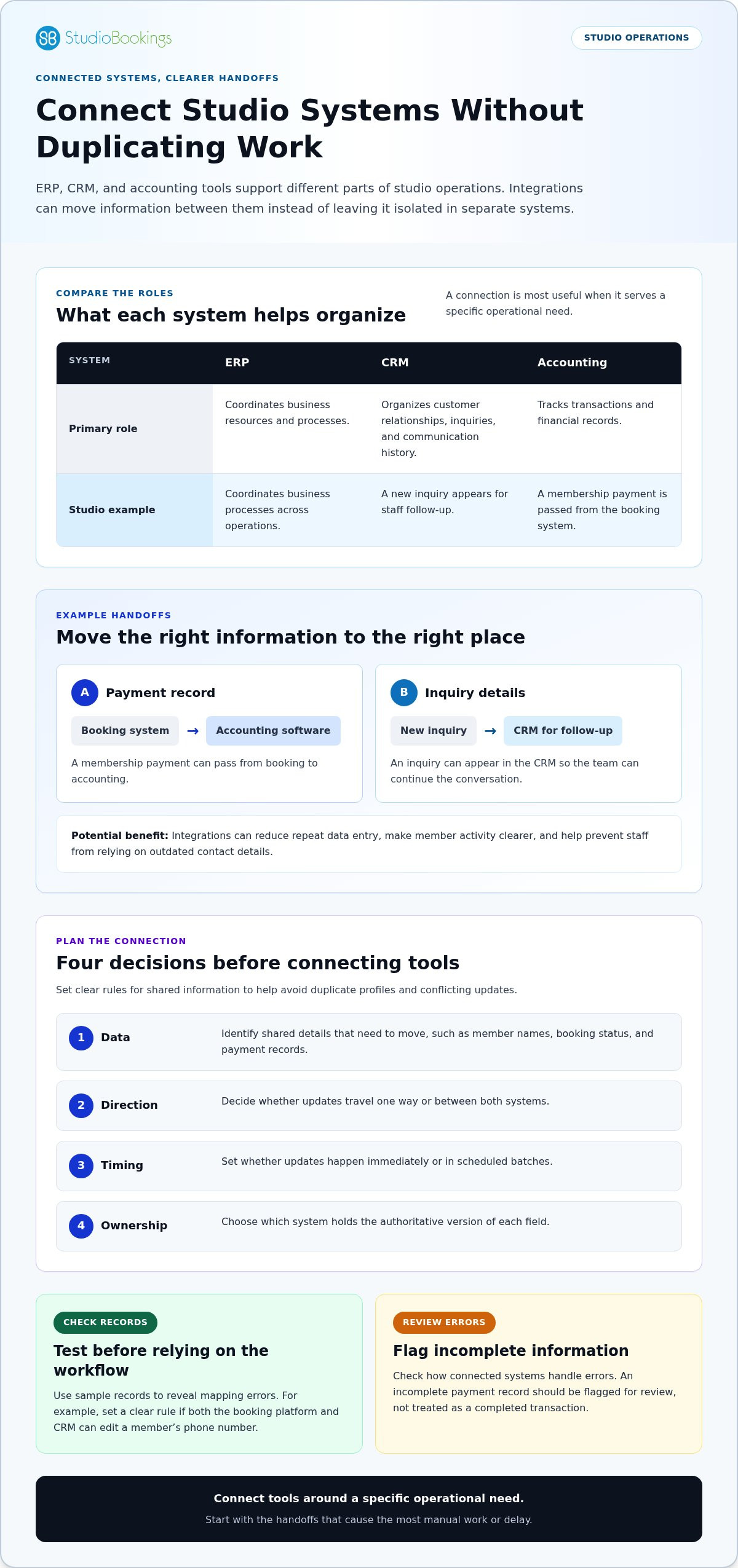
Disconnected systems make teams enter the same information more than once. A studio might record a new member separately in its booking tool, CRM, and accounting software. Each handoff creates another chance for errors, delayed updates, or mismatched records. Integrations let information move between systems instead of remaining isolated in separate databases.
Different systems support different parts of studio operations. An ERP system coordinates business resources and processes. A CRM organizes customer relationships, inquiries, and communication history. Accounting software tracks transactions and financial records. For example, a membership payment could pass from a booking system to accounting software, while a new inquiry appears in the CRM for follow-up.
Integrations can reduce repeat data entry and give staff a clearer view of member activity. They can also help prevent problems such as a customer service team relying on outdated contact details. When a member updates an email address in one connected system, integration rules can pass the change to the others.
Before connecting tools, decide which information needs to move and which system is the source of truth for each record. Review:
Identify shared details, such as member names, booking status, and payment records.
Decide whether updates travel one way or between both systems.
Set whether updates should happen immediately or in scheduled batches.
Choose which system holds the authoritative version of each field.
These requirements help prevent duplicate profiles and conflicting updates. If both a booking platform and a CRM can edit a member’s phone number, for example, set a clear rule for resolving differences. Testing with sample records can reveal mapping errors before the workflow handles everyday activity.
Dashboards can make integration results easier to review. A manager might compare booking activity with payment records and investigate a mismatch before preparing a report. Check how connected systems handle errors, too. An incomplete payment record should be flagged for review, not treated as a completed transaction.
Not every tool needs a direct connection. Start with the handoffs that cause the most manual work or delay, such as transferring inquiry details into a CRM. Then assess whether the systems can exchange the required fields and preserve reliable records. A well-planned integration links tools around a specific operational need, rather than adding connections without a clear purpose. Explore studio management software as one way to bring studio workflows together.
Dashboards turn studio activity into information you can act on. Tracking attendance, member satisfaction, and revenue helps show what needs attention.
Analytics organizes operational data to help managers make informed decisions. Reviewing attendance alongside class schedules, for example, can show which sessions may need adjustment. Comparing satisfaction feedback with booking patterns can also reveal where the member experience needs attention. These indicators provide a clearer basis for decisions than memory or isolated comments.
Choose indicators that connect directly to a decision. A studio could monitor:
Compare bookings with attendance to understand demand and participation.
Review feedback trends to identify recurring service concerns.
Track changes over time to understand business performance.
Measure how long routine requests take to resolve.
Each measure helps answer a different operational question. Low attendance in a particular class might prompt a review of its schedule or format. Longer response times for member requests may point to a process that needs attention. Use analytics to investigate the pattern before choosing a response.
Reporting presents selected data in a consistent format, while analytics helps explain what the data may mean. A weekly attendance report can reveal participation patterns; a dashboard can show current indicators. Together, they help studio managers track changes and discuss decisions using shared information.
Build dashboards around a specific audience and purpose. A studio owner may need an overview of attendance, revenue, and member satisfaction. A staff member handling member support may need response times instead. Role-based access can help each person see relevant information without crowding the screen with unrelated measures.
Real-time reporting can make changes visible sooner when data updates as activity occurs. If bookings shift during the day, a current view can help the team understand demand. Its value depends on accurate source information and well-defined indicators. A dashboard cannot explain a trend when the underlying records are incomplete or inconsistently categorized.
Inventory may also matter for studios that track equipment or supplies. Reviewing inventory alongside operational reports can help managers spot resources that need attention. Tie each metric to a practical question, such as whether equipment availability affects scheduled sessions. This keeps analytics focused on useful decisions, not numbers without a purpose.
Analytics can support faster decisions, but interpretation still matters. Compare trends across consistent reporting periods, note changes to schedules or services, and consider member feedback alongside the figures. This helps distinguish a lasting pattern from a temporary fluctuation and gives studio leaders a grounded view of operational growth.
Industry-specific software reflects the work a business does every day. A dance studio needs class scheduling and member communication, for example, while a photography studio may focus on project organization and client bookings. Match tools to real workflows so teams can coordinate tasks without forcing every industry into the same operating model.
Studio management software can bring scheduling, invoicing, inventory, and communication into one operational view. For a class-based studio, scheduling supports session planning, while invoicing helps organize charges and records. Inventory tools can track supplies or equipment, and communication features support contact with members and staff. The right combination depends on the studio’s daily work.
Other industries need different capabilities. Healthcare software may connect patient portals with scheduling and medical records. Retail inventory tools can account for seasonal demand and vendor cycles. Construction software can track blueprints, project timelines, and supply logistics. These examples show why software built around one industry’s workflows may not suit another’s needs.
For a class-based business, Streamline Studio Operations Software should support the practical work behind each session:
Scheduling tools help organize classes and keep timetables accessible.
Invoicing and communication features support routine member interactions.
Inventory tracking can help manage equipment and other studio supplies.
Shared workflows can make responsibilities and updates easier to follow.
A good fit should support collaboration without adding steps. If instructors need the current class schedule, for example, accessible scheduling information can help coordinate daily work. If staff handle invoices and member messages, fitting those tasks into their regular workflow can reduce switching between tools. The aim is to support the work, not maximize the feature count.
Industry-specific software differs from bespoke software, which can be designed around a company’s processes, goals, and users. That approach may suit operations with needs standard tools do not address. First identify where existing workflows create friction. A clearly defined project scope makes it easier to decide whether custom development is appropriate.
Choosing Streamline Studio Operations Software means matching its capabilities to your studio’s priorities, not counting features. List recurring tasks, the information each role needs, and handoffs that cause delays. A group-class studio may prioritize scheduling and member communication, while a project-based creative studio may need different coordination tools. A good fit supports consistent service and the team’s day-to-day work.
Photography, recording, dance, and art studios can all streamline their operations. Each can compare software with its routine activities and consider whether scheduling, invoicing, inventory, or communication belongs in the same operational view. Prioritize tools that support the work the studio actually does, rather than adopting features simply because they are available.
Before choosing a tool, identify recurring tasks, who handles them, and where information needs to be available. This clarifies which capabilities matter and whether standard software is likely to fit. If a process remains difficult to support, define the gap before deciding whether a more tailored approach is needed.
A unified platform brings related studio workflows into a shared digital environment. A class booking, for example, can connect with member records, payment information, and staff schedules. Instead of switching between separate tools, team members can follow the same process. The goal is not to put every feature in one place, but to make important tasks and information easier to coordinate.
A shared view can support collaboration across a studio, even when one person handles several roles. When a staff member updates the class schedule, for example, colleagues responsible for operations and member support can see the change. Clear ownership still matters: teams need to know who updates each record and which information should guide the next step.
Consolidation can also make records easier to reconcile. A manager reviewing bookings, memberships, and payments in separate systems may need to match information manually. A connected workflow makes those relationships easier to follow, leaving less time spent searching for details and more for decisions, member support, and productive work.
Consider which daily activities would benefit from a shared environment:
Keep prospective member inquiries connected to their follow-up progress.
Align class schedules with staff responsibilities and booking activity.
Give staff context about a member’s booking or request.
Review operational information together when planning changes.
Shared workflows work best when the team agrees on how information moves. Decide who records a schedule change and how staff will see it. Set out who handles an unanswered inquiry and where its progress is tracked. These working agreements help prevent inconsistent records in a shared platform.
Consolidation does not mean every tool must disappear. A studio may keep specialist software for a distinct task and connect it to core operations where practical. Consider whether each tool supports a necessary workflow, duplicates existing work, or creates a handoff that staff must manage manually. Mapping these connections shows where a unified setup can help.
To assess fit, trace a typical member’s journey from first inquiry through booking and ongoing participation. Note where staff re-enter details, switch systems, or lose visibility between roles. Prioritize the handoffs that most affect daily work. This gives the platform a clear purpose: supporting connected studio activity rather than adding another layer of technology.
Ready to bring core studio workflows together? Explore a unified studio platform as a practical next step.
A unified workflow system can give sales, marketing, operations, and member support a shared digital environment. Its value depends on clear handoffs: agree which details should follow an inquiry, booking, or request and who takes the next step. That keeps relevant context available as work passes between roles, rather than relying on separate updates or informal messages.
Before settling on a workflow, consider where information is most likely to be needed next. Agree on what staff should record, how colleagues can find it, and when responsibility changes. These practices help a platform support coordinated work without requiring every team to handle each task in the same way.
StudioBookings brings class scheduling, memberships, payments, and staff management together in one cloud-based dashboard. It can help when coordinating these tasks across separate tools distracts from running your yoga studio.
StudioBookings also supports Pilates and barre, fitness and HIIT, and pole and dance studios. Its mobile app is free for owners and members, providing another way to manage studio activity and access bookings.
To bring core studio management tasks into one platform, explore how StudioBookings fits your workflow. Visit studiobookings.com to learn more.
Choose software based on the work your team needs to manage, not a long feature list. Start by identifying a recurring task that creates avoidable effort, then define what a smoother process would look like. That gives you a practical basis for deciding whether a connected platform suits your studio.
Choosing Streamline Studio Operations Software starts with a practical question: which everyday tasks should become easier for your team? StudioBookings offers software for yoga, Pilates and barre, and fitness and HIIT studios. Explore the option that matches your studio’s activities and priorities.
Moving forward doesn’t require changing everything at once. Begin with the workflow that matters most, and use it to guide your next software decision. Contact StudioBookings to discuss your needs and take a clear next step toward smoother studio operations.
Good practices work best when software supports procedures your team has chosen, rather than assuming one rule suits every studio. StudioBookings’ online bookings and waitlists can support a consistent booking process, while late-cancel handling helps teams apply their cancellation policy. Set the policy, explain it to staff, then use the tools consistently so the system reflects how your studio works.