
A schedule managed only from the studio office can quickly become outdated. Managing staff schedules in a busy studio is easier when staff can handle routine requests, each task has a clear owner, and the calendar is reviewed regularly. Mobile access also helps you respond to changes without waiting...

A schedule managed only from the studio office can quickly become outdated. Managing staff schedules in a busy studio is easier when staff can handle routine requests, each task has a clear owner, and the calendar is reviewed regularly. Mobile access also helps you respond to changes without waiting to return to your desk.
When classes, staff availability, and last-minute changes compete for your attention, schedule management can turn into a daily scramble. A few straightforward systems make the moving parts easier to see and manage.
Set up a clear process for time-off requests and shift swaps, assign task ownership, review the calendar, and standardize routine decisions. Mobile schedule management can help you keep plans current while you’re on the go, so your team can see who’s working and what needs attention.
• Let staff submit time-off requests and shift-swap proposals through a clear process, so schedule changes have a consistent path.
• Assign an owner to recurring studio tasks and make responsibilities clear to the team.
• Review your calendar regularly to spot conflicts and adjust plans before they disrupt the day.
• Document routine decisions and procedures to reduce repeated questions and keep everyday operations consistent.
• Use mobile schedule access to review requests and make updates when you’re away from the office.
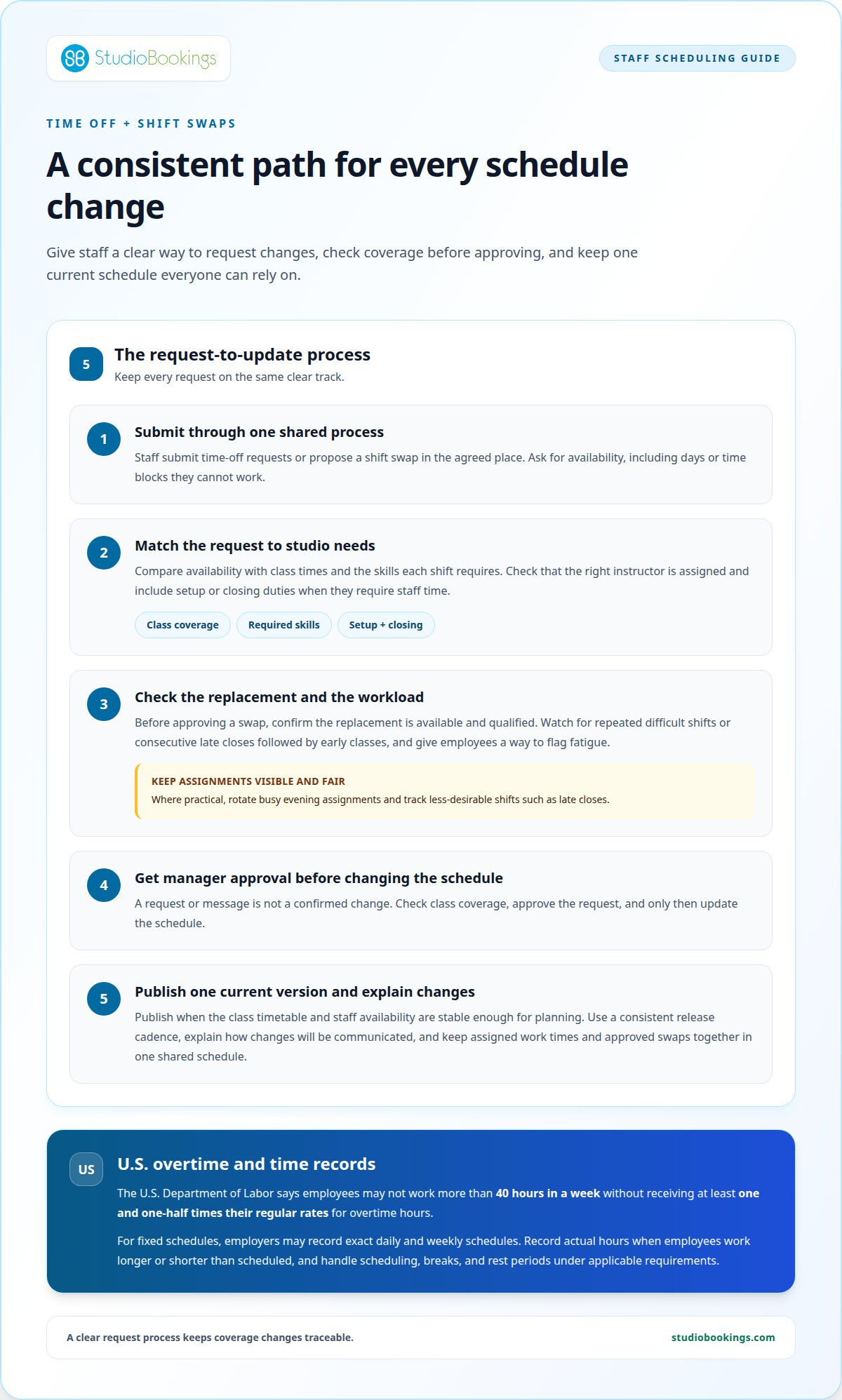
Self-service gives employees a clear way to request time off or propose a shift swap. Set one shared process: staff submit requests, a manager checks class coverage, and the schedule changes only after approval. This prevents a message sent between classes from becoming an untracked commitment.
Match each shift to the studio timetable. A morning yoga class needs an assigned instructor, for example, while an evening Pilates session needs its own confirmed coverage. Include setup and closing duties in the shift when they require staff time. The schedule should reflect when the studio needs people present, not simply give everyone the same hours.
Ask employees for their availability before building the schedule, including days or time blocks they can’t work. Compare those limits with class times and the skills each shift requires. If two instructors can cover a busy evening class, rotate the assignment where practical rather than repeatedly giving it to the same person. Track less-desirable shifts, such as late closes, so their distribution is visible and fair.
For U.S. overtime, the U.S. Department of Labor says employees may not work more than 40 hours in a week without receiving at least one and one-half times their regular rates for overtime hours. For fixed schedules, employers may record exact daily and weekly schedules, but must record actual hours when employees work longer or shorter than scheduled; handle scheduling, breaks, and rest periods under applicable requirements.
Publish schedules when the class timetable and staff availability are stable enough for employees to plan around. Use a consistent release cadence and explain how you’ll communicate changes. Timing depends on when your studio can confirm classes, availability, and coverage. A reliable process matters more than repeatedly issuing tentative versions.
Studios often build schedules around recurring class blocks, instructor skills, and demand at different times. A fitness studio might assign qualified instructors to classes, then add front-desk or setup coverage around those sessions. Beauty and creative studios can use the same approach, matching staff time to booked appointments, workshops, or production needs—often relying on specialized tools like Encore Salon & Spa Software to coordinate multi-service calendars and staff rotas.
Self-service can help manage burnout, but it needs clear boundaries. Give employees a way to flag fatigue or repeated difficult shifts, and review patterns such as consecutive late closes followed by early classes. Before approving a swap, confirm that the replacement is available and qualified. A quick coverage check protects the class while giving staff a practical way to request changes.
Keep the process simple: show employees where to submit requests, who approves them, and how they’ll know the schedule has changed. A shared schedule should show assigned work times and approved swaps in one current version. This reduces confusion and gives managers a clearer view of coverage before class begins.
Delegation works best when each task has one named owner, a clear outcome, and a deadline. For example, assign a studio coordinator to prepare the weekly instructor briefing by Thursday afternoon. Specify what it should include, such as room changes, equipment needs, and class coverage notes. Staff can see who is responsible, and the owner is less likely to become the default contact for every small decision.
Start by listing recurring administrative work, then match each task to a staff member’s skills and capacity. A senior instructor might handle equipment checks, while a front-desk lead coordinates substitute requests. A manager may find delegation worthwhile when a team member can complete a task 70 to 80 percent as well as the manager. The manager can reserve time for work that needs their experience.
Set boundaries before handing over a task. If a coordinator updates the instructor rota, clarify whether they can approve routine changes or only prepare proposed edits. Give them relevant information, such as class times and staff availability, and identify decisions that still need manager approval. Clear limits help employees act confidently without guessing where their authority ends.
Managing staff schedules in a busy studio also means sharing the work behind schedule updates. Use a simple handoff for each responsibility: explain the outcome, share the process, agree on a deadline, and name someone to contact if progress stalls. For example, a staff member tracking supplies needs to know what to monitor, where deliveries are recorded, and who handles shortages.
Make ownership visible in a shared task list or staff document. Record each task, its owner, next due date, and status. If the person opening the studio also checks equipment, list both duties clearly. Review open tasks during a regular team check-in so missed handoffs surface before they affect a class or create extra work for someone else.
Delegation shouldn’t leave someone alone with an unclear responsibility. Review the first completed equipment checklist together, then let the owner handle later checks. If a task repeatedly stalls, identify whether the cause is missing information, limited authority, or workload. Adjust the process instead of quietly taking every duty back. This helps you manage staff schedules in a busy studio without making the manager the only person who can keep work moving.
Clarify backup ownership for absences. If the person preparing the weekly briefing is away, name a second staff member who can follow the same checklist. Shared procedures reduce disruption and help employees cover essential work without relying on one person’s memory. Clear roles and handoffs keep routine operations moving while managers focus on decisions that need their attention.
Start each planning review with the studio calendar and staff rota open side by side. Compare class times, instructor assignments, room bookings, and administrative commitments in one pass. An instructor scheduled to teach in two rooms, for example, may reveal a conflict before the day begins. Mark overlaps, missing coverage, and tight transitions, then assign a clear next step to each issue.
Look beyond class coverage. Add time for setup, equipment checks, cleaning, and staff handoffs where needed. If a barre class ends just before a Pilates session starts in the same room, confirm who resets the space and whether the transition is workable. A calendar showing only public class times can hide the work needed to keep sessions running smoothly.
Review how meetings use the owner’s calendar, too. A 25-minute meeting or a 50-minute meeting can leave transition space before the next commitment. Choose a shorter slot for a focused decision, such as approving a substitute instructor, and reserve a longer slot for a detailed timetable review. Keep meeting purpose visible so staff know what decisions belong there.
Before the day starts, scan the calendar for changes and identify the first three operational priorities. For example, a substitute instructor, a room change, and a maintenance task may all affect that day’s schedule. Decide who needs each update and when they need it. This brief review helps managers prepare instead of discovering conflicts during class changeovers.
At the end of a planning period, compare the planned calendar with what actually happened. Note recurring delays, last-minute room changes, and administrative work that interrupts class preparation. If a particular transition repeatedly runs late, adjust the assigned task or calendar block. Treat recurring disruptions as a reason to revise the plan, not just another exception.
Separate fixed commitments from flexible work. Classes and staff shifts usually need firm assignments, while supply checks or planning can move around them. When the calendar is crowded, shift flexible work away from peak teaching periods. Keep the owner and due point visible so moving a task doesn’t make it disappear from the plan.
Make the review useful by recording decisions in the calendar or a shared planning note. State what changed, who owns the follow-up, and which staff members need an update. A room change, for example, should show the new location and the affected class. A consistent review makes the calendar a practical guide for adjusting plans as needs change.
Write down decisions your team makes repeatedly, such as handling a late instructor or moving a class. A short procedure should state who acts, what information they need, and how they communicate the outcome. A coverage procedure, for example, can direct staff to notify the schedule owner, identify the affected class, and record the approved change. Clear steps reduce guesswork during a busy shift.
Build routine checks into the studio’s daily rhythm. An opening checklist might prompt the shift lead to review the day’s classes, confirm room access, and note instructor changes. A closing procedure can capture unresolved issues for the next shift. Following the same sequence makes important details less dependent on memory or whoever happens to be working.
Set decision boundaries for common disruptions. If an instructor reports an absence, specify who can contact a substitute and who approves a schedule change. If a room becomes unavailable, define who decides whether to move the class or notify members. Staff can handle straightforward situations independently, while exceptions reach the manager with the relevant details.
Make procedures easy to use when needed. Store the current version in a shared staff resource, using plain-language headings such as “Class change” or “Instructor absence.” Keep each procedure focused on one task. A communication template, for example, can identify the class, the change, and the person responsible for sending the update.
Review procedures after a real disruption, not just during planning. If a substitute instructor arrives without room information, add that detail to the coverage process. If two staff members both contact members about a class change, assign communication to one role. Small revisions turn actual problems into clearer instructions for future shifts.
A disciplined daily routine helps studio owners manage recurring demands. Choose a consistent time to review schedule changes, outstanding staff requests, and operational issues. Keep the routine brief and focused on decisions affecting upcoming classes. A predictable review helps the team start with the same current information.
Studio systems can also improve the experience for members and staff. Fitness business software can help studio owners manage class schedules and automate communications. Pair those tools with written procedures that explain who handles exceptions, such as a cancelled class or instructor change. Software supports routine operations, while clear ownership keeps unusual situations from falling between roles. For allied health clinics and wellness practices looking to establish stronger operational frameworks, strategic consulting from theclinicproject.com offers guidance on refining team workflows and management systems.
A schedule can change while you’re teaching, meeting staff, or away from the studio. Mobile access lets a manager review requests on the go or update the team schedule from the back office. The key is keeping one current schedule, so changes made away from your desk don’t leave staff relying on an older version.
Use a consistent check when a request arrives. Review the affected class, the assigned employee, and whether the change leaves the shift covered. If an instructor requests a swap before an evening class, for example, confirm the replacement and update the schedule before treating the change as approved. This prevents a request from being mistaken for a confirmed shift.
Make mobile reviews purposeful. Open the schedule when a specific decision needs attention, such as approving time off or checking an upcoming class assignment. Record the decision in the shared schedule, then tell affected staff where to find the update. A clear record helps prevent parallel conversations from creating conflicting plans.
Make edits easy to understand on a small screen. Use clear employee names, class labels, and shift details instead of relying on color alone. If you move an instructor to another class, make the new assignment explicit. Staff checking the schedule between sessions should be able to identify their next work time without interpreting shorthand.
Mobile access is useful for managers, but it shouldn’t turn every quiet moment into schedule administration. Set regular review points around the studio’s operating rhythm, such as before classes begin or after the last session. Reserve mobile checks between those points for time-sensitive requests. This gives schedule decisions a reliable place without requiring constant monitoring.
Agree on how staff should report urgent changes. An employee can submit a request through the usual process, for example, then contact the designated manager if an imminent class needs coverage. The manager records any approved change in the schedule so the team can refer to the same update. Clear boundaries help staff choose the right channel.
Mobile tools work best when they support a defined process, not replace it. Decide who can edit the schedule, who approves changes, and how staff learn about updates. Then use mobile access to review requests or make edits when away from the back office. To bring schedule management and studio operations together, explore studio scheduling tools.
StudioBookings brings class scheduling, staff management, memberships, and payments together in one cloud-based dashboard. If schedule changes, staff coordination, and studio administration are scattered across separate tools, the platform can help you manage these tasks in one place. It supports yoga, Pilates, barre, fitness, HIIT, pole, dance, and cycling studios, with a mobile app for owners and members.
Consider StudioBookings when you’re ready to put the scheduling practices in this guide into a connected studio management system. You can explore whether it fits the way your team runs classes and manages day-to-day operations. Contact StudioBookings to discuss your studio’s scheduling needs.
Choose one scheduling friction point to improve first. Perhaps shift decisions still wait for your approval, or staff can’t easily see which schedule version is current. Pick the issue that most often interrupts your day, then turn the solution into a consistent team practice. This gives you a practical starting point for managing staff schedules in a busy studio without changing everything at once.
If you’re ready to connect scheduling with wider studio operations, StudioBookings offers Yoga Studio Software, Pilates and Barre Studio Software, and Fitness and HIIT Studio Software. A system that brings key studio tasks together can support the routines your team is building.
Contact StudioBookings to discuss scheduling and consider what would make your team’s day-to-day work flow more smoothly. A thoughtful next step can help you build a schedule that works better for your studio and its people.
Build schedules around confirmed services, staff qualifications, and the work required before and after each session. A workshop may need an instructor plus someone to manage check-in, for example, even if regular classes need only teaching coverage. Keep teaching duties distinct from support tasks, then check that each scheduled employee has enough time to complete their work. This makes the rota reflect the full studio day, not just class start times.
Review booking patterns by class time alongside actual attendance and cancellations. If evening sessions regularly fill while midday classes remain quieter, schedule more coverage around evening demand and adjust quieter periods. Also check upcoming workshops, seasonal timetable changes, and waitlisted sessions. Revisit the forecast when booking behavior changes instead of relying on an old timetable to represent current demand.
Choose software that fits your studio’s class operations and makes staff schedules straightforward to manage. Check whether the system can support the workflows you need, such as class scheduling and staff management, and whether it suits your team’s day-to-day use. StudioBookings uses tiered subscription pricing based on active members or required features, with no long-term contracts. Compare the plan structure with your studio’s needs before choosing.
Give staff one process for routine requests and a separate escalation route for an absence affecting an imminent session. A callout should identify the affected shift and urgent coverage needs so the manager can act quickly. Keep a current list of qualified employees who can cover different class types. Once coverage is agreed, update the authoritative schedule and notify everyone whose duties or arrival time changed.
Understaffing can leave instructors juggling setup, check-in, or member questions while preparing to teach. That can disrupt transitions and make service less consistent. Overstaffing can leave employees without clear responsibilities and create avoidable labor costs. Compare scheduled coverage with the work each session needs. If a workshop requires extra check-in support, for example, assign help to the event rather than every regular session.
Look for conflicts across the whole workday, including travel between locations, preparation duties, and responsibilities outside teaching. A schedule may show no class overlap yet leave an instructor too little time to reset equipment. Ask staff to flag recurring pressure points during check-ins, then use their feedback to adjust assignments. Protecting recovery time between demanding shifts can also help prevent excessive fatigue.