
A quick signup isn’t the same as a smooth welcome. Automating a new member onboarding process means using software to coordinate routine steps, such as collecting information, sending next-step instructions, and tracking completion. The goal is to make joining easier to manage while preserving the p...

A quick signup isn’t the same as a smooth welcome. Automating a new member onboarding process means using software to coordinate routine steps, such as collecting information, sending next-step instructions, and tracking completion. The goal is to make joining easier to manage while preserving the personal welcome that helps a new member feel at home.
If onboarding feels scattered, a better system can bring the steps together. Choose a tool that fits your studio’s workflow and reduces administration instead of adding to it.
This guide explains what onboarding automation involves and what to look for in a tool. You’ll learn how digital forms and e-signatures can support document collection, which outcomes to measure, and how to keep the experience personal as routine tasks become more efficient.
• Automate repeatable tasks like welcome messages, reminders, and progress tracking, while keeping personal conversations part of the experience.
• Choose a tool that fits your onboarding workflow, supports useful integrations, and makes task progress easy to see.
• Digital forms and e-signatures can simplify document collection and help you track what’s complete.
• Measure outcomes such as completion rates, time spent on admin, and new member feedback to see where the process needs improvement.
• Build a clear journey from signup to first visit, with timely instructions that show each new member what happens next.
Onboarding automation uses software workflows to coordinate repeatable steps from signup to first participation. A clearly defined process can streamline administrative tasks while leaving personal guidance to your team.
Mapping means outlining each stage a new member experiences, from initial enquiry through registration, orientation, and first visit. A workflow can coordinate only the steps you’ve defined. List the welcome message, information collection, introductory session, and follow-up, then assign an owner to each step.
Some organizations also automate candidate outreach and interview scheduling before hiring. For member onboarding, the equivalent is responding promptly to an enquiry and helping a prospective member book an introductory visit. Keep the journeys distinct: interviews belong to recruitment, while member communications should guide someone toward participation.
Choose predictable tasks that follow clear rules, such as sending a welcome email after registration or reminding someone to complete a profile. Automation should reduce manual work, not add unnecessary steps. Start with one workflow, define its trigger, and decide what happens if a member skips a step.
Which onboarding tasks can be automated for new members? A workflow can send welcome messages, collect form responses, share orientation details, schedule reminders, and track completion. Staff can then focus on exceptions, such as helping a member choose an appropriate first session.
Common risks include automating a confusing process, sending duplicate messages, or collecting unnecessary information. The U.S. Environmental Protection Agency notes that automating an existing paper process without changing it may not improve efficiency. Review the steps first, remove duplication, and assign someone to handle errors.
Effective onboarding automates routine communication while reserving personal contact for moments that call for listening and context. A welcome message can share practical details, but it can’t learn why a new member joined or respond thoughtfully to a concern. Use a staff introduction or conversation to make that connection.
What privacy, consent, and data security rules apply to automated member onboarding in the United States? Requirements depend on the information collected and how it is used, so there isn’t one rule for every organization. Explain why each field is requested, collect only what the workflow needs, and restrict access to member records.
Personalization can be simple: use a member’s name, refer to their selected class, and provide relevant arrival instructions. Set a clear handoff, too. If someone asks a question an automated reply can’t answer, route it to a staff member instead of repeating the same message.
The right platform should fit your membership workflow, not force your team into a complicated process. First identify the steps that need coordination, then compare tools against those requirements.
Map the path from registration to a new member’s first session, including messages, forms, and staff handoffs. Use the map to separate essential tasks from optional features. If your team mainly needs welcome emails and completion tracking, for example, a complex workflow builder may add work without solving a real problem.
Check that the platform supports the triggers your process needs. A completed registration might start a welcome sequence, while a missing form might trigger a reminder. Decide what happens if a member changes their details or needs staff help. Clear exception handling prevents repeated messages and unfinished records.
How do you integrate onboarding automation with a CRM or membership platform? Connect the systems through a supported integration, then define what information moves between them and which event starts each workflow. Registration data, for example, can create a member record, while a completed orientation task updates onboarding progress.
Before choosing a setup, decide which system should hold each record. Keep member details consistent, limit duplicate entry, and test the workflow with sample records. A useful platform also shows who completed each task and where a workflow stopped. That information helps staff resolve errors without searching across separate tools.
If your organization also automates recruitment, consider how the system handles candidate information. Hiring workflows and member onboarding have different purposes, so keep their records and messages separate. A clear integration plan helps prevent an employee or candidate record from being confused with a member profile.
How much do membership onboarding automation platforms cost? There’s no single cost for every setup; pricing depends on factors such as user count, integration needs, and workflow complexity. Treat the purchase as a case-specific decision, with the price provided after a quote request.
Compare the work involved in building and maintaining workflows, not just the feature list. Automation can help organize onboarding messages and rules, but staff still need to review whether they suit the process. Ask how permissions, records, and audit history are managed. These controls matter when several employees share responsibility for onboarding.
Test one practical workflow before expanding automation. Check whether the integration passes the right information, reminders arrive at the right point, and staff can step in. A small test can reveal gaps early and show whether the platform simplifies the process or increases administrative work.
Digital collection replaces paper handoffs with forms members can complete online. A fitness studio might collect contact details, preferences, and acknowledgements before a first class. E-signatures let members sign documents electronically, while a workflow can track completed items and remind them about anything outstanding.
Separate required information from details that are merely useful. A registration form might collect a member’s name and contact information, while a separate preferences form asks about class interests. Short forms are easier to follow than one long document with unrelated sections.
Tell members what each form is for and when to complete it. Send the relevant document at the right stage, such as an acknowledgement after registration. Clear labels help members understand what they’re signing, while a progress indicator can show whether another action remains.
An e-signature workflow should connect each document to the correct member record. After a member signs a studio policy, for example, the system can mark it complete and store the signed document with their account. This reduces manual filing and gives staff a consistent place to find records.
Keep the process clear. Identify the document, explain the required action, and provide a way to ask for help if anything is unclear. If a member submits an incomplete form, route it for correction rather than marking it complete. This simple exception path can prevent avoidable errors.
A completion view helps staff see which documents are ready and which need attention. A team member can review a new account before an introductory session, for example, and follow up on a missing acknowledgement. Document status stays visible without searching through email threads or paper folders.
Keep contact details, preferences, and signed policies easy to distinguish.
Name the unfinished form and explain the next action.
Give staff a way to resolve incomplete or mismatched entries.
Digital collection can make a repetitive administrative task more organized, but the workflow still needs human oversight. Assign a staff member to handle exceptions, update outdated documents, and confirm that each form serves a clear purpose. A tidy process supports onboarding without making paperwork the whole welcome.
These workflow principles can also support employee onboarding. Automated onboarding can collect I-9s, W-4s, company policies, and benefits enrollment documents digitally with e-signatures. Digital document tracking can help staff see which items remain open. Basic onboarding automation, such as document collection and email sequences, can be implemented in 4-6 weeks.
An employee's I-9 document may be completed more than three days after the employee's start date, potentially exposing the organization to penalties. More than half (58%) of organizations' onboarding experiences focus on paperwork and processes. A clear digital journey can make required steps easier to track, while staff remain responsible for reviewing exceptions and keeping documents current.
Measure whether a workflow improves the member journey, not just whether it sends messages. Compare a defined starting point with results after making changes. Record how long registration takes, how many forms remain incomplete, and how often staff correct member records. These measures show whether automation reduces administrative effort without making the welcome feel impersonal.
Choose a small set of indicators tied to specific workflow steps. Measure a registration reminder by form completion, for example, and an introductory-session message by bookings and attendance. Track each result consistently, using the same definitions before and after a change. Otherwise, an apparent increase may reflect a different counting method rather than an improved onboarding experience. A consistent baseline helps you assess the results of automating the new member onboarding process.
Track whether new members finish key onboarding steps.
Record staff time spent resolving unfinished registrations or repeated questions.
Follow introductory-session bookings and first-visit attendance.
Count corrections to member details or duplicated records.
Ask new members whether instructions were clear and timely.
Keep employee onboarding and member onboarding separate when reviewing results. Hiring measures might include employee readiness, while a studio’s member workflow should focus on registration, first participation, and continued engagement. This separation connects each metric to the right process instead of treating every welcome sequence as the same experience.
Pair numbers with direct feedback. If a member completes every form but still arrives unsure where to go, completion alone won’t reveal the problem. Ask about a specific touchpoint, such as whether arrival instructions made the first visit clear. Staff notes can add context when members miss a session or contact the team for help.
Review results at each stage and identify where the process breaks down. If registrations are complete but introductory bookings fall, examine the message that explains the next step. If staff corrections increase, review the form fields and how information transfers into member accounts. Change one part of the workflow at a time so you can see what helped.
Set a regular review rhythm, such as discussing workflow records at a scheduled team meeting. Bring the completion report, member comments, and examples of support requests. Decide whether to keep, revise, or pause a workflow, and record why. This makes measurement actionable and helps ensure that automating the new member onboarding process supports retention rather than adding another task.
Organisations may see measurable improvements within 30-60 days after deploying onboarding automation, while some organisations see positive returns within the first year.
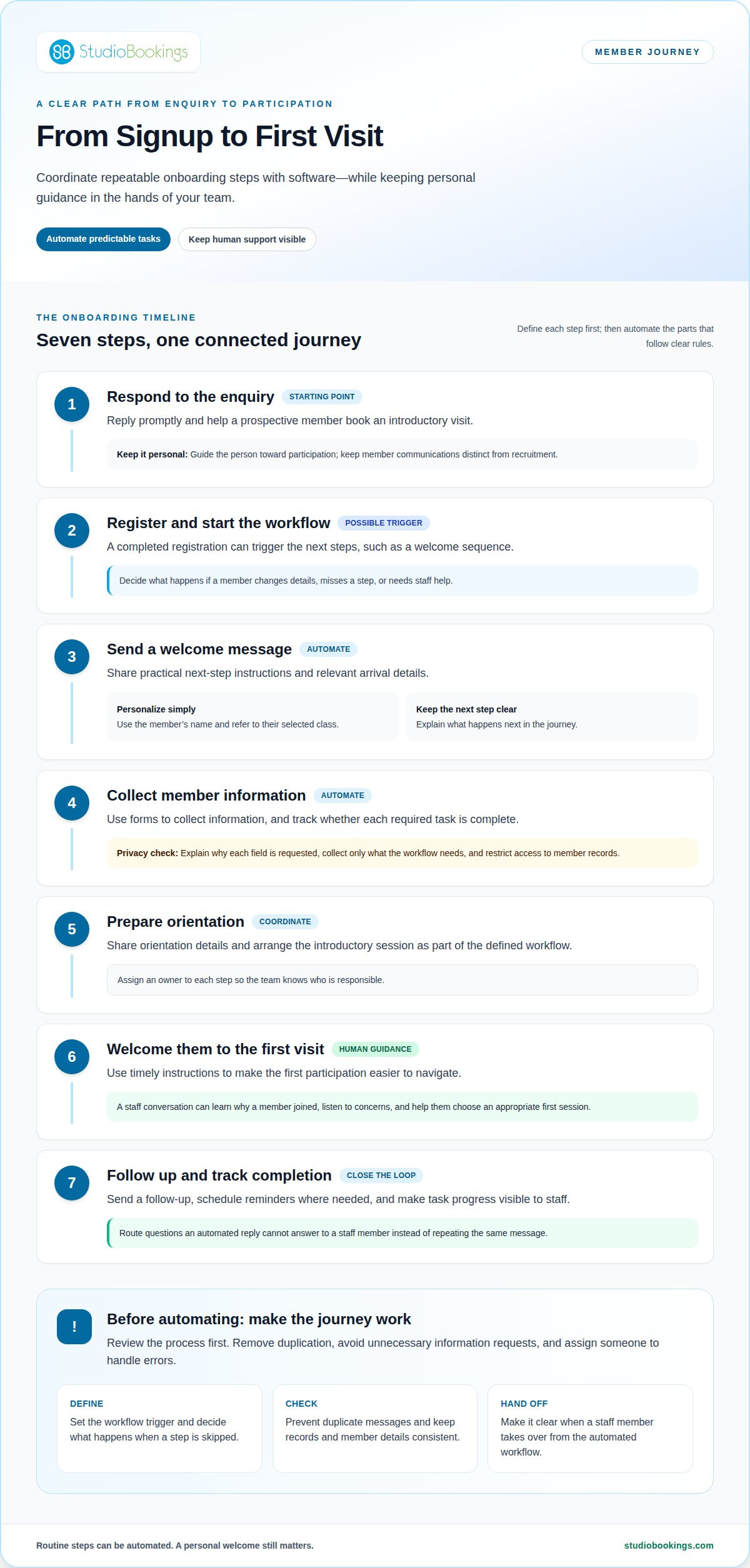
A strong onboarding journey takes a member from signup to a confident first visit, with each step showing what happens next. A checklist and timely reminders help staff keep the experience consistent without turning it into a stream of automated messages.
Define the journey around the member’s first week. Include the information staff usually explain, then identify which steps belong before arrival, on the first day, and after the first session. This gives every message a purpose and makes missing instructions easier to spot.
Send a welcome message that acknowledges the signup and explains the next action. For example, tell a new member how to choose an introductory class or where to find the schedule.
Ask for information needed to manage the membership and make communication useful. Keep fields relevant, and explain why each one matters so members can complete the form with confidence.
Provide practical details such as where to arrive, what to bring, and how to find the right room. If the member has booked a class, make the instructions specific to that visit.
Add first-day tasks to the onboarding materials, such as checking in at reception or meeting the instructor. A short checklist helps the member arrive ready and gives staff a clear welcome routine.
Send a message that invites the member to ask questions or book another session. Use the response to identify unclear instructions or a step that needs a personal conversation.
Record which actions are complete and assign unfinished items to a staff member. If a member hasn’t booked a first visit, send a relevant reminder rather than a generic sequence.
Make the checklist visible to everyone responsible for a handoff. The person handling registration can see whether the welcome message went out, for example, while the instructor can prepare to greet a first-time attendee. Clear ownership helps prevent conflicting instructions or a missed handoff between signup and arrival.
Review the journey from the member’s perspective. Follow a sample path from registration through the first follow-up. Check that each message arrives at the right moment, uses plain language, and points to one clear next step. A reminder should help someone act, not simply say a task is unfinished.
Keep a human welcome in the process. Automation can coordinate the checklist, but a staff greeting makes the first visit personal. Adjust the journey when member questions reveal a confusing instruction or an unnecessary task.
StudioBookings gives fitness studios a central place to manage memberships, class schedules, payments, and staff. If onboarding involves coordinating signup with a new member’s membership and first classes, keeping those details together can help your team manage the transition.
StudioBookings offers software for yoga, Pilates and barre, fitness and HIIT, and pole and dance studios. Choose an approach that fits your studio’s activities and existing member journey. The platform supports the operational side of welcoming members, while your team provides personal guidance and follows up when someone needs help.
If you’re ready to discuss how studio management software could fit your member onboarding workflow, contact StudioBookings.
Turn your onboarding goals into a process your team can maintain. Start with one improvement, such as making the path from signup to a first visit clearer, then use member feedback to decide what to refine. Automating the new member onboarding process should support your team’s personal welcome, not replace it.
StudioBookings offers software for yoga, Pilates and barre, and fitness and HIIT studios. It helps studios manage the member journey alongside everyday operations. The right setup depends on how your studio welcomes members and what your team needs to coordinate.
If you’re ready to explore a better fit for your studio, contact StudioBookings. A clearer onboarding experience starts with a practical next step.
Membership platforms, customer relationship management systems, workflow automation tools, and digital document services can all support onboarding. A membership platform keeps member activity close to bookings, while a CRM focuses on contact history. Workflow tools connect steps across systems, and document services focus on forms and signatures. Compare them by checking how well they fit your current setup, display task status, and let staff handle exceptions.
Collect only information that supports membership administration and a useful welcome. This might include contact details, communication preferences, class interests, and relevant signed documents. Asking whether someone prefers email or text, for example, can help staff choose an appropriate channel. Explain why each item is requested, make optional fields clear, and keep sensitive details out of forms that don’t need them.
Personalize messages with details that change what a member needs to know. Send different arrival instructions based on the class they booked, for example, or tailor a follow-up to whether they attended. Use the member’s name naturally, keep each email focused on one action, and hand questions off to staff. Review message examples to catch irrelevant details before they reach members.
Assess whether members move smoothly from signup to meaningful participation, not just whether a workflow runs. Compare groups who experienced different versions of the process, using the same definitions for completed registration, first booking, and attendance. Pair those results with member comments and staff feedback. If bookings rise but members report unclear instructions, revise the relevant message before expanding the workflow.