What if the best Pilates studio software isn’t the one with the longest feature list, but the one that fits the way your studio actually runs? When class scheduling, bookings, memberships, payments, and staff coordination each involve separate manual steps, admin can crowd out the work you’d rather...

What if the best Pilates studio software isn’t the one with the longest feature list, but the one that fits the way your studio actually runs? When class scheduling, bookings, memberships, payments, and staff coordination each involve separate manual steps, admin can crowd out the work you’d rather focus on.
You need more than a generic software comparison. Your class formats and booking workflows matter, whether you run group sessions, private appointments, or both. The right fit brings daily essentials together and makes booking straightforward for members, without adding tools you don’t need.
This guide shows you how to map your studio’s workflows before comparing options, then assess booking, membership, payment, and staff-management features as a connected system. You’ll also learn how to weigh practical needs such as equipment-based bookings and reminders, and how to take a manageable next step without a long-term contract. By the end, you’ll have a clearer way to compare Pilates studio software based on how your business works, not just what appears on a feature list.
• Map your class formats, booking volume, memberships, and staff responsibilities before comparing platforms.
• Assess pilates studio software by how well it connects bookings, payments, memberships, and staff workflows, not by feature count alone.
• Use your studio’s real booking scenarios to compare usability, member access, and contract terms.
• Prepare schedules, membership details, payment processes, and staff roles to make setup more manageable.
• See how StudioBookings fits your workflows, then use its free trial to explore the platform without a long-term contract.
Pilates studio software coordinates class and appointment bookings with essential studio operations, including scheduling, membership administration, payments, and staff management. Instead of treating each task as a separate process, it can bring shared information into one dashboard so owners and staff can work from a consistent view of the studio.
A booking calendar shows when sessions take place, and a payment tool handles transactions. Used separately, however, these tools can leave you copying information between systems or checking different records to understand a member’s booking and membership status. Studio management software brings these tasks into a broader workflow. The aim is to coordinate information and reduce disconnected admin, not to promise a particular business result.
A booking begins with a session on the schedule and a member reserving a place. That reservation can then be associated with the member’s record, helping staff view relevant booking and membership information together. Payments are part of the same picture: staff may need to know what a member has booked, which membership or payment arrangement applies, and whether any follow-up is needed.
Shared information matters, too. When owners, instructors, and other staff rely on separate calendars, spreadsheets, or payment records, routine admin can become scattered. A shared system gives the team a common place to view operational details relevant to their work, rather than repeatedly tracking down updates. Assess the full sequence: schedule a session, manage the reservation, keep member information organized, and handle the related administration.
Pilates studios don’t all run the same kind of session. A mat class, a reformer session, and a private appointment can differ in format, capacity, timing, and resources. A studio offering a mix may need to manage group classes and individual bookings without forcing them into identical booking rules. Equipment availability can also affect how a session is scheduled and who can reserve a place.
For example, a mat class might use a general capacity limit, while a reformer session may need bookings to reflect available equipment. A private appointment may require a bookable time slot rather than a group-class roster. A single generic setup could blur these differences. The Pilates method provides useful context for the practice, but your studio’s actual formats and resources should guide your software requirements. List how each session works, then identify what the booking process needs to account for.
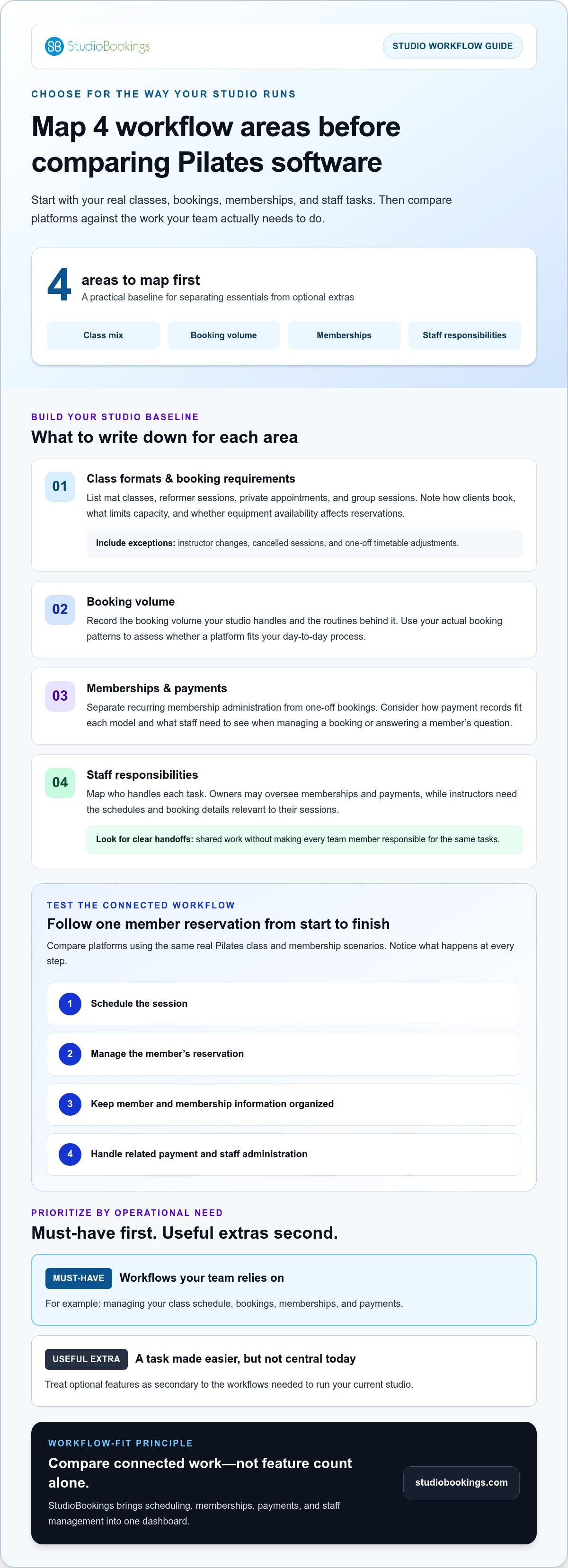
Before comparing platforms, write down how your studio operates today. The best pilates studio software for your business should support the work you actually do, not just offer a long list of features. Start with four areas: your class mix, booking volume, membership structure, and staff responsibilities. This creates a practical baseline for separating essential workflows from optional extras.
For broader context on coordinating studio operations, read this Pilates studio management software guide. Then bring your own booking and admin routines into focus. Technology can also help streamline small business operations, but the benefit depends on choosing tools that fit your processes.
List each format you offer, such as mat classes, reformer sessions, private appointments, and group sessions. For each one, note how clients book, what limits capacity, and whether equipment availability affects reservations. These examples turn broad feature labels into practical scenarios you can compare.
Include schedule exceptions, too. Note how you handle instructor changes, cancelled sessions, or one-off timetable adjustments. The process should let staff update the relevant session clearly and avoid unnecessary steps or confusion for members.
Separate recurring membership administration from one-off bookings. For example, a member may attend scheduled group classes through a membership, while another client books and pays for an individual appointment. Consider how payment records fit each model and what staff need to see to manage a booking or answer a member’s question.
Map who handles each task. An owner might oversee memberships and payments, while instructors need the schedules and booking details relevant to their sessions. Clear handoffs help you assess whether the system supports shared work without making every team member responsible for the same tasks.
workflows your team relies on, such as managing your class schedule, bookings, memberships, and payments.
a feature that could make a task easier but isn’t central to running your current studio.
Compare platforms against your must-haves first, testing the connected workflow from booking through payment and staff follow-up. StudioBookings brings scheduling, memberships, payments, and staff management into one dashboard. Explore StudioBookings studio software to see how it could fit your studio.
A feature list tells you what a platform offers, but not whether it handles your studio’s daily work smoothly. Compare each option using the same Pilates class and membership scenarios, then record what happens at every step. Workflow fit matters more than feature quantity because a feature only helps when it supports the way your studio operates.
Use a simple comparison table. Try the same example in each platform, such as a member booking a reformer class using a membership, then follow the process through staff access and payment administration. Note where information carries through and where someone must switch screens, enter details again, or follow up manually.
| Area | What to compare | What to look for |
|---|---|---|
| Schedules and bookings | Can you set up your class formats and manage reservations? | The booking steps reflect your sessions and capacity needs. |
| Memberships and payments | Can the system connect a member’s booking to the right membership and payment process? | Staff can follow the process without relying on disconnected records. |
| Staff tasks | Can the right team members access the information they need? | Responsibilities and handoffs are clear in everyday use. |
| Usability and access | Can owners and members find the tasks they need to complete? | Common actions feel clear on the devices your team and members use. |
| Trial and terms | Is a trial available, and what contract commitments apply? | You understand the terms before deciding to proceed. |
Setup takes effort, especially when you’re organizing class schedules, membership information, payment processes, and staff access for the first time. Compare that initial work with the ongoing steps the software could bring together. During a trial, test routine tasks directly: create a schedule, make a test booking, review membership details, and check how staff access the information they need. This gives you a more realistic sense of everyday usability than a feature checklist alone.
Member access deserves the same attention as owner tools. Consider whether clients can follow the booking process and whether staff can manage their responsibilities without unnecessary handoffs. Also compare mobile access, trial availability, and contract flexibility. StudioBookings offers a mobile app for owners and members, a free trial, and no-contract pricing.
If you’re considering a switch, use your workflow notes to compare platforms against the same criteria. Keep your test scenarios consistent. You’ll get a clearer picture of what fits, what adds setup work, and what could simplify your studio’s regular operations.
A thoughtful rollout starts with your current routines, not a rush to move every task at once. Pilates studio software takes preparation to set up, so keep the first goal practical: get one typical week of bookings and studio tasks working clearly before changing how the whole team uses it.
Gather the information you’ll need to configure the system and check that it reflects how your studio operates:
Collect your current timetable, session types, and any regular schedule exceptions.
Organize the membership options and relevant member information your team uses.
Write down how you handle recurring memberships and one-off bookings.
Identify who manages schedules, bookings, memberships, and payment administration.
Next, decide which processes should change and which should stay familiar for members. For example, you might bring scheduling and membership administration into one workflow while keeping the class names members already recognize. Set a clear first-use goal: manage a typical week of bookings from schedule to staff follow-up.
Before a wider launch, test representative booking journeys. Book a group class, check the relevant member record, review how the membership or payment process fits, and confirm that the staff responsible can find the information they need. Try a private appointment too if your studio offers one. Testing these examples early can reveal confusing steps while the rollout is still small.
Start with the tasks each staff member handles most often. Walk through how to view the schedule, manage a booking, and find the information needed for their role. Keep the initial instructions focused on daily responsibilities, then cover less frequent tasks later.
Give members a clear explanation of any booking changes before they need to use them. Tell them what’s changing, where to book, and what to expect. Pay attention to early questions. If several people stumble over the same step, simplify the instructions or adjust the process instead of overwhelming everyone with more information.
StudioBookings offers a free trial, giving you a practical way to explore the setup using your real studio workflows. Use it to test a typical week and familiarize your team before deciding on your next step. Explore StudioBookings with a free trial.
The right choice comes down to whether software supports your real studio routines. Use your class formats, booking requirements, membership setup, payment processes, and staff responsibilities as a final checklist. Then consider how easy it is for your team to manage those tasks and for members to access booking information.
StudioBookings is cloud-based software for Pilates and other studio businesses. Its shared dashboard brings scheduling, memberships, payments, and staff management together, letting you review these connected workflows in one place. Compare it with the needs you’ve mapped: can it support your sessions, the way members book, and the tasks your staff handle?
With a shared dashboard, scheduling and bookings sit alongside membership and payment administration, as well as staff management. This lets you review essential studio workflows together instead of evaluating each task in isolation. StudioBookings also provides a mobile app for studio owners and members, giving both groups a mobile way to access the platform.
Use your comparison criteria to explore how the setup fits your studio. Consider whether the processes align with your class mix, whether staff can find the information they need, and whether the member booking experience feels clear. These practical checks matter more than a feature label that doesn’t match your day-to-day work.
You can explore the fit before making a decision. StudioBookings offers a free trial and no-contract pricing, so you can review the platform without a long-term contract. Use the trial to work through a representative schedule, membership workflow, payment process, and staff task. Note what feels straightforward and where your team needs guidance.
If the platform supports the way your Pilates studio operates, you’ll have a clearer basis for deciding what comes next. Explore StudioBookings and see how its Pilates studio software fits the workflows that matter to your business.
The strongest pilates studio software fit starts with your actual workflows. Match the platform to your class formats, booking needs, memberships, payments, and staff responsibilities. Then compare how clearly it connects those tasks and how manageable the setup feels for your team and members.
StudioBookings brings scheduling, memberships, payments, and staff management together in a shared dashboard, with a mobile app for studio owners and members. Founded in 2012 by studio owners, it serves studios in over 40 countries. You can explore the platform with a free trial, and its no-contract pricing gives you flexibility as you consider whether it suits your studio.
Ready to put your workflow criteria into practice? Explore StudioBookings and try the platform. Take it one step at a time, and choose the setup that helps you run your studio with greater clarity.
Pilates studio software is a digital system for coordinating studio tasks such as class scheduling, member bookings, memberships, payments, and staff administration. Features vary by platform, so begin with the workflows your studio handles each week. Consider your session formats and how members book, then assess whether one system can support those tasks clearly and keep related information together for your team.
Start with your studio’s essential needs: class scheduling, member bookings, membership administration, payment processing, and staff management. If you offer different session formats, assess whether the software can represent your schedules and capacity clearly. Compare platforms using realistic daily tasks, such as booking a class and checking the related membership information. A long feature list matters less than whether the tools fit the work your team actually does.
Test the software with examples from your own timetable. Include the session type, its capacity, and the steps a member takes to book. For reformer sessions, consider how your studio accounts for available equipment. This practical test can show whether the booking setup fits your routine or requires workarounds.
List your class formats, booking process, membership tasks, payment workflow, and staff responsibilities first. Then separate essential tasks from optional extras and compare platforms using the same real-world scenarios. Check whether the system is clear for both your team and members, and review trial availability and contract terms. This focused approach helps you judge pilates studio software by how well it fits your workflows, rather than by features you may not use.
It may be useful if manual scheduling, membership administration, payments, or staff coordination take time away from running your studio. The value depends on your workload and whether the software supports the tasks you handle regularly. Map those tasks, then compare them with the platform’s workflows. StudioBookings offers a free trial, giving you a practical way to explore the fit before deciding whether to proceed.
Studio management platforms can bring membership administration and payment processing together with scheduling and bookings. Consider how those tasks fit your current processes, including how members reserve sessions and how your team handles recurring administration. StudioBookings provides scheduling, memberships, and payment management through a cloud-based dashboard. Compare these capabilities with your operating needs, since platforms can differ in how they connect bookings, membership information, and payment tasks.
Setup time depends on your schedules, membership information, payment processes, staff workflows, and the platform. Prepare those details before setup, then test a typical class and booking journey with your team. Begin with the tasks you handle most often, and explain any member-facing changes clearly. Use your studio’s readiness and the results of these practical tests to guide the rollout.
Contract terms vary by platform, so review them alongside workflow fit and usability. StudioBookings offers no-contract pricing, so studios can explore the platform without a long-term contract. A free trial also gives you a chance to test everyday tasks and review the member experience before deciding whether the software suits your studio. Read the terms for your chosen platform so you understand the commitment before moving ahead.