The best software for yoga studio owners isn’t necessarily the platform with the longest feature list. It’s the one that connects classes, memberships, payments, and staff in a system that works for your studio. When these essentials are scattered across different tools, even simple admin can pull y...

The best software for yoga studio owners isn’t necessarily the platform with the longest feature list. It’s the one that connects classes, memberships, payments, and staff in a system that works for your studio. When these essentials are scattered across different tools, even simple admin can pull your attention away from teaching and growing your business.
Look beyond flashy features. The right fit should support the way your studio runs, make it easier for members to book and manage classes, and reduce the follow-up that lands on your plate. To compare options, focus on the everyday tasks you need the software to handle and whether its workflows will make those tasks simpler.
This guide compares the workflows and business needs to consider when choosing yoga studio software. You’ll see how scheduling, memberships, payments, staff management, and mobile access fit together, and how to assess platforms based on your studio’s setup rather than a long checklist. You’ll also find practical ways to test a system before committing, so you can choose with confidence.
• See what Software for yoga studio should manage, from class schedules and member records to payments and staff operations.
• Trace the member journey from discovering a class to booking, paying, attending, and returning to see where connected workflows help.
• Compare spreadsheets, booking-only tools, and integrated platforms by setup effort, workflow coverage, and the work each leaves you to manage.
• Use a five-step assessment to map your workflows, spot friction, prioritize needs, test a platform, and review the experience for owners, staff, and members.
• Explore how StudioBookings brings scheduling, memberships, payments, staff management, and a mobile app together in one cloud-based platform.
Yoga studio software helps manage class schedules, member bookings, memberships, payments, and day-to-day studio operations in one connected place. Unlike a standalone calendar or payment tool, it links the admin work around classes. It also differs from teacher-training resources, which support instruction or curriculum rather than studio operations. Within the broader category of business software, yoga studio software focuses on the workflows that keep a class-based studio running.
The goal isn’t to automate the personal side of yoga. Software supports administration, but it doesn’t replace thoughtful teaching, welcoming members, or building relationships. It can make practical details easier to manage, leaving more room to focus on the people in your studio.
Look for tools that connect the class schedule with bookings, memberships, payment processing, and staff management. A shared dashboard can reduce the need to copy details between separate systems or search multiple records to answer a routine question.
For example, when you change a class time, connected scheduling and booking information can help keep the details members use up to date. You can also manage membership and payment records alongside the schedule, rather than tracking each piece in a different place. When comparing platforms, check whether the everyday tasks your team handles are clear and straightforward within the system.
There’s no fixed member count that signals it’s time to switch. Workload and operational complexity matter more. A small studio may feel the strain early if it runs varied classes, while a larger studio may manage comfortably with a simpler setup.
Notice what keeps interrupting your day. Are you repeatedly answering questions about bookings? Manually checking whether payments have come through? Updating a schedule in one place, then remembering to tell members or staff somewhere else? These are signs that admin is becoming fragmented, not a verdict on how well you run the studio.
Start by identifying the tasks that take the most time or create the most confusion. Then compare systems based on whether they address those specific friction points, rather than choosing by feature count alone. For a structured comparison of workflows and platform options, explore this yoga studio software buying guide.
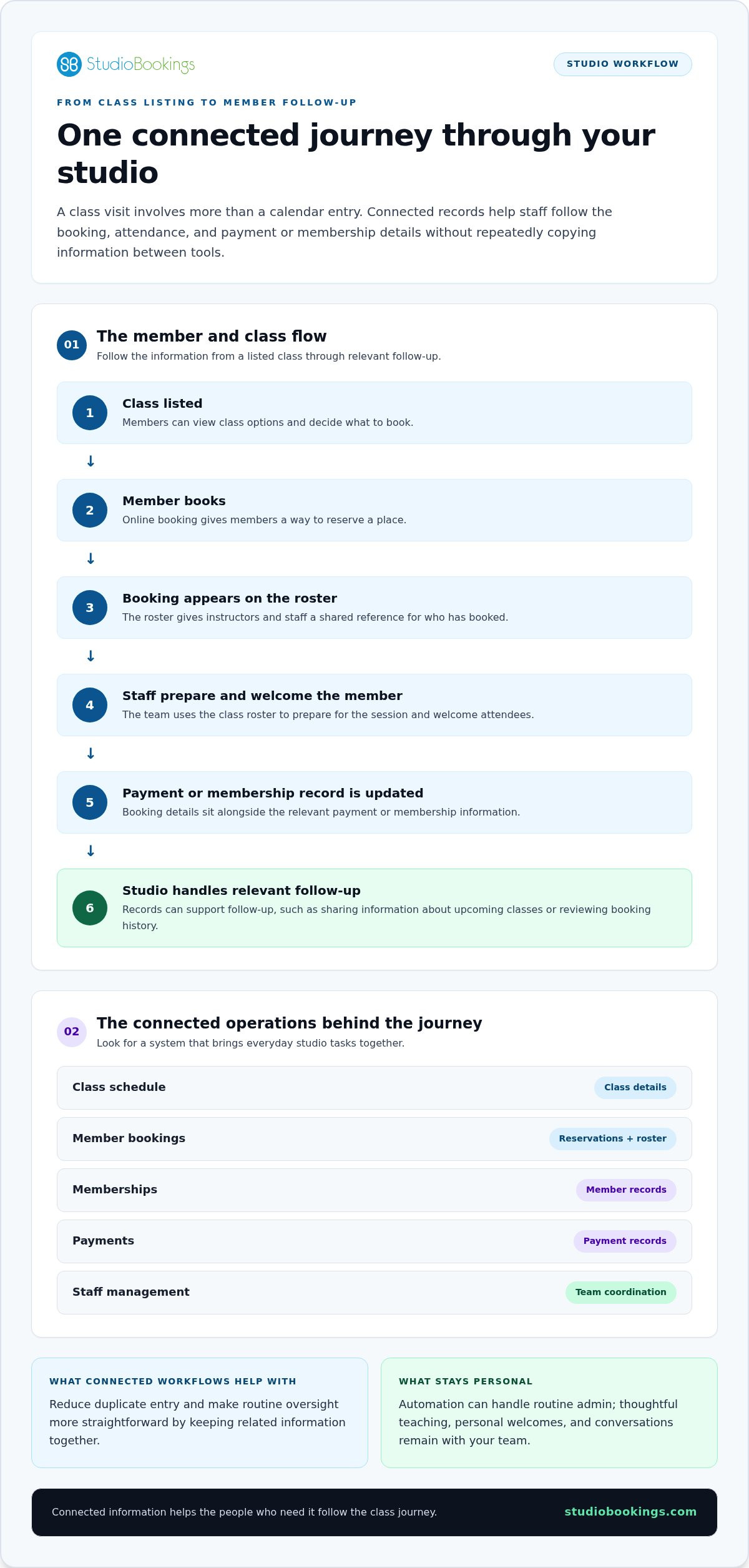
A studio visit involves more than a calendar entry. A member finds a class, books a spot, attends, pays through a membership or another payment option, and may return for another session. When each step is recorded in a connected system, staff can follow the class and member journey without repeatedly copying details between tools.
Online booking gives members a clear way to view class options and reserve a place. The resulting roster gives instructors and staff a shared reference for preparing the session and seeing who has booked. After class, the studio can use its records for relevant follow-up, such as sharing information about upcoming classes or reviewing a member’s booking history. Automation can handle routine admin, while personal welcomes, teaching, and conversations remain with your team.
Picture one class moving through the system:
Class listed → Member books → Booking appears on roster → Staff prepare and welcome the member → Payment or membership record is updated → Studio handles relevant follow-up
This workflow can help you see where information should be entered once and then used by the people who need it. The exact steps depend on your studio’s policies and the platform’s capabilities.
Keeping booking details alongside membership and payment administration makes it easier to understand the context of a class reservation. Instead of checking separate records to see who booked and how their membership is managed, staff can work with connected information. This can reduce duplicate entry and make routine oversight more straightforward.
Staff management adds another important link. A clear view of class schedules and staff responsibilities helps the team coordinate who is handling each session and respond when plans change. These are everyday parts of running a small business, alongside financial and employee responsibilities described in the U.S. Small Business Administration’s guide to managing your business operations.
Good Software for yoga studio operations connects admin without making the member experience feel impersonal. If you’re comparing how these workflows fit together, this yoga business software guide offers another perspective. You can also explore how StudioBookings supports studio workflows with scheduling, memberships, payments, staff management, and a mobile app.
The best setup depends on how your studio works, not how many features a platform advertises. A spreadsheet may be enough for a simple schedule. A booking tool can handle reservations. An integrated platform can connect bookings with memberships, payments, and staff workflows. These are software categories, not named product tiers, and each has trade-offs.
| Approach | Setup and workflow coverage | Member experience and admin |
|---|---|---|
| Spreadsheets | Familiar to set up, but schedules, member details, and payment notes may need manual upkeep. | Works for simple operations, though members may rely on staff to confirm bookings or changes. Updating records in different places can create duplicate admin. |
| Booking-only tool | Focused on reservations, with less coverage for connected membership, payment, and staff workflows. | Gives members a direct way to book. Staff may still need to reconcile booking information with other records. |
| Integrated studio platform | Can bring scheduling, bookings, memberships, payments, and staff management together. Setup involves configuring more of your studio’s processes. | Can offer a more consistent booking journey and reduce repeated record-keeping when information is connected. |
If you run a limited schedule and only a few people handle bookings and payments, a spreadsheet or booking tool may cover the essentials. The trade-off is coordination: a schedule change or payment update may need to be entered in more than one place. There’s no universal member-count threshold for moving on. Pay attention to the time spent checking and reconciling information.
As class times, instructors, membership options, or payment workflows become more complex, coordinating them across separate tools can add extra steps. An integrated system can help staff work from connected studio information and give members a consistent path from viewing classes to booking. The value is less about having every available feature and more about reducing friction in the workflows you actually use.
Modern platforms may also promote advanced capabilities. Harvard Business School’s discussion of small businesses embracing AI tools offers broader context, but AI should be a secondary consideration if core tasks like scheduling and payment administration still feel disconnected. For a closer look at simpler studio setups, read the small yoga studio software guide. Choose Software for yoga studio operations by matching workflow coverage to your current needs, then reassess as those needs change.
A useful evaluation starts with the work your studio actually does, not a list of impressive features. Follow these five steps to compare platforms against daily needs and assess the experience from the owner, staff, and member perspectives.
Write down how you schedule classes, take bookings, manage memberships, process payments, and coordinate staff.
Mark repeated questions, manual updates, duplicate data entry, and tasks that are easy to overlook.
Separate must-haves from optional extras. Account for your class formats, staff roles, membership structure, and growth plans.
During a free trial, build a representative schedule, complete a booking, manage a membership, and carry out a payment task.
Ask whether owners can oversee operations, staff can handle their responsibilities, and members can find and book classes clearly.
Be specific about what you want a platform to improve. For example, “make class changes easier to communicate” is more useful than “needs better features.” Consider how often staff update schedules, answer booking questions, reconcile payment records, or coordinate who is leading a class. Software for yoga studio operations should fit these real workflows and your plans for the studio, rather than adding complexity for its own sake.
Use this short checklist while comparing options:
• Can I set up the class formats and schedule we actually run?
• Can staff understand their roles and manage the tasks assigned to them?
• Can members complete the booking and membership steps clearly?
• Can I manage payment tasks alongside bookings and memberships?
• How much effort does it take to keep studio information accurate?
A trial is most useful when you test complete scenarios, not just browse menus. Add a typical class, book it as a member, review the roster as staff, and complete a membership and payment task as the owner. Note where each person gets stuck. Also assess onboarding: how straightforward is it to enter your information and keep schedules, memberships, and staff details current?
StudioBookings offers a free trial and no-contract pricing, so you can explore its studio management platform against your own workflows before deciding. Start testing StudioBookings for your studio.
After mapping your workflows and testing what matters, judge a platform by how well its tools fit together in everyday use. StudioBookings brings core studio administration into one cloud-based dashboard, connecting class scheduling, memberships, payment processing, and staff management. You can manage these related parts of your studio in one system instead of treating each as a separate job.
For owners, a central dashboard provides a place to oversee the administrative work that supports your classes. Scheduling, membership, payment, and staff management sit within the same platform, helping keep related parts of studio operations connected. Staff can use the system to support their studio responsibilities, while members have access to the StudioBookings mobile app.
The mobile app is part of the platform for both studio owners and members. It gives your studio a mobile option alongside its cloud-based management tools. StudioBookings serves yoga and other class-based studios in more than 40 countries.
Software for yoga studio management should fit the way your classes, team, and memberships work together. StudioBookings combines these core operational tools, so you can assess the platform against the workflows you identified rather than judging it by a long feature list.
Use the free trial to test your real studio routines. Set up a representative schedule, walk through a membership task, and review how payment processing fits into your workflow. Consider each perspective: can you oversee the work as an owner, can staff manage their responsibilities, and can members use the mobile app as part of their experience? Testing familiar tasks helps you evaluate practical fit, not just the look of a dashboard.
StudioBookings also offers no-contract pricing. Use the trial to see how the platform handles the administrative routines that matter most to your studio. If the workflows fit, you’ll have a clearer basis for deciding whether it supports your classes and growth.
Explore StudioBookings and try your studio’s workflows for yourself.
The right Software for yoga studio operations should fit the way your studio works, not bury you in features you don’t need. Start with the tasks that create the most admin, then compare platforms by how well they connect scheduling, memberships, payments, and staff responsibilities. A practical trial can show whether the system works for owners, staff, and members alike.
StudioBookings brings these core workflows together in a cloud-based platform, with a mobile app for studio owners and members. Its free trial and no-contract pricing make it easier to explore how the tools fit your day-to-day needs before deciding.
Take the next step at your own pace. Explore StudioBookings and try the platform with your studio’s real workflows. The right setup can make administration more manageable and help you focus on teaching, connecting with members, and building what comes next.
Yoga studio software is a management system that helps you organize class schedules, member bookings, memberships, payments, and staff administration. Software for yoga studio management connects these operational tasks, unlike a standalone calendar or payment tool that handles only one part of the workflow. It supports the business side of running classes, but it doesn’t replace teaching, personal communication, or the relationships you build with members.
Start with the capabilities your studio needs to run its regular classes: scheduling, member bookings, membership administration, payment processing, and staff management. A mobile app can also support the experience for studio owners and members. The best feature set depends on your workflows. Prioritize tools that address recurring administrative friction instead of choosing a platform simply because it offers a long list of extras.
Yes. Studio management platforms can bring membership administration and payment processing together with scheduling and bookings. This makes it easier to review related studio information without maintaining separate records for every task. For example, you can manage a member’s booking alongside the membership and payment workflows your studio uses. Test your typical membership and payment tasks during a trial to see how the platform handles them.
Yes. A small studio can benefit if booking questions, schedule updates, membership administration, or payment tracking are taking too much time. You don’t need to reach a particular member count before considering software. Assess your workload instead: if manual systems create repeated tasks or confusion, compare platforms that fit your current operation and could support future growth.
Pricing depends on the platform and may be based on factors such as active members or the features required. Look beyond the subscription fee to understand what’s included and whether pricing changes as your studio’s needs change. StudioBookings offers no-contract pricing and a free trial, so you can explore the platform and assess its fit before starting a subscription.
Map your daily workflows first, then identify tasks that create delays, duplicate entry, or confusion. Prioritize essential capabilities based on your class formats, staff roles, and membership structure. During a trial, test a representative schedule, booking, membership task, and payment process. Review each workflow from the owner, staff, and member perspectives. The right choice should fit the way your studio operates, not just look impressive in a feature list.
It can reduce repetitive administration by connecting tasks that might otherwise be spread across separate tools. Shared scheduling, booking, membership, payment, and staff information can mean fewer details to enter or reconcile in multiple places. Software won’t remove every admin task, and your team still provides the personal experience members value. Identify the routine work you want to simplify, then test whether a platform improves that workflow.