What makes the best yoga studio software for your business? It may not be the platform with the longest feature list. Look for one that brings together the work your studio already does, such as managing classes, member records, payments, and staff details, without making you jump between separate t...

What makes the best yoga studio software for your business? It may not be the platform with the longest feature list. Look for one that brings together the work your studio already does, such as managing classes, member records, payments, and staff details, without making you jump between separate tools.
If bookings and billing live in one place while teacher schedules and member information sit somewhere else, everyday admin can take time away from teaching and running your studio. Comparing platforms by feature lists alone also makes it hard to tell which one will simplify your actual routines.
This guide compares yoga studio software by the workflows that matter. You’ll find practical ways to assess scheduling, member management, payment processing, and staff tools, then test whether each platform fits your classes, memberships, and team. The goal is to choose software that works for members and staff today and can keep pace as your studio changes.
• Use your day-to-day class, member, payment, and staff processes to define what yoga studio software needs to handle.
• Compare platforms by whether you and your members can complete key tasks smoothly, not just by the number of listed features.
• Test realistic studio scenarios before choosing, and check how the platform’s terms and flexibility fit your plans.
• Before switching, prepare your records and confirm with the provider which existing data can be transferred.
• Explore whether a cloud-based option such as StudioBookings fits your workflows, with a free trial available to evaluate it before committing.
Yoga studio software helps organize the business and member-facing work around your classes. Depending on the platform, you may be able to manage schedules, memberships, payments, and staff information from one dashboard instead of updating a calendar, spreadsheet, payment tool, and separate member records. Check that the workflows you need are connected, not simply listed as separate features.
Many modern platforms are delivered through the cloud using a model called Software-as-a-Service (SaaS). You access the software online rather than relying on an installation on a studio computer. Providers differ in what their platforms include, so assess each one against the tasks you need to handle and the way your team works.
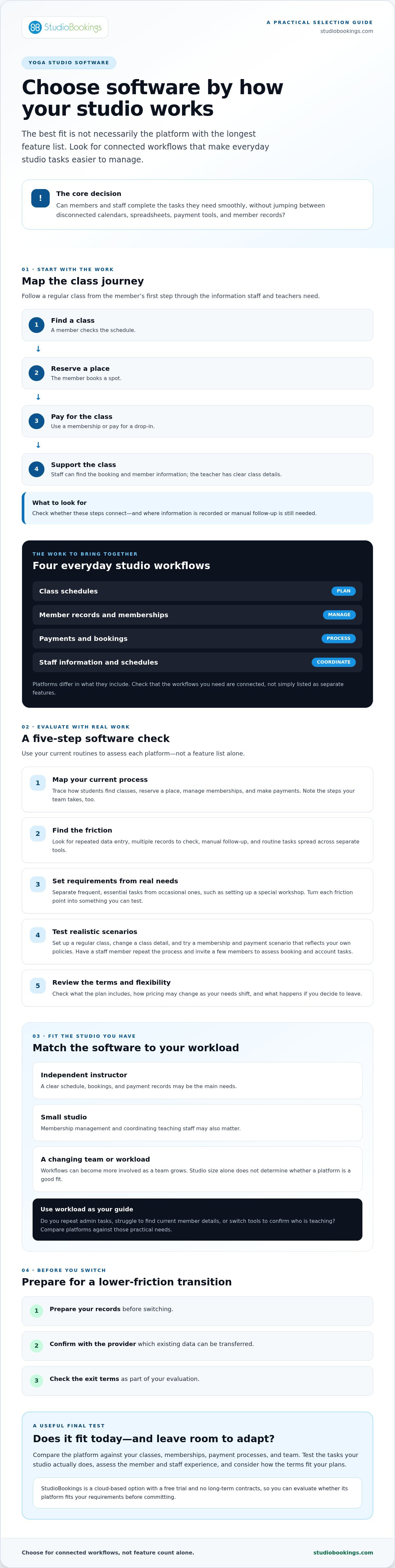
Start with a regular class journey. A member checks the schedule, books a spot, and pays for a drop-in or uses a membership. Staff need to find the booking and the relevant member information, while the teacher needs clear class details. When those steps are connected, you can more easily see where information is recorded and which tasks still require manual follow-up.
Use that journey to check for repeated data entry. For example, if a schedule change means updating several tools, ask whether the platform lets you manage the class details in one place and how the change appears to members and staff. Software can organize these processes, but it doesn’t replace the personal side of your studio: a teacher’s guidance, a warm welcome, or the care you bring to member relationships.
No. An independent instructor may mainly need a clear schedule, bookings, and payment records. A small studio may also need to manage memberships and coordinate teaching staff. Those workflows can become more involved as a team grows, but studio size alone doesn’t determine whether software is a good fit.
Look at your workload instead. Do you repeat the same admin tasks, struggle to find current member details, or switch tools to confirm who’s teaching? Those are practical reasons to compare platforms. If you run a smaller operation, our guide to software for small yoga studios can help you focus on essentials and avoid choosing a system that adds complexity without solving a real problem.
A polished feature list won’t tell you whether a platform addresses the admin slowing down your studio. Start with the work you do now and judge each option against those needs. A useful evaluation follows five steps: map your workflows, identify friction, set requirements, test realistic scenarios, and review the terms.
Trace the steps your members and team take today. How do students find classes and reserve a place? How do they manage memberships and make payments? Note where staff re-enter information, check multiple records, or follow up manually. Separate frequent, essential tasks from occasional ones, such as setting up a special workshop. This gives you a shortlist based on your actual work rather than features you may rarely use.
Turn each point of friction into a requirement you can test. If staff update class details in different places, check whether a platform keeps the schedule information consistent. If membership changes create extra payment admin, ask how those steps work and what staff need to do. Consider your plans for the studio, too. The U.S. Small Business Administration’s guide to writing a business plan can help you think through your goals before deciding what your software needs to support.
Use a trial to perform the tasks your studio actually does instead of only browsing menus. Set up a regular class schedule, change a class detail, and see how easy it is to manage the update. Try a membership and payment scenario that reflects your own policies. Ask a staff member to repeat the process, then invite a few members to assess whether booking and account tasks feel clear. Note confusing steps, workarounds, and anything that still requires a separate tool.
Review the terms as well as the workflow. Check what’s included in the plan, how pricing may change as your needs shift, and what happens if you decide to leave. StudioBookings offers a free trial and no long-term contracts, so you can evaluate whether its platform fits your requirements before committing. Explore StudioBookings and try the platform as one way to put your checklist into practice.
A feature matters when it helps someone complete a real task. Compare platforms by following common workflows from a member’s first booking through to the owner’s daily admin. Use the table as a checklist, then verify current capabilities directly with each provider. Plans and features can change.
| Workflow | What to check |
|---|---|
| Scheduling | Can you manage your usual class schedule and make changes without unnecessary steps? |
| Memberships | Can you find and update the member details relevant to your studio? |
| Payments | Can a member complete the payment process that matches your requirements? |
| Staff administration | Can you keep staff and class information organized in a way your team can use? |
| Mobile access | Can members handle booking clearly, and can owners access the tools they need? |
Check whether essential tasks connect through one management dashboard rather than merely appearing on a feature list. Follow a member’s booking through to the information you need as an owner. Does the booking appear where you expect? Can your team find relevant member and class details without entering the same information again? Make a note of manual handoffs, since they can limit the time saved by bringing tasks together.
Assess setup clarity and the member experience, too. Ask a staff member to find a class detail or complete a routine admin task, and note where they hesitate. Have a member try the booking flow. Clear navigation for both groups is more useful than a feature that is technically available but difficult to use.
Compare how providers structure their plans. Some may base tiers on active members, while others may organize them by included features. Check what happens when your needs change: can you move between plans, and how would that affect the tools you rely on? Review contract length and whether a trial is available. StudioBookings offers tiered pricing based on active members or features required, a free trial, and no long-term contracts.
Use a workflow checklist to compare the specific tools each provider offers. StudioBookings is one option to assess: its cloud-based platform brings scheduling, memberships, payment processing, and staff management together, with a mobile app for owners and members. Compare its current capabilities with your requirements, and confirm details with the provider before deciding.
Changing systems takes planning. Treat the move as an operational project: prepare your records, configure essential workflows, test the setup, communicate changes, and review how things are working after launch. Don’t rely on the new platform for live classes until you’ve tested the tasks your studio depends on.
Begin by listing what needs to move and who uses it. Include class schedules, membership information, staff responsibilities, and recurring payment processes. Ask the prospective provider which data can be transferred, what import options are available, and what support is offered during setup. Confirm the details directly rather than assuming every record will transfer in the format you expect.
Choose a changeover window that gives your team time to prepare, and assign one internal point person to coordinate questions and decisions. Configure essential tasks first, such as publishing the schedule and setting up the membership and payment workflows you rely on. Before going live, test a booking, a membership process, and relevant staff tasks. Check that information appears where expected and that the steps are clear to the people who’ll use them.
Give staff time to practise common tasks before the new workflow goes live. Ask them to manage class information and find member details, then invite them to flag confusing steps. For members, explain what’s changing and how to book under the new system. Keep instructions clear and timely, especially if they need to take a different step to manage a booking or membership.
Review feedback soon after the change. If members are unsure how to book or staff are falling back on old records, address the friction before introducing optional processes. A gradual, well-tested transition can help you spot gaps while there’s still time to correct them. Use a transition checklist to keep the records, tests, and communications you need to handle in view.
As part of your transition planning, explore StudioBookings and consider whether its workflows fit your studio.
The right choice should make current routines easier without forcing your studio into workflows that don’t fit. Before deciding, check five things: whether the software fits essential workflows, feels clear to members, supports staff tasks, offers flexibility as your needs change, and has terms you understand.
StudioBookings may be worth evaluating if you want scheduling, memberships, payment processing, and staff management in one cloud-based platform. It serves yoga studios as well as other studio types, including Pilates and barre, fitness and HIIT, pole and dance, and cycling and rowing. Every studio has different needs, so test your own workflows rather than assuming a feature will suit every business. StudioBookings was founded by studio owners in 2012, which is useful context as you assess the platform.
The platform also offers a mobile app for owners and members. Its pricing is tiered according to active members or the features required, and it offers a free trial with no long-term contracts. Check the current plan details directly with the provider so you understand which tier fits your needs.
Make a short list of must-have workflows and test each one during a free trial. For example, try managing a typical class, checking the member experience, and completing the payment and staff tasks your studio relies on. Ask a team member to try the same tasks. A workflow that feels straightforward to you should also be practical for the people who’ll use it every day.
Before committing, review current plan inclusions, how tiers are structured, and the terms for changing plans or ending service. Confirm any details that could affect your decision with the provider.
Make your choice based on the work the platform helps you complete, not just the features it lists. Explore StudioBookings and start with the free trial to test your priority workflows.
The right yoga studio software should fit the way your studio works, not leave you juggling disconnected tasks. Compare platforms against your essential workflows, check that members and staff can use them comfortably, and test realistic scenarios before you decide. That process helps you choose a system that supports your studio now and can adapt as your needs change.
StudioBookings brings scheduling, memberships, payments, and staff management together in one dashboard. Founded by studio owners in 2012, it offers a free trial and no long-term contracts, so you can explore the platform and assess its fit before committing.
Start with the workflows that take the most time or cause the most friction. See how they work in practice, then review the plan details that matter to your studio. Explore StudioBookings and try the platform to test whether it fits your priority workflows.
Yoga studio software is a digital platform for organizing recurring business tasks, such as class scheduling, memberships, payment processing, and staff administration. Depending on the provider, these workflows may sit in one dashboard and connect with member-facing booking tools. List the tasks your studio needs to manage, then test them in the platform. This helps you see whether its workflows match the way your studio operates.
Start by mapping how your studio schedules classes, manages bookings and memberships, processes payments, and coordinates staff. Identify which tasks cause the most friction, then compare platforms against those priorities instead of relying on a long feature list. During a trial, test realistic scenarios and ask staff to try the system too. Before deciding, review member usability, available support, plan details, and contract terms directly with the provider.
Many studio platforms support membership administration and class booking, but the details vary by provider. Check how members find a class, reserve a place, and use the arrangements your studio offers. Then see how staff view bookings and manage membership information. Test the full process rather than relying on a feature description, and confirm current capabilities with the provider before choosing.
Pricing varies by provider and may depend on factors such as active members or included features. Compare what each subscription tier covers, whether a trial is available, and whether the agreement requires a long-term commitment. Don’t judge by a headline figure alone. Confirm current pricing and terms with each provider, and make sure the plan supports the workflows your studio needs without paying for features you won’t use.
Setup depends on the platform, the information you need to organize, and how your current processes work. Before starting, document your class schedules, membership details, staff responsibilities, and payment workflows. Ask the provider which setup assistance and data-import options are available. Configure and test essential tasks before going live, and give staff time to practise so they can learn the new process and flag confusing steps.
A planned transition can help reduce confusion, though the process depends on your current system and the new provider’s import options. Confirm which records can be transferred, then test booking and payment workflows before relying on the new platform for live classes. Choose a suitable changeover window and tell members clearly what’s changing and when. Ask the provider about transition support, and verify important records as part of your switch.
Mobile access varies by provider and plan. Some platforms offer apps for owners, members, or both, so check who can use the app and which tasks it supports. Test a member’s booking journey as well as the owner’s administrative tasks. StudioBookings offers a mobile app for studio owners and members. Confirm its current capabilities and check that the app supports the experience you want for your studio.