Fitness payroll has to handle class or session pay, hourly shifts, commissions, time records, and tax filing, not just a standard salary. Automating payroll for fitness instructors works best when tracked hours feed into payroll and the system can handle different pay rules. Covered hours worked bey...

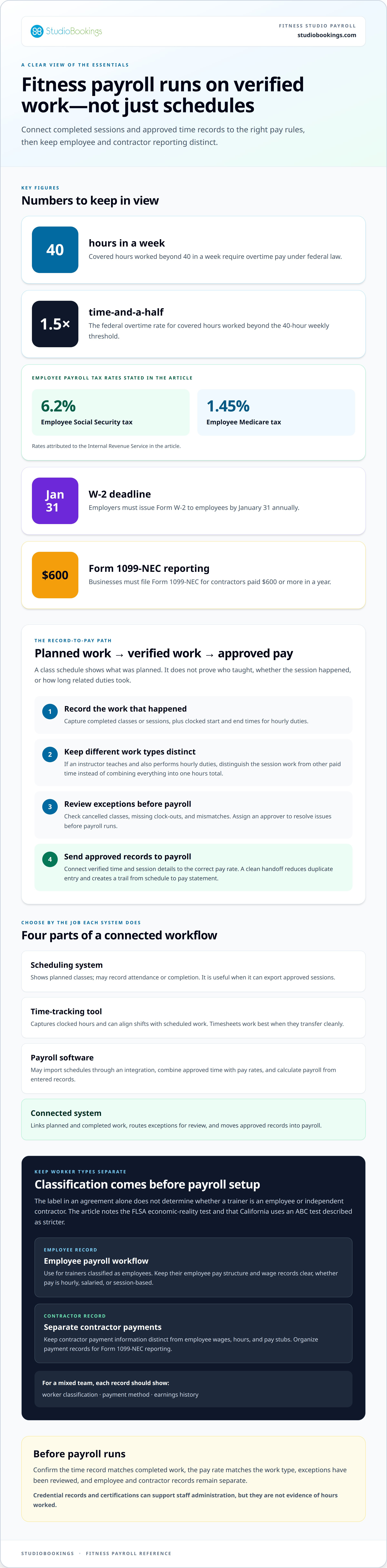
Fitness payroll has to handle class or session pay, hourly shifts, commissions, time records, and tax filing, not just a standard salary. Automating payroll for fitness instructors works best when tracked hours feed into payroll and the system can handle different pay rules. Covered hours worked beyond 40 in a week require time-and-a-half pay under federal law, according to the U.S. Department of Labor.
If you manage a fitness studio, instructor schedules and compensation can vary from shift to shift. Payroll designed for a conventional hourly workforce may not handle per-class rates, attendance-based pay, or commissions well.
Compare payroll options by how they track time, integrate timesheets, support different pay structures, and handle payroll tax filings. The right system should fit how your studio records and pays instructors.
• Compare payroll tools by how well they connect instructor time records and timesheets to payroll.
• Understand how employee-versus-contractor classification affects the way trainers are paid and reported.
• Choose software that can handle hourly, per-class, per-session, commission, and multi-rate pay structures.
• Review what payroll tax tasks the system automates and which steps still need attention.
• Use clear pay records and verification steps to catch errors before payday.
Fitness payroll starts with a reliable record of each instructor’s work. A class schedule shows when a session is planned, but not who taught it, whether it went ahead, or how long related duties took. Connect scheduling and verified time records to payroll so approved hours and session details feed into pay calculations.
For example, an instructor might teach a scheduled class and cover a second session for a colleague. Record both sessions, track any hourly duties separately, and send the approved timesheet to payroll. Integration reduces duplicate entry and gives managers a trail from schedule to pay statement. Before approving a pay period, review exceptions such as cancelled classes and missing clock-outs.
Build the workflow around each pay rate. Per-class pay requires a record of completed sessions; hourly pay requires start and end times. If someone does both, distinguish teaching from other paid duties. Payroll software should preserve these details when transferring records instead of combining them into one hours total.
| Option | Schedule connection | Time and session records | Payroll handoff |
|---|---|---|---|
| Scheduling system | Shows planned classes | May record attendance or completion | Useful when it exports approved sessions |
| Time-tracking tool | Can align shifts with scheduled work | Captures clocked hours | Works best when timesheets transfer cleanly |
| Payroll software | May import schedules through integration | Combines approved time with pay rates | Calculates payroll from the entered records |
| Connected system | Links planned and completed work | Routes exceptions for review | Moves approved records into payroll |
Choose a setup that connects scheduled work, verified time, and the correct pay rate with as few manual steps as possible. Assign an approver to resolve mismatches before payroll runs.
Credential tracking can also help fitness teams organize staff records. Store each instructor’s certification and expiration date, and use reminders to prompt follow-up. This helps managers spot credentials that need attention before assigning future sessions. Keep credential information separate from time entries: a certification documents staff information, not hours worked.
For workforces with variable hours, ACA tracking is a separate administrative consideration. Keep each employee’s hours organized by pay period so records are available for internal review and applicable reporting. A class schedule is not proof of hours worked. Use reviewed time records when planned sessions change or an instructor takes on extra work.
Tax details also rely on accurate employee records. According to the Internal Revenue Service, the employee Social Security tax rate is 6.2%, and the employee Medicare tax rate is 1.45%. According to the Internal Revenue Service, employers must issue Form W-2 to employees by January 31 annually. Accurate hours and employee details help payroll records support those processes.
The right fit depends on how your gym classifies trainers and pays each type of worker. Compare systems for their ability to keep employee and contractor records separate and support the corresponding payroll workflows.
Employee payroll is for trainers treated as employees, whether they receive hourly pay, a salary, or session-based compensation. The FLSA uses an economic-reality test to assess whether a trainer is an employee or independent contractor, so the label in an agreement alone does not determine classification. Payroll software should identify employees clearly and apply the appropriate pay setup to their records.
California applies an ABC test, which the California Department of Industrial Relations describes as stricter than the FLSA’s economic-reality test. A gym operating in California should account for that distinction when setting up trainer records. Classification matters before selecting payroll features: employee payroll and contractor payments follow different reporting workflows.
Contractor payments are handled separately from W-2 employee payroll. A 1099 workflow should let a gym record the contractor’s pay and keep payment information distinct from employee wages, hours, and pay stubs. This separation is useful when personal trainers provide sessions under a contractor arrangement while other coaches work as employees.
Businesses must file Form 1099-NEC for contractors paid $600 or more in a year. Payroll software can help organize contractor payment records for that reporting process. It doesn’t make a worker a contractor; classification comes first, and the payroll setup follows that determination.
For a mixed team, check that the system keeps different worker types and payment structures distinct. A gym might have an hourly front-desk employee, an employee trainer paid per session, and a contract coach. Each record should show the person’s classification, payment method, and earnings history. This makes reports easier to review and helps keep contractor payments out of employee wage totals.
Use the same setup process for each new trainer. First, determine worker classification under the applicable test. Create the appropriate employee or contractor profile, enter the agreed pay structure, and follow the matching payroll workflow. If someone’s role changes, review their classification and update the record rather than carrying forward an outdated setup.
Use for trainers classified as employees, with their employee pay structure.
Keep contractor payments separate and organize records for Form 1099-NEC reporting.
Compare whether payroll reports distinguish employee wages from contractor payments.
Payroll software is a better fit for a gym when it supports the workforce it actually has, including hourly employees, session-paid trainers, and contract coaches. Prioritize correct classification and separate records before comparing convenience features.
Fitness payroll can combine hourly shifts, class rates, appointment pay, and commissions. A system for automating payroll for fitness instructors should turn each approved work record into the correct earnings calculation and a report managers can review.
Per-class pay ties compensation to a completed class rather than clocked hours. One sample structure pays a group instructor $25 per class, plus $2 for each participant above 10. Configure the class rate and attendance trigger separately, then record the class as completed and enter attendance. Reports can show the base amount and attendance-based addition distinctly.
With per-class pay, the completed class determines the base calculation. If a class is cancelled or another instructor covers it, update the record before payroll. This keeps manual changes visible and prevents a scheduled session from being counted as completed work.
Per-session pay ties earnings to a specific training appointment. Records should connect the instructor, completed session, and applicable rate so payroll can calculate pay for delivered work. Unlike a group-class rate, this structure centers on an individual appointment and its compensation rule.
For example, a system can flag an appointment with a missing instructor or rate before sending verified entries to payroll. If a personal trainer earns commission, the session record can connect the payment to the applicable rule. Managers can then compare the report with booked client appointments.
Client-based compensation uses a client interaction as its tracking unit. A studio might pay for each completed appointment rather than for a whole class or every hour on shift. Record the client-linked service, instructor, and pay rule together. This distinguishes delivered appointments from cancellations, schedule changes, and sessions reassigned to another trainer.
Unlike a flat class rate, client-based pay can vary according to completed appointments or the commission rule. Keep the underlying activity visible in reports so managers can trace each payment to its source. Avoid relying on a manual total that hides which appointments earned compensation.
Hourly class pay calculates earnings from time worked, not simply the number of classes taught. A fitness center records an instructor’s paid hours and applies the assigned hourly rate. This can suit a shift that includes setup or other scheduled duties as well as teaching.
Unlike per-class pay, hourly pay can change with the length of a shift, even if the instructor teaches the same class. Record the hours and review edits before payroll. Keep hourly duties separate from per-class or commission earnings so each pay rule remains clear.
When automating payroll for fitness instructors, match each pay rule to its work record: completed class, appointment, client activity, or verified hours. Configure the software to calculate and report each earnings type separately.
Payroll systems calculate hourly pay from approved hours and the assigned rate, salary from the configured pay period, and per-class pay from completed classes and the class rate. For mixed roles, keep each earning type separate so reports show how the total was calculated.
Hourly pay changes with recorded hours, while salary follows a set amount for each configured pay period. A fitness center may use both structures for different workers or assign separate rates to one employee’s duties. For example, an instructor might receive an hourly rate for administrative work and a class rate for teaching.
Set up each role or earning type as a separate line in the payroll system. This lets the dashboard show hours, salary, and class earnings without blending them into an unexplained total. Tie each entry to the worker and pay period so tax calculations and pay statements reflect the correct earnings categories.
Commission links pay to sales or completed sessions, while a bonus rewards a defined outcome. A sample personal-trainer structure pays 55% of each $60 session, or $33 per session. Another example awards $100 for every 10 client renewals. Configure the rate, qualifying activity, and bonus trigger separately, then review the resulting report before processing payroll.
Commission schedules differ from fixed hourly or salary pay because the amount depends on recorded activity. A sample trainer compensation structure uses 50-60% commission per session. If sales are slow, commission structures may need minimum-wage top-ups. Build a way to record the relevant hours and flag shortfalls for review rather than assuming commissions alone cover every pay situation.
Small-group sessions can combine a base rate with an attendance-based addition. For example, a Hatha Yoga instructor might receive $30 per session, plus $3 for each person above fifteen attendees. Keep the base payment and attendee count visible as separate inputs. That makes the calculation easier to explain and helps identify whether a class was recorded with the right attendance.
Flexible pay schedules can help studios manage workers with multiple earning rules. One instructor might receive hourly pay for desk coverage, session commission for personal training, and a renewal bonus. Contractors may have different payment arrangements from employees, so keep their records and payment categories distinct. The dashboard should make each rule visible rather than hide it in a combined total.
Before running payroll, confirm that each calculation uses the right worker, period, activity, and rate. Review commission totals, bonus triggers, and any top-up flags in the report. This simple sequence makes mixed compensation easier to understand and correct.
Some payroll platforms automate tax calculations, deposits, and filings; others handle only selected steps. Review which tax tasks the service performs and which remain part of your process.
For studios in multiple locations, choose payroll software that supports relevant state tax filings and records work locations separately. Check whether it can apply the appropriate state setup to each employee and organize filings by location. The right fit reflects the states where your employees work.
Common fitness payroll errors include misclassifying workers, missing employee details, inaccurate hours, and applying the wrong pay rate. These can lead to compliance risks or incorrect pay. Before payday, match employee records, approved work records, pay rules, and payroll results.
Automation doesn’t remove the need to review records. Form 941 is due on the last day of the month following each quarter. Payroll-related records should be maintained for 3-7 years in accordance with federal and state law. Late payroll filings or payments can incur fines of up to $1,000 per incident.
Use a repeatable verification process before approving each payroll run:
• Match each employee’s hours or completed sessions to approved records.
• Review pay rates, commissions, bonuses, and deductions for the current period.
• Resolve missing employee information or unexpected changes before submission.
• Compare payroll totals with the resulting pay stubs and filing records.
Onboarding is another opportunity to prevent errors. Before an employee’s first payroll run, enter the correct work location, classification, pay structure, and tax details. Employee self-service can let staff submit or update information through the platform, with managers reviewing changes before they affect payroll. Keep a record of approved edits so a changed schedule or rate does not silently affect a payment.
Payroll pricing may combine a base fee with a charge per employee. Whether inactive employees incur fees depends on how the service treats profiles that remain on the platform but are not currently paid. Compare billing terms alongside tax filing, onboarding, and reporting features rather than relying on automation claims alone.
Before choosing a system, confirm which filings it submits, which locations it supports, and how it handles exceptions. Payroll software can streamline recurring tax tasks, but reliable payroll still depends on accurate employee records and a clear approval step.
StudioBookings helps fitness and HIIT studios manage class schedules, memberships, payments, and staff from one dashboard. If payroll comparisons have highlighted the need to keep studio operations organized, it can bring key management tasks together while you run payroll through a suitable payroll system.
Use StudioBookings to coordinate classes and staff information alongside your process for recording hours, sessions, and pay structures. Studios with other class formats can also use its Yoga Studio Software, Pilates and Barre Studio Software, or Pole and Dance Studio Software.
Contact StudioBookings to discuss how its studio management software can fit your business.
Start by turning your current pay rules into a process your team can follow consistently. Map each instructor’s role, approved work record, and earning type, then decide which tasks payroll software should handle and which exceptions a manager must review. A clear workflow is a practical starting point for automating payroll for fitness instructors as your staffing needs change.
StudioBookings supports fitness studios with Fitness and HIIT Studio Software, as well as Yoga Studio Software and Pilates and Barre Studio Software for other class formats. These tools organize studio management alongside the separate work of calculating wages and filing payroll taxes. Explore StudioBookings to see how it can bring your scheduling, memberships, payments, and staff management together.
Choose a setup that fits your studio’s routines today and can adapt as those routines evolve. Contact StudioBookings to explore how its studio software could fit your business. A more organized studio workflow is a solid next step toward giving your team more room to focus on members and classes.
Fitness payroll often needs to account for several kinds of work in one pay period. A trainer might teach a group class, cover a front-desk shift, and lead individual sessions. Role-specific earnings records help clarify the mix. For example, separating a substitute class from regular hourly duties explains pay differences and makes payroll reports easier to trace.
Setup time depends on how quickly you can prepare employee records, pay rules, work locations, and tax details. Organized records can make configuration smoother; missing information or unclear compensation terms can slow it down. Before the first run, confirm that each employee’s profile reflects their role and that the filing setup matches where the business operates.
A system can support both employees and contractors if it keeps their payments in separate workflows. A studio might pay an employed instructor through its regular payroll run and record a contract coach’s payments separately. Keep classifications and payment histories clear, and do not classify someone as a contractor simply because they are paid per session.
The right option fits your studio’s compensation mix and locations. Compare how it handles hourly, salaried, session-based, and commission earnings, along with tax filing and employee records. Try modelling a pay period with a class instructor, an hourly staff member, and a commission-based trainer. Check whether each calculation is clear in the resulting reports.
Record each earning type separately and define the activity that triggers payment. Link commission to the eligible sale or session, show the target for a bonus, and base attendance-related class pay on recorded attendee numbers. Keep tips distinct from studio-defined incentives. This makes earnings easier to explain and helps managers investigate discrepancies without rebuilding the entire calculation.
US payroll can involve employee tax withholding, employer payroll tax obligations, federal filings, state-specific filings, and wage statements. The Internal Revenue Service oversees federal payroll reporting, while state requirements vary according to where employees work. A payroll platform should clearly state its filing responsibilities and preserve records for review. Distinguish employee wages from contractor payments because they follow different reporting processes.
Payroll software pricing may combine a recurring base charge with costs based on employee count or selected services. Compare what the plan includes, such as tax filing, onboarding tools, reporting, and support for inactive employee profiles. Consider whether your staff size changes during the year. A useful comparison looks at the full billing structure, not just the advertised starting price.
Connect class schedules to time records, then review substitutions, cancellations, and missing entries before approval. For example, compare the completed class roster with instructor assignments before approving the pay period. Record manual edits and who approved them. This gives managers a clear way to resolve mismatches before payroll runs, rather than correcting them after payment.