A full class is about to start, but you’re still updating a membership, checking a payment, and searching your inbox for a staff change. Simplifying studio administration tasks isn’t about adding automation for its own sake. It’s about connecting everyday work that currently lives across separate to...

A full class is about to start, but you’re still updating a membership, checking a payment, and searching your inbox for a staff change. Simplifying studio administration tasks isn’t about adding automation for its own sake. It’s about connecting everyday work that currently lives across separate tools, spreadsheets, and messages.
When admin is scattered, repetitive data entry eats into your day and important tasks are easier to miss. Practical changes should fit around classes and keep member service running smoothly, without creating a complicated overhaul.
This guide will help you identify administrative bottlenecks, decide which tasks to simplify first, and create repeatable workflows with clear ownership. You’ll also learn what to look for in tools that bring scheduling, memberships, payments, and staff management into a shared view. The goal is to spend less time chasing information and more time running your studio.
• Spot admin friction by tracking repeated updates, scattered information, and tasks without clear ownership.
• Map a member’s journey to see where connected steps can reduce handoffs and duplicate data entry.
• Compare manual records, disconnected tools, and a shared platform by visibility, consistency, and setup effort.
• Start simplifying studio administration tasks with one recurring, high-friction workflow, then review what changes.
• See how a shared dashboard can bring scheduling, memberships, payments, and staff management into one operating hub.
A busy studio day leaves admin squeezed between classes, member questions, and staff needs. You may update the same detail in two places, search your inbox for a change, then follow up on a task you thought someone else owned. Before changing tools or adding automation, look closely at what your team actually does. Simplifying studio administration tasks starts with finding where routine work gets stuck.
Make a simple inventory of recurring work across the studio. Include small jobs that happen often and less frequent tasks that can disrupt a busy day when they come due.
Updating schedules, recording attendance, and communicating class changes.
Handling sign-ups, changes, renewals, and member questions.
Checking payment status, recording transactions, and following up on outstanding balances.
Sharing schedule changes, assigning responsibilities, and keeping staff information current.
Look for duplicate data entry, messages you send repeatedly, and manual follow-ups that rely on someone remembering. A short task can create significant friction when it has to be repeated across several systems or staff members. Also flag occasional work, such as preparing a schedule change or resolving a membership issue, if it regularly interrupts other tasks.
Not every interaction should be streamlined away. A personal conversation can help a member feel welcome or clarify a situation that needs care. Create a clearer process for repetitive steps while preserving the human attention that makes your studio experience personal.
Assess each task using four practical indicators: how often it happens, how long it waits before completion, how easily errors occur, and how much a delay or mistake affects members. You don’t need a complex scoring system. A low, medium, or high rating can help you decide what to address first.
Does the task happen daily, weekly, or only occasionally?
Does it sit in an inbox or wait for information before anyone can act?
Is information copied manually or handled differently by different people?
Could a missed step affect booking, membership, payment, or communication?
Ask staff where they search for information, repeat work, or wait for someone else to take the next step. Clarify who owns each task, too. Studio manager responsibilities often span day-to-day coordination, so clear ownership helps prevent work from falling between roles.
An admin bottleneck is a recurring task that gets delayed, repeated, or handled inconsistently, creating extra work or a poorer member experience. Use that definition to choose a first priority. The best place to begin isn’t necessarily the task that takes the longest. It’s the one where frequency, avoidable effort, and member impact combine to cause the most friction.
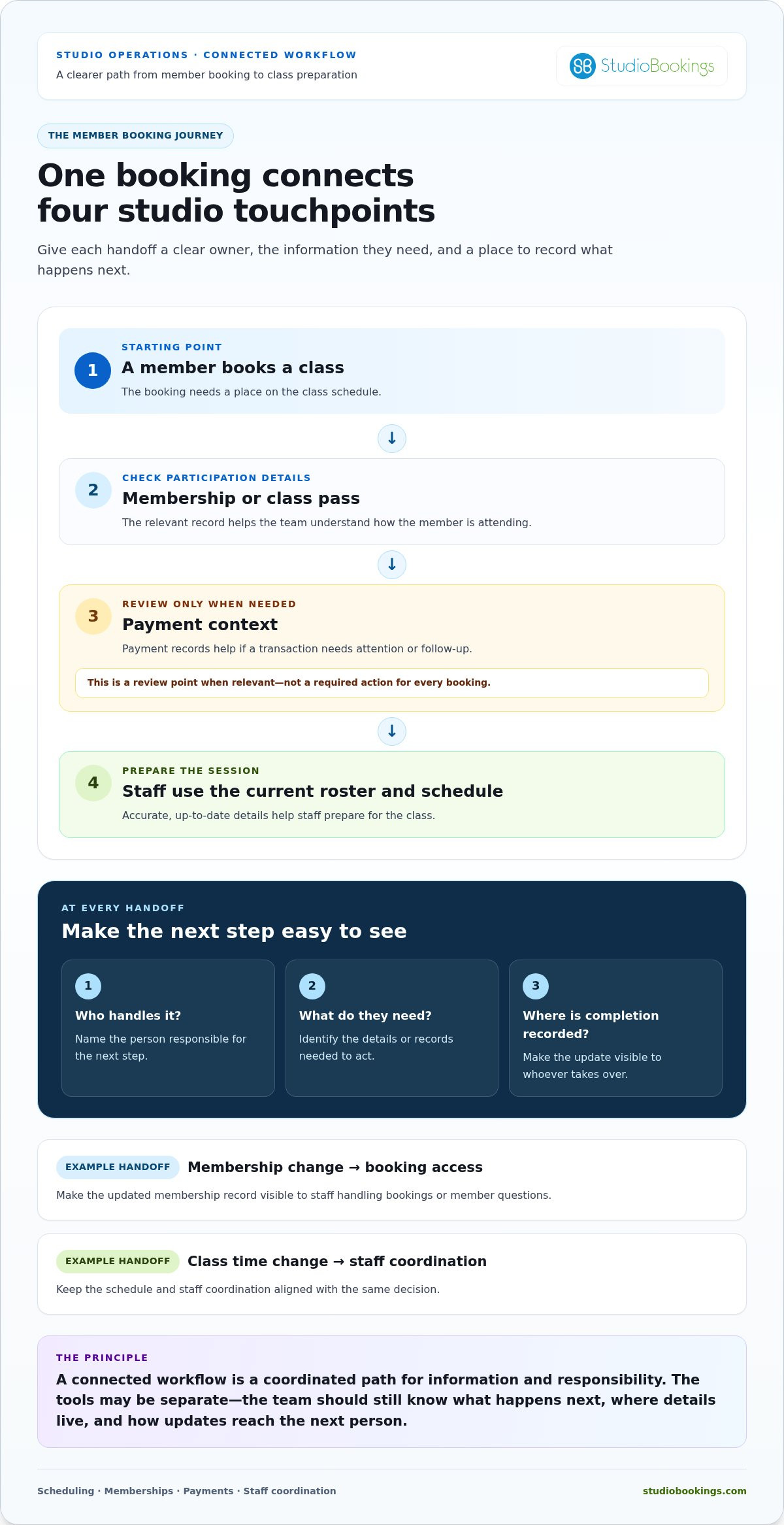
A member’s booking can touch several parts of your studio’s operation. The class needs a place on the schedule. The member’s pass or membership needs to be understood. Payment information may need attention, and staff need an accurate class roster to prepare. If each step lives in a separate place, your team has to bridge the gaps by hand.
A connected workflow links those steps through clear processes and accessible information. It doesn’t mean every tool automatically shares data. It means each person knows what happens next, where to find the details they need, and how to record an update so the next task can be completed consistently.
Picture a member booking a class. The booking appears on the schedule. The relevant membership or class-pass record helps the team understand how the member is attending, while payment records provide context if a transaction needs follow-up. Staff use the current roster and schedule to prepare for the session. Each step depends on reliable information from the one before it.
Map this journey by asking, “What happens next?” at every handoff. Note who handles each step, what information they need, and where they record its completion. For example, if a membership change affects class access, the person updating the record needs to make that change visible to staff handling bookings or member questions. If a class time changes, the schedule and staff coordination should reflect the same decision.
Which class or time is involved, and who needs the updated details?
What membership or pass information is relevant to the booking?
Is there a payment detail that requires a separate review or follow-up?
Who needs the latest schedule or member information to do their part?
A connected workflow is a coordinated path for information and responsibility. With isolated tools, your team has to create that path themselves.
A shared management dashboard can make key operational areas easier to view together. StudioBookings brings scheduling, memberships, payment processing, and staff management into one dashboard, giving studio teams a common place to work without assuming every step happens automatically.
Consistency helps with routine updates, but not every member interaction should follow a script. A sensitive concern, a request that needs careful judgment, or a conversation about someone’s experience belongs with the appropriate person. A clear process can help that person find the relevant context without replacing their discretion or empathy.
Keep routine messages and record updates simple and consistent, then leave room to respond warmly when a situation calls for it. Simplifying studio administration tasks means removing unnecessary searching, repetition, and uncertainty, not the human connection that makes members feel supported. If you’re considering a shared hub for steps in the member journey, studio management software is one option to explore.
Manual records can feel straightforward, and separate tools may solve individual problems. But when tasks cross between scheduling, memberships, payments, and staff coordination, keeping information aligned can take extra effort. The right setup depends on your workflow, not on how many features a system advertises. Use the comparison below to see where each approach helps and where it can create more work.
| Area | Manual records | Disconnected tools | Shared studio platform |
|---|---|---|---|
| Visibility | Details are available in the files people know to check. | Information is split across separate apps or documents. | Core studio operations can be viewed in one place. |
| Repeat entry | Staff may copy the same update between records. | Separate tools can require duplicate updates. | A shared view can reduce the need to re-enter or hunt for details. |
| Handoffs | Often depend on notes, messages, or memory. | Staff must know where information lives and who updates it. | Teams can work from a common operational hub. |
| Consistency | Processes may vary by person or document. | Different tools can create different versions of the truth. | Shared processes can make routine work easier to follow consistently. |
| Setup effort | Low for a simple process, but upkeep can grow. | Each tool needs its own setup and maintenance. | Requires setup and team adoption, so fit matters. |
A spreadsheet can be a sensible choice for a simple, low-volume process with one clear owner. It may be enough for a task that rarely changes and doesn’t require several people to act on the information. Keep using it if the team can find the current version, update it reliably, and understand who is responsible.
Look for signs that the process is outgrowing the file: conflicting versions, the same update entered repeatedly, or uncertainty about who should make the next change. Those are workflow problems, not proof that spreadsheets are always wrong. Simplifying studio administration tasks means choosing the least complicated approach that keeps essential information visible and dependable.
Start with the workflow you want to improve. Can the system support how your studio handles scheduling, memberships, payments, and staff tasks? Then consider daily usability for owners, staff, and members. A tool only helps if the people involved can use it as part of their regular routine.
Compare the subscription terms, including pricing transparency, contract requirements, and trial access. Consider what adopting the system will ask of your team, too: data setup, process changes, and time to learn a new routine. A platform won’t fix unclear ownership by itself. Match it to a defined process, then evaluate whether it makes the work easier to follow.
For more ideas on choosing an approach that fits a smaller studio, explore this boutique studio management guide.
Changing every process at once can create more confusion than it solves. Improve one recurring task, clarify responsibilities, and see how the new process works during normal studio operations. This gives your team a manageable way to test changes without turning busy class days into a full-scale transition.
Pick a task that happens regularly and causes visible delays, repeated work, or confusion. Describe how it works today, from the moment it begins to the point it’s complete. Note where information changes hands, where someone has to wait, and who steps in if the usual owner is unavailable.
Set a simple baseline before making changes. Track how much staff time the task takes, how often information must be entered again, or whether follow-ups are missed. A rough but consistent record is more useful than a precise measurement you can’t maintain.
Write the new workflow in plain language and test it with a limited task or team before expanding it. Keep the instructions and current information in one agreed place, so staff aren’t left guessing which version to follow. Make the owner, trigger, required information, and completion point explicit.
Record its current steps and identify unnecessary handoffs or repeat work.
Choose a practical signal, such as time spent, repeated updates, or missed follow-ups.
State what starts the task, who owns it, what information is needed, and what “done” means.
Decide where staff will find the current instructions and record the update.
Try it with a limited workflow first, rather than changing every studio process at once.
Ask staff what was unclear, then check for missed steps and repeated work before deciding whether to expand it.
For example, if staff repeatedly need to confirm a schedule change, define who records the approved change, where the current schedule is kept, and who needs to refer to it. That gives everyone a clear next step without requiring a studio-wide overhaul.
During the pilot, invite staff to flag friction as it happens. Did they have the information they needed? Was ownership obvious? Did any part of the task still require re-entry or a manual reminder? Review their observations after a short trial period and make small adjustments before rolling out the process more widely.
Keep the review practical. Compare the new workflow with your baseline and look for fewer repeated actions, clearer handoffs, or more reliable follow-through. If the process adds steps without solving the original problem, revise it. For a shared way to manage key studio operations, explore StudioBookings for your studio.
You’ve identified where work gets stuck and what a better workflow needs to support. Now assess whether your tools make those steps easier to manage. A shared operating hub can reduce the need to jump between separate records for core studio tasks, while keeping processes and ownership clear.
StudioBookings brings class scheduling, memberships, payment processing, and staff management together in one dashboard. That gives your team a shared place to work across areas that often affect one another. A schedule update, for example, is easier to coordinate when class information and staff management sit alongside other studio operations rather than in separate records.
Match the platform’s capabilities to the friction you’ve already identified:
Consider whether class schedules are easier for the people responsible for maintaining and coordinating them to access.
See whether membership records fit the steps your team follows when handling member activity and questions.
Assess whether payment administration can sit within the same operating view as related studio tasks.
Consider whether staff responsibilities are easier to coordinate when they’re part of the same platform.
A shared dashboard doesn’t remove the need for clear ownership or mean that every update happens automatically. Its value is in bringing key functions together, so your team has fewer disconnected places to navigate. StudioBookings also provides a mobile app for owners and members, extending access beyond a desktop without changing the need for a well-defined workflow.
If your studio focuses on yoga, this yoga software for small studios guide can help you think through the needs of a smaller operation as you assess what matters most.
Start with one workflow, not every admin task at once. Write down its trigger, owner, necessary information, and completion point. Then compare each step with StudioBookings’ scheduling, membership, payment, and staff management capabilities. Note where a shared dashboard could make information easier to find, and where your team will still need a clear procedure or personal judgment.
Use the free trial to explore how the platform fits your day-to-day needs. Try the workflow you mapped and involve the people who handle it, so you can assess whether the setup feels practical for owners and staff. StudioBookings also offers no-contract pricing.
Simplifying studio administration tasks means matching useful tools to real routines, then refining the way your team works. Keep the focus on fewer unnecessary handoffs, clearer responsibilities, and a smoother view of essential operations. Try StudioBookings and explore how a shared hub could fit your studio.
You don’t need to redesign every studio process to make the day run more smoothly. Choose one recurring task, give it a clear owner, and make its next step easier to see. That small change gives your team a practical starting point for simplifying studio administration tasks without losing the personal care members value.
Founded by studio owners in 2012, StudioBookings serves studios in more than 40 countries. Its shared dashboard brings key studio operations together, giving you a way to assess whether one operating hub fits the workflow you’ve chosen to improve.
Start with the process that causes the most drag. Map it, try a clearer approach, and see how it works in your studio’s day-to-day routine. Explore StudioBookings and start your free trial.
Start with a task that happens often and creates a visible snag, such as checking whether a class change was reflected in the staff rota. Ask the people doing the work where they repeat an update or wait for information, then consider whether the delay affects a class or member. Choose one contained process, document its current steps, and compare the revised version with your starting point. That gives simplifying studio administration tasks a practical focus.
Yes, if it addresses work that’s hard to track across your current tools. A small studio with a shared calendar and a straightforward membership process may not need to change much. But if the owner checks one record for bookings and another for payment status, a platform that fits both needs could make routine tasks easier to oversee. Decide based on the work involved, not the size of the studio.
No, not if you keep personal conversations for situations that need care and judgment. A routine class update can use consistent wording, while a member raising a personal concern deserves a thoughtful response from a staff member. You can set a standard process for recording the next action without scripting the conversation itself. That balance helps your team stay organized and attentive, rather than making every interaction feel automated.
Before changing a process, identify what must stay reliable during the transition, such as having an accurate class list available to staff. Document the current steps, the person responsible for each, and where the information is kept. Ask the staff involved to review the outline for missing details. Then test the revised process on a limited basis, with a clear fallback if an important step is unclear or missed.
No. Separate tools can be a good fit if each task is clear and information rarely needs to pass between them. A shared platform may be worth considering if staff regularly copy the same details between systems or aren’t sure which record is current. Compare the effort of maintaining your existing setup with the effort of using one platform, including how easily each option fits the team’s everyday routines.
Make the first change easy to understand and explain the problem it’s meant to solve. Give staff a concise reference showing where to find current information, what to do next, and who handles exceptions. Invite them to point out confusing steps as they use the process. Their feedback can reveal practical details, such as unclear handoff language, before you extend the workflow to other studio tasks.
Track a few measures connected to the original issue, rather than collecting data for its own sake. For a follow-up process, note time spent, how often staff repeat an action, and whether any follow-up is missed. Use the same method before and after the change so the comparison is useful. Also ask staff whether the process feels clearer, and watch for any new friction affecting member service.