What if the most affordable Pilates management tool isn’t the one with the lowest monthly fee? The better choice is the one that covers your studio’s real workflows without adding costs for features you need or limits that slow you down. Finding affordable pilates management tools can be tricky when...

What if the most affordable Pilates management tool isn’t the one with the lowest monthly fee? The better choice is the one that covers your studio’s real workflows without adding costs for features you need or limits that slow you down. Finding affordable pilates management tools can be tricky when subscription plans, payment fees, and feature tiers don’t line up neatly.
Cost matters, but so does the time you spend on class scheduling, membership tracking, payments, and staff tasks. Those jobs can take you away from supporting members. A long feature list isn’t automatically better, especially if your studio won’t use most of it.
This guide shows you how to compare tools by practical fit and subscription value. You’ll learn which workflows to prioritize, what plan details to check, and how an all-in-one option like StudioBookings brings scheduling, memberships, payments, and staff management into one dashboard. Use the guidance to build a shortlist and test each option against everyday studio tasks.
• Affordable pilates management tools should match the way your studio runs, not just look attractive by monthly fee.
• Separate essential features from optional extras to focus your shortlist on the workflows that matter most.
• Compare plan limits, contract terms, included features, and possible add-on charges to understand the full subscription value.
• Test the same real studio tasks across shortlisted platforms to see which one makes daily administration easier.
• Consider whether StudioBookings’ cloud-based dashboard and mobile app fit your needs, and use its free trial to assess real workflows.
Pilates management tools help coordinate bookings and the everyday work involved in running a studio. Instead of using separate systems for class sign-ups, membership records, payments, and staff details, you can manage connected tasks in one place. That’s a practical example of business software, technology designed to support an organization’s operations.
“Affordable” doesn’t simply mean the lowest subscription price. It means the software fits your budget and handles the workflows you need without making routine tasks harder or requiring extras you don’t use. A standalone calendar may show when classes happen, but it won’t necessarily connect a member’s booking to membership or payment information. Spreadsheets and separate payment tools can help, too, but they may leave you copying information between systems.
The right setup depends on your studio’s schedule and admin needs. A small timetable with a few class types may need fewer capabilities than a studio managing changing schedules, recurring memberships, and several instructors. Start by listing the tasks you handle regularly, then assess tools against those tasks.
Scheduling and booking are often the starting point. Members can reserve classes while your studio keeps timetable and booking information organized. When membership records and payment processing are part of the same system, it may be easier to review booking and payment information together. Staff information in that system can also reduce the need to maintain separate records or update multiple tools when instructor details or schedules change.
Look for connections between tasks, not just a checklist of features. If a class booking requires you to check a spreadsheet and then open another tool to confirm membership, the process is still fragmented. A single dashboard can bring scheduling, memberships, payments, and staff administration together, though the precise features and limits vary by platform.
Spreadsheets can work when schedules and membership records are simple. Regularly updating class times, tracking recurring memberships, or keeping up with more bookings may create extra manual steps and make it harder to keep information current. That’s a useful signal to compare dedicated software, not proof that every studio needs the same system. Focus on repetitive tasks that take time or make your records harder to maintain.
Affordable Pilates management software fits a studio’s budget and reliably supports the work it needs to do. Use that definition to judge practical fit rather than assuming the cheapest option or the longest feature list is automatically best.
A long feature list can look impressive, but value comes from capabilities your team will use. Before comparing plans, map your regular admin tasks to software functions. Do you manage group classes, private sessions, or both? How do you track memberships and payments? Which staff details do you update repeatedly? Your answers define the must-haves. Consider extras only when they support your current operating model or a clear future need.
Assess how the main functions work together, not just whether each appears on a feature list. Members should be able to book the sessions you offer, while your team can manage related membership and payment information without unnecessary duplicate entry. Staff coordination should fit into the same routine instead of creating another disconnected admin task.
Check that the schedule supports the classes and sessions you offer, and that the booking process is clear for members.
Confirm how the platform records membership details and handles payments related to your studio’s process.
Review whether staff information and relevant tasks are easy to manage alongside the schedule.
Consider whether owners and members can comfortably use the available app or mobile experience.
Keep the list specific to your studio. Don’t pay extra for specialist capabilities unless you’ve confirmed they’re available, relevant, and useful in your day-to-day work.
Compare plans on consistent terms. Check which capabilities are included, whether member or staff limits apply, what contract terms you’d accept, and whether add-ons or other charges could affect the total. A lower starting fee may not be the best fit if a capability you rely on is outside the plan. For broader platform context, see this Pilates studio management software guide.
To estimate potential admin savings, note how often you handle bookings, membership updates, payment tasks, and staff changes. Then consider which steps the software could simplify. During a trial or evaluation, test those tasks rather than relying on a feature demo. StudioBookings offers cloud-based studio software, a mobile app for owners and members, and no-contract pricing. If it’s on your shortlist, review Pilates studio software against your must-haves.
They can be. A low subscription fee isn’t good value if the plan excludes an essential workflow, limits the number of members you can manage, or requires extra tools to fill the gaps. Compare platforms using the same criteria, and check current plan details directly. If a price, feature, or limit isn’t confirmed, mark it as unknown rather than guessing.
Build a simple comparison for each option on your shortlist. Record the plan you’re evaluating, then note what’s included and any terms that could affect your studio:
Does it support the class and session booking process you need?
Are your membership types and recurring arrangements supported?
What payment capabilities are included, and are additional charges listed?
Can you handle the staff information and tasks relevant to your studio?
Is there an owner or member mobile experience, and does it meet your needs?
Check member limits, contract requirements, feature access, and any paid add-ons.
Use the same rows for every platform. Write “not confirmed” where details are unavailable, then ask the provider or consult its current plan information before deciding. This makes differences visible without relying on broad claims about named competitors.
Possibly, but don’t assume integration automatically means lower costs. First list your existing subscriptions and the admin steps between them. For example, do you move booking information into another system to update membership or payment records? Compare those recurring commitments and tasks with the complete workflow offered by an integrated dashboard. Count only costs you can verify, and treat expected time savings as an estimate based on your own process.
For wider operational considerations, explore this boutique studio management guide. Affordable pilates management tools should cover the workflows your studio depends on, with clear limits and terms, not just a tempting entry fee. If a cloud-based dashboard is on your shortlist, you can also compare StudioBookings with your requirements.
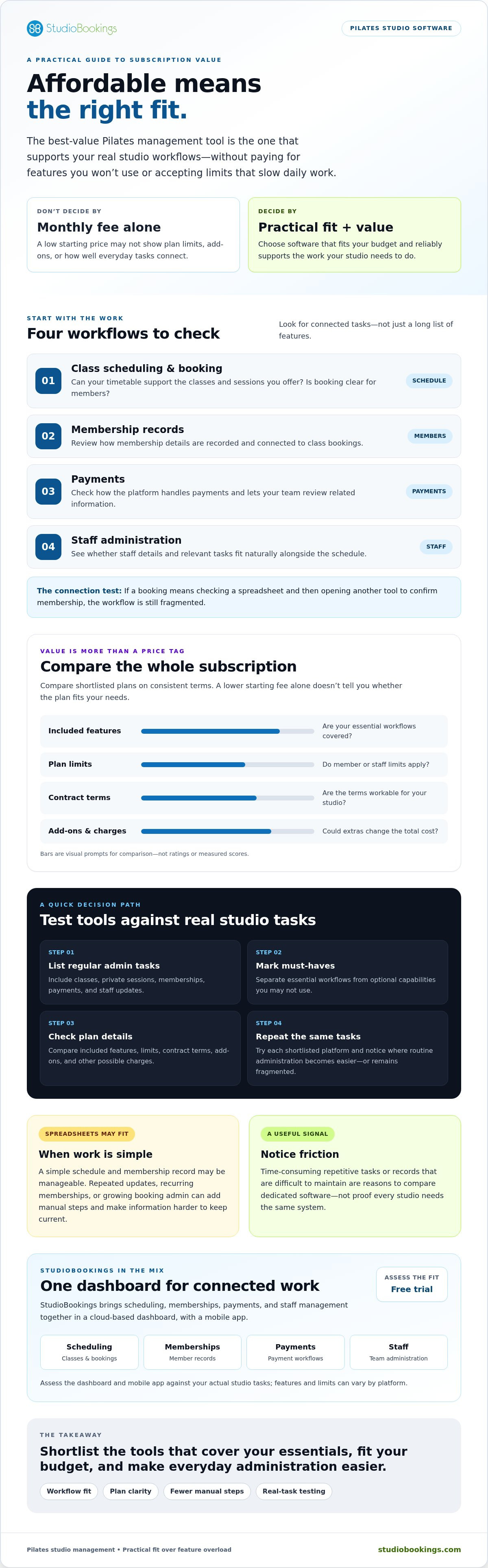
Start with the admin that’s slowing your studio down. A useful evaluation compares real tasks, not polished feature lists. Write down where time goes, such as updating class schedules, answering booking questions, tracking memberships, managing payment information, or coordinating staff. Use that list to assess affordable pilates management tools against your priorities.
Choose the same representative workflows for each shortlisted platform. This makes it easier to spot where a tool saves steps and where it adds friction. Use test data, and check the provider’s current trial terms and eligibility before getting started. Don’t assume trial access, length, or included features are the same across platforms.
Add the class types and times that reflect your studio, then follow the booking process from a member’s perspective.
Use test records to see how you would add or update a membership and connect it to a booking.
Review the steps involved in managing a payment, along with any relevant fees disclosed by the provider.
Ask the people who handle daily operations to complete relevant tasks and note confusing screens, duplicate entry, or extra steps.
Usability matters for everyone. Owners need a clear view of studio operations, staff need workflows they can follow consistently, and members should be able to understand how to book. A feature that exists but is difficult for your team or members to use may not deliver much practical value.
Keep the shortlist focused on realistic options for your studio now, as well as near-term needs you can identify. Include the owner and staff who will use the system regularly, and score each platform against the same criteria:
• Does it support your must-have booking, membership, payment, and staff workflows?
• Can owners, staff, and members use it comfortably?
• Are current tier limits, included features, fees, and contract details clear in writing?
• Does the full subscription fit your budget and expected operating needs?
Ask providers to confirm unclear details in writing before you decide. Check current member limits, add-on charges, contract requirements, and trial conditions instead of relying on assumptions or outdated plan summaries. StudioBookings offers a free trial, but verify its current terms before testing it against your studio’s workflows.
Use your checklist to evaluate StudioBookings for your Pilates studio alongside other options.
StudioBookings may suit owners who want to coordinate core studio operations through one cloud-based platform. Its dashboard brings class scheduling, memberships, payments, and staff management together. A mobile app is available for studio owners and members, so both can access the platform beyond the main dashboard.
This combination may be relevant if your current process involves switching between tools to manage bookings, membership records, payment tasks, and staff information. The platform still needs to match the way your studio operates. Compare your must-have workflows with current plan details, and confirm any limits or conditions before deciding. Affordable pilates management tools should make practical sense for your studio, not just look attractive on a feature list.
Consider it if you’re looking for a central place to manage scheduling, memberships, payments, and staff tasks. The cloud-based setup may suit a studio that wants to access operations through an online dashboard. You can also assess the mobile app from both the owner and member perspective. Start with your real requirements: the sessions you schedule, how you administer memberships, and the tasks staff handle regularly.
Then compare those needs with the features and terms currently available. Check subscription details, member limits, included capabilities, and any other charges that could affect your decision. StudioBookings offers no-contract pricing, but review the current terms rather than assuming a particular plan or feature is included.
Test it against the same tasks you used to evaluate other options. Set up a representative schedule, try the booking experience, and work through membership, payment, and staff processes using appropriate test data. Notice whether the dashboard makes routine work clearer and whether the mobile app works for the owner and member tasks you care about.
StudioBookings offers a free trial, but confirm its current terms and eligibility before you begin. A hands-on evaluation can help you decide whether its workflows fit your studio better than your current setup. You can explore StudioBookings and try the platform.
The best affordable pilates management tools fit your actual workflows, not just your budget. Compare plan limits, included features, contract terms, and additional charges before deciding. Then test the tasks your team handles regularly, from scheduling classes to managing memberships and payments. A tool earns its place when it makes those jobs easier without adding unnecessary complexity.
StudioBookings brings scheduling, memberships, payments, and staff management together in a cloud-based dashboard. Its mobile app serves studio owners and members, while a free trial gives you a chance to assess real workflows. No-contract pricing offers flexibility, but review current plan details, limits, and trial terms so you know what to expect.
Ready to see whether it fits your studio? Explore StudioBookings and try the platform, then compare it against the needs you’ve identified.
Affordable pilates management tools are software that helps a studio coordinate tasks such as class scheduling, memberships, payments, and staff administration at a cost that fits its needs. Affordability isn’t just the starting fee. Compare included features, member or staff limits, contract terms, and possible extra charges. A practical choice covers the workflows you rely on without making you pay for capabilities your studio won’t use.
Pricing varies by provider, subscription tier, active-member limits, and included features. Some platforms base plans on the number of active members or the capabilities you need, so check current details directly rather than relying on a generic estimate. Ask whether additional users, payment processing, or expanded features affect the total. Confirm fees and contract terms before choosing, and compare the full plan value instead of judging by its headline price.
Start with the tasks your studio handles each week. Common priorities include class scheduling and member bookings, membership administration, payment processing, and staff management. Consider whether owners and staff can use the dashboard easily, and whether members have convenient mobile access. Then check that the capabilities you need are included in the specific tier you’re comparing. A focused list of must-haves helps you avoid paying for features that don’t support your day-to-day work.
It can be enough for a studio with simple needs, but check what the free option includes before relying on it. Look for limits on members, classes, or access to essential workflows, and find out what happens if your studio’s needs change. Compare the plan with the time and effort involved in managing separate tools. Test a real booking and admin process so you can judge whether the free option works in practice.
Some studio management platforms connect membership administration and payment processing with class scheduling. The exact capabilities and terms vary by provider, so confirm what’s included and whether payment-related charges apply. During an evaluation, use appropriate test data to walk through a representative membership update and payment task. Don’t assume every plan supports the same membership rules or payment methods. Verify the details for the specific platform and tier you’re considering.
List your essential workflows, current admin frustrations, and budget boundaries first. Compare each option against the same criteria, including scheduling, memberships, payments, staff tasks, usability, plan limits, and contract terms. If a trial is available, test the same realistic scenarios and involve the people who’ll use the system regularly. Before deciding, confirm current pricing and feature details directly with the provider. That gives you a clearer basis for comparing fit and value.
Yes, StudioBookings offers a free trial for its studio management software. Use it to assess whether the platform’s scheduling, membership, payment, and staff-management workflows suit your Pilates studio. Make a short list of everyday tasks to test, rather than simply browsing the dashboard. Confirm the current trial terms, available features, and any eligibility conditions with StudioBookings before signing up, since trial access and terms can change.