A missed class may be the first sign that a member is drifting away, not just a scheduling hiccup. Members often stop attending before they cancel, and those early changes are easy to miss when your team is managing bookings and memberships. Automated member retention tools can help surface changes...

A missed class may be the first sign that a member is drifting away, not just a scheduling hiccup. Members often stop attending before they cancel, and those early changes are easy to miss when your team is managing bookings and memberships. Automated member retention tools can help surface changes in activity and prompt timely follow-up. The key is to make each follow-up relevant, so it feels like support rather than noise.
Personal check-ins matter, but making them consistent can add to a busy team’s admin. Automation can help staff notice patterns and organize follow-up. People still bring the care and context that build lasting relationships.
This guide covers practical workflows for spotting changes in member activity, following up thoughtfully, and choosing tools that fit how your studio manages memberships and bookings. You’ll also see how connected studio operations can give your team a clearer view of member activity, helping make outreach more relevant. The goal isn’t to automate the relationship. It’s to make it easier to show up for members when it counts.
• Distinguish retention from acquisition, attendance, engagement, and cancellation so you can focus on the right outcomes.
• Use automated member retention tools to organize follow-up around observable changes in member activity, not assumptions about why someone disengaged.
• Compare studio platforms, email tools, spreadsheets, and manual processes by how clearly they show member records, booking context, membership details, team access, and reporting.
• Start with one member moment, define a useful signal and response, assign ownership, then review the workflow before expanding it.
• Use connected scheduling, memberships, payments, and staff information to give your team shared context for more consistent member communication.
A member who stops booking may be busy, injured, travelling, or losing interest. Booking records can show a change in activity, but they can’t explain the reason. For a class-based studio, attendance is useful context, not a complete picture of how someone feels about their membership.
Retention automation uses software and repeatable workflows to organize member signals and support timely, consistent follow-up. It can help your team notice when a new member hasn’t booked again or when a regular’s class pattern changes. It cannot create a welcoming experience, make classes a good fit, or replace a thoughtful conversation. Those depend on what your studio offers and the care your team brings.
This approach connects to Customer Relationship Management (CRM), the broader practice of organizing interactions with customers. In a studio, the practical question is how to use operational context, such as bookings and membership status, to choose a relevant next step for each person.
These terms describe different parts of the member relationship:
is bringing a new person into the studio as a member.
is whether, and how often, a member comes to classes. It can signal engagement, but it doesn’t prove satisfaction or predict renewal on its own.
describes a member’s participation and connection with the studio, including activities such as booking and attending.
means members continue their relationship with your studio over time.
is membership loss, such as when someone cancels or their membership ends. A short attendance dip isn’t churn. It’s a possible reason to pay attention.
Keeping these measures separate helps staff avoid treating one missed class as a decision to leave. Compare activity with the member’s usual pattern, then use a human check-in to understand what’s happening.
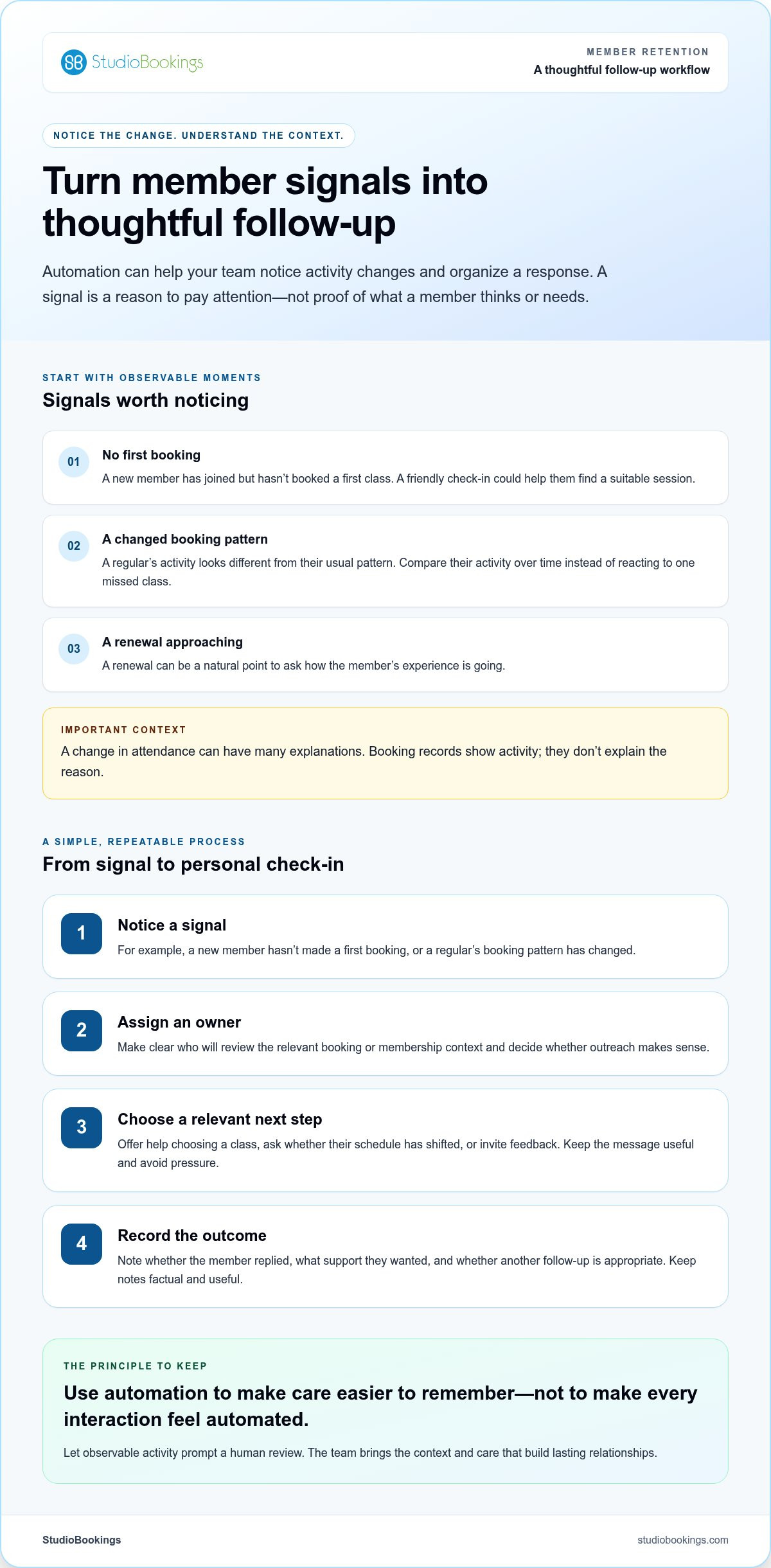
Some moments are easy to overlook in a busy schedule. A new member may need help finding a suitable class after their first visit. A regular may suddenly book less often. An approaching renewal can also be a natural point to ask how the experience is going.
A simple workflow can prompt a staff member to review the relevant booking or membership context and decide whether to reach out. Make the next step useful, not pressuring: offer help finding a class, ask whether their schedule has changed, or invite feedback. Don’t assume why attendance has dropped, and don’t send a generic nudge just because a signal appeared. Automation should make a considerate response easier to remember, not make every interaction feel automated.
A useful retention process follows the member journey, not just the cancellation date. At each stage, your team can notice relevant activity and decide whether a personal check-in would help. Treat operational signals as prompts for attention, not proof of what a member thinks or needs.
Start with moments your team can observe: a new member’s first booking, a second visit, a developing attendance routine, a renewal date, or a change in booking activity. These points create a practical timeline for follow-up. For instance, if someone joins but doesn’t book a first class, a friendly message could help them find a suitable session.
Context matters. Missed visits may reflect a changing schedule, travel, health, or other circumstances. A slowdown can be worth noticing, but it doesn’t tell you why it happened. Compare activity with the member’s own pattern over time rather than reacting to one missed class. A signal identifies an opportunity to ask, not a reason to assume.
This distinction keeps communication respectful. A member who usually attends a particular class might simply be away for a week. A sustained change across several bookings may be a better reason for a staff member to check in, especially if a renewal is approaching too.
Give each workflow a clear purpose, a responsible person, and a natural studio voice. A welcome check-in can ask whether a new member found a class that suits them. Re-engagement outreach can acknowledge a change in booking activity without implying blame. A renewal reminder can make the next step clear, while a feedback request can invite an honest response.
Keep the process simple and consistent:
For example, a new member has joined but hasn’t made a first booking, or a regular’s booking pattern has changed.
Make clear who will review the context and decide whether outreach makes sense.
Offer help choosing a class, ask whether their schedule has shifted, or invite feedback. Avoid messages that create pressure.
Note whether the member replied, what support they wanted, and whether another follow-up is appropriate.
That final step helps the next team member continue the conversation without asking the member to start over. Keep notes factual and useful. “Asked for evening class options” gives staff a practical next step; “not committed” assumes a motive the member may not have expressed.
Membership workflows are easier to coordinate when booking and member information sit in a clear operational context. For yoga studios, this yoga studio software guide offers related insight into managing studio operations. StudioBookings brings scheduling, memberships, payments, and staff management into one dashboard. See studio management software for fitness studios for an overview of the platform.
A long feature list won’t tell you whether a tool fits your studio. Start with the work your team needs to do: notice a useful change, understand the member’s booking and membership context, and follow up without losing track of who owns the next step. A feature matters when it supports that workflow and staff can maintain it during a busy week.
Compare the main options against your actual routine. Studio management platforms can bring operational information together. Email tools can support planned communication. Spreadsheets can track a small, defined process. Manual follow-up can work when the team has clear ownership and enough time. Each approach has trade-offs. The right choice depends on how much context staff need and how reliably they can keep records current.
Use the same practical criteria for every option. Can staff find the member record, relevant booking activity, and membership information without searching across disconnected systems? Can the team see who owns follow-up and what has already happened? Is reporting easy to interpret? Does using the tool fit naturally into daily studio routines?
| What to assess | Why it matters |
|---|---|
| Member records | Staff need a reliable place to find relevant member details and keep useful notes. |
| Booking context | Class bookings help teams understand activity patterns before deciding whether outreach makes sense. |
| Membership visibility | Clear membership information can help staff plan appropriate renewal or support conversations. |
| Team access | Shared access and visible responsibility can reduce duplicate outreach and missed handoffs. |
| Reporting | Reporting should help you review trends and improve your workflow, not just produce more numbers. |
Score each option against a real task. For example, can a staff member review a change in class bookings, see the relevant membership context, and identify who should follow up? If that requires copying information into several places, include the extra work in your comparison. Personalization doesn’t come from a feature toggle. It depends on thoughtful setup, useful context, and human review before a message goes out.
Separate systems can offer flexibility, but they may require staff to move between tools, duplicate records, or manually pass follow-up tasks along. A connected platform can provide a shared view of scheduling, memberships, payments, and staff management in one dashboard, helping teams work from common operational context. Clear processes and staff judgment are still essential to make outreach personal. For wider criteria on evaluating studio systems, explore this boutique studio management guide.
Before choosing among automated member retention tools, map one workflow from signal to follow-up and note every handoff. StudioBookings brings scheduling, memberships, payments, and staff management into one dashboard, giving studio teams a connected operational foundation. Read more about StudioBookings for your studio.
A workflow only helps if your team can run it consistently. Start small: choose one member moment, agree on what should happen next, and make the process easy to review. You don’t need to automate every interaction. One well-managed check-in can teach you more about what your members need than a complicated process nobody has time to maintain.
Choose a clear moment, such as a new member’s first booking or an upcoming renewal. Review your existing records to understand what typically happens at that stage. Use your own history as a baseline rather than adopting an outside target that may not suit your studio. Then agree on who reviews the signal and what a helpful response should look like.
Use this rollout sequence to turn the idea into a working routine:
Pick a specific point in the journey, such as a first booking or an approaching renewal.
State what staff can observe in your records. For example, a new member has joined but hasn’t booked a class.
Decide whether to send a relevant message, make a personal check-in, or take no action if the context doesn’t call for outreach.
Name the role responsible for reviewing the signal and following through, so the task doesn’t fall between shifts.
Look at replies, staff observations, and outcomes. Keep what feels useful, and revise anything that creates unnecessary work or comes across as generic.
Keep the first version manageable. A simple workflow with a clear owner is easier to improve than several automations launched at once. Choose a review rhythm the team can sustain, then use it to spot missed handoffs, repeated questions, or messages that need a more natural tone.
Before outreach, respect each member’s contact preferences and follow applicable privacy requirements. Requirements can vary by location, so verify the rules that apply to your studio. Keep messages warm and direct, and review them before use. A useful check-in should make it easy for someone to reply, ask for help, or decline further contact.
Record the response in a way the team can use. If a member says their schedule has changed, staff can take that context into account next time. If they don’t reply, avoid treating silence as proof of dissatisfaction. A thoughtful process leaves room for judgment and gives staff the final say on whether a message makes sense. Studios refining membership routines can also explore this dance studio membership management guide.
Connected operational information can make follow-up easier to coordinate. StudioBookings brings scheduling, memberships, payments, and staff management into one dashboard, giving your team a shared view of studio operations while leaving room for staff judgment. Learn more about StudioBookings for your studio as you build a retention workflow your team can maintain.
Member follow-up is easier to coordinate when staff can see the operational context behind it. A booking change, membership detail, and payment record may each tell part of the story. If they sit in separate places, your team has to piece those details together before deciding what action makes sense. Connected studio software brings key information into a shared working view, helping staff make informed decisions without treating a single data point as the whole picture.
StudioBookings is cloud-based studio management software that brings scheduling, memberships, payments, and staff management into one dashboard. This gives studio teams a shared foundation for reviewing day-to-day operations and coordinating member care. The StudioBookings Mobile App serves studio owners and members, extending access beyond the main dashboard.
That operational connection can support a staff-led retention process. For example, a team member reviewing a booking change can also refer to relevant membership information, then decide whether a personal check-in is appropriate. The software helps keep operations organized; it doesn’t determine why a member’s activity changed or replace a staff member’s judgment.
This distinction matters when evaluating automated member retention tools. A useful system can give your team clearer context and reduce the effort of moving between operational records. Relationship-building still comes from knowing your members, listening to their needs, and offering support that fits their circumstances. The tool supports consistency; your people provide the care.
Start with one recurring follow-up task that feels harder to coordinate than it should. Perhaps staff need a clearer way to review membership details before a renewal conversation, or to find booking context before checking in with a member. Identify what information the team needs, who should take the next step, and where the process currently gets stuck. That gives you a practical way to assess whether a connected platform fits your daily routine.
As you explore, look for an operational setup your staff can use consistently, rather than expecting software to solve retention by itself. StudioBookings offers a free trial and no-contract pricing, so you can explore the platform and consider how its dashboard and mobile app fit your studio’s work.
Start your StudioBookings free trial to explore a connected foundation for studio operations and more consistent, staff-led member follow-up.
Choose one recurring member interaction you’d like your team to handle more consistently. It might be a welcome check-in, a renewal conversation, or a thoughtful response when booking habits change. Make the next step clear, give someone ownership, and leave room for staff to use their judgment. A steady, considerate process is more useful than a complex system your team struggles to maintain.
Automated member retention tools can help organize that work, but the relationship still grows through the experience your studio creates and the care your team shows. Use technology to make the practical details easier to manage, then keep listening and adapting as members’ needs change.
StudioBookings was founded by studio owners in 2012 and serves studios in more than 40 countries. Its connected studio management software comes with a free trial and no-contract pricing. Start your StudioBookings free trial and take a practical first step toward more consistent member communication.
Automated member retention tools are software features and repeatable workflows that help a studio organize member information, notice relevant changes, and coordinate follow-up. For example, staff might use booking and membership records to prepare for a check-in with someone whose class routine has shifted. These tools can make a process easier to manage, but they can’t create member satisfaction on their own or replace the personal relationships that help people feel welcome.
They can help staff respond more consistently to changes in member activity, but they can’t guarantee fewer cancellations. People join for different reasons, and their experience depends on factors such as class quality, schedule fit, and the support they receive. To understand whether a workflow is useful, review member replies and relevant outcomes over time. If cancellations continue, look beyond the messages and consider what members say about their overall studio experience.
Choose a timeframe, then compare a clearly defined starting group of members with those who remain active in the relationship at the end. Decide in advance how you’ll treat pauses, new joins, membership changes, and people whose membership ends during the period. Apply those rules consistently each time you measure. If you share a retention rate, state the timeframe and calculation so your team can interpret the result and compare like with like.
Reach out when a change stands out against the member’s usual pattern or a relevant point in their membership journey, rather than reacting to one missed class. For example, if a member who normally books weekly has stopped booking, a brief, open-ended check-in may be appropriate. Make it easy for them to explain, ask for support, or decline further contact. Record any preferences they share so future communication respects them.
Write each message for a specific situation, use the language your studio naturally speaks, and offer a useful next step. A note asking whether someone needs help finding a class feels more considerate than a blanket promotion. Avoid suggesting you know why they haven’t attended. For sensitive conversations, let a staff member review or adapt the wording before it’s sent, and use feedback to make future messages more relevant.
Look for a system your team can use as part of its normal work, not one that depends on constant manual updates. Consider how easily staff can find the information they need, see who owns a follow-up, and understand what happened after a member was contacted. Test a realistic task, such as preparing for a renewal conversation. Clear reporting and a manageable daily workflow matter as much as the feature list.
A separate email platform can support planned communication, but it may not contain the context staff need to make each message relevant. For example, someone preparing an email might also need to understand a member’s booking pattern or membership status. Decide what the email tool is responsible for and how staff will keep related records accurate. If handoffs or duplicate entry become hard to manage, reassess the workflow, not just the email features.
No. Automation can help staff organize routine tasks, but a personal conversation is still important when a member’s situation needs empathy or a flexible response. Use a reminder as a prompt to review what’s known, not as an instruction to send the same message every time. A staff member can choose whether to reach out, adjust the tone, and respond thoughtfully if the member shares something that needs individual attention.