More software isn’t always better. If you’re searching for “Better than Mindbody,” the right choice depends on how well a platform fits your studio’s size, daily workflows, and budget, not how many features it lists.It makes sense to compare options carefully before switching. Check whether scheduli...

More software isn’t always better. If you’re searching for “Better than Mindbody,” the right choice depends on how well a platform fits your studio’s size, daily workflows, and budget, not how many features it lists.
It makes sense to compare options carefully before switching. Check whether scheduling, memberships, payments, and staff management work smoothly together, and calculate the full cost, including fees and add-ons. You’ll also need a transition plan that keeps bookings, payments, and member communication on track.
This guide shows you how to compare studio management platforms by their fit with real workflows. You’ll learn what to assess across essential tasks and pricing, how to weigh options for different studio models, and what to prepare before moving your data. StudioBookings brings scheduling, memberships, payments, and staff management into one cloud-based dashboard. Its tiered, no-contract pricing and free trial let you evaluate the workflows hands-on. The goal is to help you choose with confidence and make a change more manageable.
• Identify whether your frustration comes from one workflow or from the platform’s overall fit before deciding to switch.
• Compare booking, scheduling, memberships, payments, staff tools, mobile access, and pricing against your studio’s actual needs.
• The best alternative to Mindbody is the one that helps your team complete core tasks reliably, not simply the one with the longest feature list.
• Prepare for a smoother transition by organizing records, testing essential tasks, and mapping classes, payment cycles, and staff responsibilities before choosing a move date.
• Use StudioBookings’ cloud-based dashboard and free trial to evaluate how well the platform suits your studio’s daily workflows.
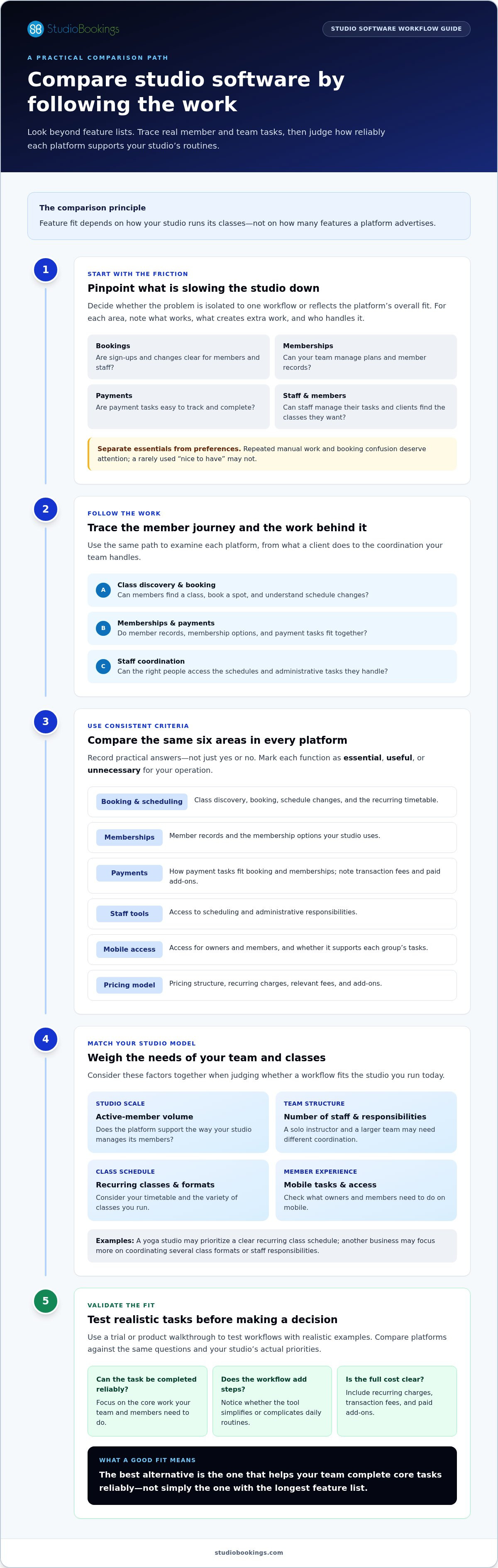
Changing established studio software is a significant operational decision. Your booking calendar, member records, payments, and team routines may all depend on it. Before searching for something better than Mindbody, pinpoint what’s causing friction. Is one workflow awkward, or does the platform as a whole no longer suit the way your studio operates?
Start with a quick self-audit. For each area, note what works, what slows people down, and who handles the task:
Are class sign-ups and changes clear for members and staff?
Can your team manage plans and member records without extra work?
Are payment tasks easy to track and complete?
Can the right people manage schedules and routine admin?
Can clients easily find and book the classes they want?
Software fit is how reliably a platform supports your studio’s recurring tasks, for both your team and your members. This keeps your decision grounded in everyday use rather than an impressive-looking feature list. Many platforms use the Software as a Service (SaaS) model, delivering software through the cloud. When comparing them, focus on how well each supports your actual routines.
Look for repeated manual work, booking confusion, and records your team has to reconcile across separate places. Then separate essential gaps from preferences. A recurring problem that delays class administration deserves attention; a feature that would be nice to have but rarely used may not. Record who handles each task and how often it comes up. This makes the operational cost of friction easier to see.
A growing schedule, new class formats, or changes to team responsibilities can expose limits in an existing setup. Before comparing replacements, write down specific examples: what happened, who was involved, and what extra step was needed. This gives you a baseline for judging whether another platform would improve the workflow. For broader operational context, explore this boutique studio management guide.
If the issue is isolated, a process adjustment may be enough. If several core tasks repeatedly create friction, evaluate the platform as a whole. Start with the studio you run today, then consider what your operations need to support next.
A useful comparison follows a member’s journey and your team’s work behind the scenes. Start with class discovery and booking, then trace what happens with memberships, payments, and staff coordination. A tool can check every box on paper and still add steps to the daily routine.
Feature fit depends on how your studio runs its classes, not on how many features a platform advertises. Mark each function as essential, useful, or unnecessary for your operation. This keeps optional extras from distracting you from the work your team needs to do reliably.
Use the same questions for each platform, and record practical answers rather than a simple yes or no. A trial or product walkthrough can help you test workflows using realistic examples.
| Area | What to compare |
|---|---|
| Booking and scheduling | Can members find the right class, book a spot, and understand schedule changes? Can staff manage the recurring timetable? |
| Memberships | Can your team manage member records and the membership options your studio uses? |
| Payments | How do payment tasks fit into booking and membership workflows? Note any transaction fees or paid add-ons in the total cost. |
| Staff tools | Can staff access the scheduling and administrative tasks they’re responsible for? |
| Mobile access | Is mobile access available for both owners and members, and does it support the tasks each group needs? |
| Pricing model | Record whether pricing is tiered, based on member volume or features, or structured another way. Include recurring charges and relevant fees. |
Keep the comparison grounded in your priorities. For a yoga studio, a clear recurring class schedule may be essential. Another business may place more weight on coordinating several class formats or staff responsibilities. The Mindbody alternative guide for yoga studios offers a more focused look at that discipline.
Consider your active-member volume, number of staff, and variety of recurring classes together. A solo instructor may need a straightforward way to manage bookings and memberships, while a larger team may need clearer coordination around schedules and responsibilities. Pilates, barre, dance, and cycling studios can have distinct scheduling needs too. See the Pilates software management guide for discipline-specific considerations.
Include data protection in your review of mobile access and member records. The FTC’s cybersecurity best practices can help frame questions about protecting client information. To evaluate a platform against your workflow checklist, explore StudioBookings studio management software.
There’s no universal winner for every studio. A platform with a long feature list may still add steps to your team’s day, while a simpler system could handle essential work more cleanly. To decide what’s better than Mindbody for your studio, compare outcomes: can members book without confusion, can staff complete routine tasks, and can you find the information you need to run the business?
Use the same realistic scenario for every product demonstration or trial. Follow a member from finding a class through booking and managing membership activity. Then switch perspectives: have a staff member update the schedule, locate the relevant member record, and complete the routine administration that follows. Note where the workflow is clear, where it requires extra steps, and where important information is hard to find.
Assess the member experience from the client’s point of view. Is the class schedule easy to understand? Can a member complete the booking journey and find the information they need afterward? For staff, check whether schedule management and member administration follow a clear path or rely on workarounds and repeated manual checks.
Keep a simple scorecard for each platform: task completed, steps or handoffs involved, and any confusion encountered. Include reporting in your test. Decide which routine questions you need reports to answer, then see whether the available information helps you act without a separate tracking process. The goal isn’t to eliminate every difference, but to understand which trade-offs your team can accept.
Compare the subscription structure with the capabilities included in the plan you’d actually use. Record separately charged options, payment-related fees, contract terms, and how pricing relates to your active-member needs. A low starting price may not reflect the full cost if key workflows require add-ons. A broader plan may include functions your studio rarely uses. Compare like with like.
Separate current product details from opinions and claims that can change. A review may describe someone’s experience, but it doesn’t establish how a workflow works today. Note the source and date of pricing or feature information, and verify time-sensitive details in current product materials before relying on them. For Pilates-specific considerations, see the Mindbody alternatives for Pilates guide.
Once you’ve compared the member journey, staff workload, reporting, and overall operating trade-offs, you can judge fit based on your priorities rather than feature count alone.
A platform change affects more than software. Your class calendar, member records, payment routines, and staff responsibilities all need a clear handoff. Before setting a transition date, map upcoming classes, membership activity, payment cycles, and who owns each task. This helps you spot conflicts before they affect the member experience.
Use this readiness sequence to organize the work and assign responsibility for decisions:
Write down how your studio handles class schedules, member bookings, memberships, payments, staff tasks, and member communication.
Identify the records your team needs to maintain, where they currently live, and who is responsible for each set. Don’t assume data will transfer automatically.
In the new platform, walk through representative scheduling, booking, membership, payment, and staff workflows before relying on the setup.
Review upcoming classes, membership changes, payment cycles, and staff availability. Choose a transition window that gives your team time to prepare and check its work.
Plan how and when you’ll tell members and staff about booking changes, account access, and relevant dates. Assign responsibilities so questions don’t fall between people.
This checklist can’t guarantee a disruption-free change. It gives you a practical way to reduce avoidable surprises and identify what needs attention before the new system becomes central to daily operations.
Use the trial to run the same common scenarios you rely on today. Create or review a class schedule, follow a member booking journey, examine how membership activity is handled, and walk through payment tasks. Include staff workflows too. Record confusing steps, missing information, and anything that feels more involved than its equivalent in your current system.
Set decision criteria before the evaluation ends. Decide which core tasks must be straightforward, which issues your team can work around, and what records or responsibilities need a plan before you choose a transition date. This makes the decision more than a reaction to a promising demo.
If StudioBookings is on your shortlist, use its free trial to evaluate the workflows that matter to your studio. Try StudioBookings free and see how its scheduling, memberships, payments, and staff management fit into your readiness plan.
If you run a yoga, Pilates, barre, dance, fitness, or cycling studio, the right platform should support the way your business operates every day. StudioBookings is cloud-based management software that brings class scheduling, memberships, payments, and staff management together in one dashboard. This can help organize your team’s core administrative work in one place instead of across separate workflows.
Whether StudioBookings is better than Mindbody for your studio comes down to fit, not a universal ranking. Compare the tasks your team handles regularly, the experience members have when they book, and how the platform’s pricing structure matches your needs. StudioBookings offers a mobile app for owners and members, a free trial, and tiered, no-contract subscriptions based on active members or required features.
StudioBookings provides software for yoga, Pilates, barre, dance, fitness, cycling, and other boutique studio operations. It’s worth evaluating if you want class scheduling, memberships, payments, and staff tools managed from one dashboard, with mobile access for owners and members.
The right match depends on your priorities. A studio focused on a recurring weekly timetable may want to assess schedule management closely. A team with several staff members may pay particular attention to how responsibilities and member administration fit together. Start with your essential tasks, then see how each one works in practice.
Rank your must-have workflows before comparing platforms, and use the same criteria throughout your evaluation. For example, assess how well each option supports:
• Managing class schedules and member bookings.
• Handling memberships and payment tasks.
• Coordinating staff responsibilities.
• Supporting members and owners through mobile access.
Use the StudioBookings free trial to explore the workflows that matter to your studio. Try representative tasks, note any confusing steps, and consider the experience for both staff and members. Then weigh it against your current platform and pricing priorities. Choose the system that supports everyday operations most reliably, not simply the one with the longest feature list.
Ready to assess the fit for yourself? Start your free StudioBookings trial and put your studio’s key workflows to the test.
The right alternative isn’t the one with the longest feature list. It’s the platform that supports your essential workflows, gives members a clear booking experience, and helps staff manage daily tasks reliably. Compare the full operation, including the pricing structure and practical steps involved in changing systems, before deciding what could be better than Mindbody for your studio.
StudioBookings brings scheduling, memberships, payments, and staff management together in a cloud-based dashboard. Founded in 2012 by studio owners, it serves studios in over 40 countries. Its free trial gives you a chance to test relevant workflows, while tiered, no-contract subscription pricing lets you assess the structure against your studio’s needs.
Start with your priorities. Try representative tasks, note how the experience works for staff and members, and decide based on everyday fit. Start your free StudioBookings trial to explore whether it suits your studio. A clear, practical evaluation can make your next software decision more manageable.
The best alternative is the one that fits your studio’s workflows, team, and budget. What’s better than Mindbody for one business may not suit another. Compare how each platform handles class discovery and booking, scheduling, memberships, payments, staff tasks, mobile access, and reporting. Test the same everyday scenarios in each option, then weigh the results against your must-haves rather than choosing by feature count alone.
Some platforms offer free plans, while others provide a free trial rather than ongoing free access. Recess is described as a free all-in-one platform for fitness and wellness businesses. Its audience and capabilities may differ from your studio’s needs, so assess whether it covers your essential workflows. StudioBookings offers a free trial to evaluate its software, not a stated permanent free plan.
Costs vary by platform, plan, location, member volume, and paid extras. Mindbody’s US Starter plan begins at $79 per month per location, while higher tiers may require a quote. Compare the subscription with payment processing fees, add-ons, contract terms, and other charges relevant to your use. StudioBookings uses tiered subscription pricing based on active members or required features, with no long-term contracts. Its free trial lets you assess workflow fit.
A switch can preserve important records, but don’t assume a transition will be lossless. First identify which member, membership, schedule, booking, and payment records you need. Determine what can be exported and how the new system handles each record type. Keep a secure copy of essential information, then validate record accuracy and upcoming bookings before relying on the replacement platform for daily operations.
Compare the full workflow: class schedules and bookings, membership management, payment handling, staff tools, mobile access for owners and members, and pricing structure. Separate must-haves from optional capabilities. Then test realistic tasks, such as a member booking a class and a staff member updating the schedule. Note how clearly each step works, what extra work it creates, and whether the plan includes tools your team will actually use.
Start by listing your schedules, membership types, payment routines, staff responsibilities, member records, and communication needs. Organize the information your team must maintain and assign an owner to each task. Test representative booking, membership, payment, and staff workflows in the new platform. Before setting a change date, map upcoming classes and payment cycles, plan how you’ll communicate booking or account changes, and verify records before depending on the new setup.
Yes. StudioBookings provides cloud-based management software for yoga, Pilates, barre, fitness, dance, and cycling studios. Its dashboard brings class scheduling, memberships, payments, and staff management together, with a mobile app for owners and members. A free trial lets you explore relevant workflows, while tiered, no-contract subscriptions are based on active members or required features. Test the tasks your studio handles regularly to judge whether it’s a practical fit.