What if your studio’s biggest operational problem isn’t missing information, but having to check several places to find it? A studio owner management dashboard should make the day’s essentials easier to see: upcoming classes, member activity, payments, and staff details. When those details are scatt...

What if your studio’s biggest operational problem isn’t missing information, but having to check several places to find it? A studio owner management dashboard should make the day’s essentials easier to see: upcoming classes, member activity, payments, and staff details. When those details are scattered, changes in attendance or revenue can be easy to miss.
A polished screen isn’t enough. If keeping it current means repetitive data entry or jumping between tools, the dashboard adds work instead of removing it. The right setup brings everyday studio tasks together and makes key information easier to act on.
In this guide, you’ll learn which dashboard features matter in 2026, how to assess attendance and revenue reporting, and what to check before choosing software for your studio’s size, services, and team. We’ll look at how classes, members, payments, and staff can fit into a clearer daily workflow, so you can compare options based on the work they actually help you do.
• Use a studio owner management dashboard to bring essential class, member, payment, and staff information into a clearer daily view.
• Follow how a class booking connects to attendance and follow-up to see whether the software supports your real workflow.
• Look beyond a polished interface: assess how easily your team can complete routine tasks, find useful information, and manage access.
• Start setup by listing recurring tasks, then test the views you need most before adding more options.
• Compare the effort of keeping separate tools with the benefits of a connected platform, keeping your studio’s size and future needs in mind.
You check the class calendar, open a separate payment record, then search staff messages for a schedule change. By the time you have the full picture, the day is already moving. A studio owner management dashboard should bring core operational information and useful actions into one central view, so you can see what needs attention without piecing together updates from separate tools.
A business dashboard presents information that helps people monitor activity and make decisions. For a studio, that means more than displaying numbers. The view should make priorities clear: what’s coming up, where attention may be needed, and which tasks your team can handle next. The useful information depends on your services, team structure, and daily workflow. More data isn’t automatically more useful.
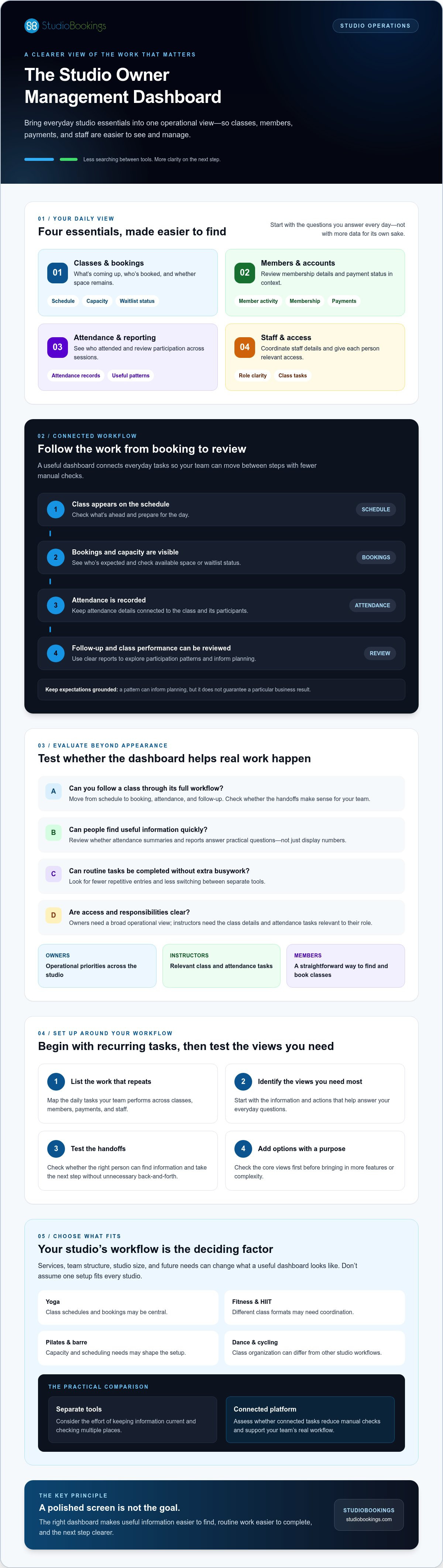
Start with the questions you answer every day. What classes are coming up? How many people are booked, how many attended, and is there capacity for another booking? Can you review a member’s membership and payment status without searching separate records?
Staff coordination matters, too. Owners need a broad operational view, while instructors may need access to class details and attendance tasks relevant to their role. Look for clear access controls so staff can complete routine work without seeing or changing information they don’t need. The aim is a smoother handoff, not another place to check.
Owners can use a shared view to spot operational priorities across classes, members, payments, and staff. Instructors benefit from timely class information and attendance details. Members need a straightforward way to find and book classes. Each group uses the system differently, so assess whether it supports their tasks without making the experience feel complicated.
Workflows vary by studio. A yoga studio may focus on class schedules and bookings; a fitness or HIIT studio may need to coordinate different class formats. Pilates and barre studios may have their own capacity and scheduling needs, while dance studios may organize classes differently from cycling studios. Don’t assume one setup fits all. Map the tasks your team performs, then check whether the dashboard supports those routines.
StudioBookings is one option for studios looking to bring scheduling, memberships, payments, and staff management together. Use your daily workflow as the test: can the right person find the information they need and take the next step without unnecessary back-and-forth?
A useful dashboard connects tasks that are often handled separately. A booking begins with a class appearing on the schedule. The team needs to see who has booked, prepare for attendance, and record who attended. That information can then support follow-up and help you review how the class is performing over time.
A studio management dashboard brings class schedules, bookings, attendance, member accounts, payments, and staff tasks into a shared operational view. The benefit isn’t simply having all those details on screen. It’s being able to follow the work from one step to the next with fewer manual checks.
Start with the schedule. A clear class and booking view helps you prepare for the day, see who’s expected, and check available capacity. If your studio uses waitlists, confirm whether the system shows their status and how it handles members when space opens. Don’t assume every dashboard includes the same booking tools.
After class, attendance information can help you compare participation across sessions and decide whether a class time or format needs a closer look. Reports are most helpful when they make patterns easy to understand. Explore the data visualization techniques used in reporting, and ask whether the charts or summaries answer practical questions. A pattern can inform planning, but it doesn’t guarantee a particular business result.
When membership and payment records sit alongside booking information, it’s easier to review an account without switching between separate systems. You can check membership details and payment status in context, then identify what needs follow-up. Confirm which account actions the software supports and how changes are recorded.
Staff access is another part of the workflow to evaluate. Ask whether instructors can use individual logins and whether permissions can match their responsibilities. For example, an instructor may need to manage class attendance, while an owner reviews wider operational and financial information. The right setup supports shared work while keeping access relevant to each role.
For broader operational ideas, explore this boutique studio management guide. If you’re comparing connected workflows, you can also review StudioBookings studio management software and consider how its scheduling, membership, payment, and staff management capabilities fit your processes. Check the workflows your team would use, including any waitlist or permission requirements, before choosing a system.
A polished dashboard can still slow your team down. To judge whether a studio owner management dashboard is useful, test the work behind the screen: can the right person complete a task, find the relevant information, and understand what needs attention? Compare systems using your own studio scenarios, not just a feature list or sales demonstration.
Try routine tasks in the system. Find an upcoming class, check its bookings, record attendance, review a member account, and locate the information you use to assess operations. Notice how many steps each task takes and whether labels are clear. A useful report should answer a real operating question, such as which classes have changing attendance, rather than simply displaying numbers.
Check access controls, too. Can instructors reach the class information they need without being given unnecessary access to owner-level details? Consider how member-facing booking works as well. A dashboard may serve owners and staff, but the booking process should also make sense to members.
| Workflow | Fragmented approach | Connected dashboard to look for |
|---|---|---|
| Class preparation | Check one calendar, then find bookings elsewhere. | Review schedule and booking information in a joined workflow. |
| Attendance follow-up | Record attendance separately and compile it later. | Check whether attendance can be reviewed with relevant class information. |
| Member account review | Switch between membership and payment records. | See whether account details and payment status are easier to review together. |
| Team coordination | Pass updates through messages or verbal handoffs. | Give staff appropriate access to the tasks they handle. |
Match the software to your class formats, membership structure, and booking needs. Don’t assume that a workflow designed for one studio type will suit another. Ask an instructor and a front-desk team member to try representative tasks, then note where they hesitate or need help. For yoga-specific considerations, see this yoga studio software guide.
Keep the test grounded in a real day: a member books a class, staff check the booking, attendance is recorded, and you review the relevant information afterward. Confirm what the system supports, including reports and role permissions, rather than assuming a feature from its appearance. The best fit is the one your team can use clearly and consistently.
Start with the work, not the settings. A dashboard setup is only useful if it reflects what your team actually does, who does it, and what information they need at each step.
Map the tasks your studio owner management dashboard must support before you configure the software. This gives you a practical checklist and helps you avoid spending time on options that don’t solve a real studio need.
Write down recurring tasks and the person responsible for each. Include class scheduling, bookings, member administration, payment handling, and staff coordination. For each task, note what information is needed and where it currently comes from. This can reveal repeated entry or handoffs that are easy to overlook.
Then separate essential daily work from occasional tasks. Scheduling and checking bookings may be part of the daily routine, while a broader report might only be reviewed periodically. Set up the essential workflows first. Add less-frequent views once your team is comfortable with the basics.
Walk through a typical class day using the roles your team will have. Follow a task from start to finish, such as updating a class, checking its bookings, handling a member account, and completing the related staff task. Ask:
• Does the right person know what to do next?
• Is any information entered more than once?
• Can staff find what they need without unnecessary access?
• Can the owner locate the relevant overview or report?
Invite instructors and administrative staff to test the same scenarios. Their feedback can uncover friction that an owner may not experience personally. If a task is unclear, takes extra steps, or depends on an informal handoff, adjust the setup or confirm whether the software supports a better workflow. Review it again after the team has used it in regular operations. Focus on recurring issues rather than changing settings after every small preference.
Keep the first version simple. Set up the views and permissions needed for core tasks, then expand when a genuine need appears. When evaluating platforms for your business, focusing on your mapped operational workflows ensures your chosen setup supports daily success.
To see how a connected system may fit your mapped workflows, explore StudioBookings studio software.
The right dashboard should fit the studio you run now and remain practical as your routines change. Consider your class formats, membership setup, team size, and how members book. A small team with a straightforward schedule may need different tools from a studio coordinating several services or staff roles. Prioritize flexibility that solves a real need, not a long feature list you may never use.
There’s a trade-off between keeping separate tools and moving core operations into one platform. Separate systems may suit specific tasks, but can mean more switching and repeated updates. A connected platform can bring key workflows together, but only if it supports the way your studio works and gives each person appropriate access. Check how information moves between tasks, and ask what would happen if your schedule, services, or team changed.
Verify the platform supports your studio’s activities and routine workflows. Review staff access, member booking, reporting, and payment administration. Ask which features are included and whether any depend on add-ons or integrations. Check pricing, contract requirements, and trial terms directly with the provider, since these can affect the total commitment as much as the dashboard itself.
A product tour shows what a platform can do; a trial lets you test whether it fits your work. If a trial is available, confirm its current terms, then try representative owner, staff, and member tasks. Use a simple checklist to record steps that feel slow, information that’s hard to find, and questions that still need answers.
Test the member experience as carefully as the owner view. Can members find and book the right class? Can staff handle their assigned tasks? Can you access the information you need to review operations? Involve the people who’ll use the software regularly, and compare notes before making a decision.
StudioBookings provides cloud-based studio management software for scheduling classes, handling memberships and payments, and managing staff from a single dashboard. It offers a free trial and no-contract pricing; review the current terms and assess the platform against your needs. Explore StudioBookings and test how it fits your studio’s workflows.
The right studio owner management dashboard does more than gather information. It helps you see what needs attention, connect routine tasks across classes, members, payments, and staff, and make decisions using information that’s clear and relevant to your studio.
Before choosing, test the workflows your team actually uses. Check that owners, staff, and members can complete their key tasks, and confirm that reporting, access, and booking features fit your services today and as your operations change. A good fit should make everyday work clearer, not add another layer of administration.
StudioBookings offers cloud-based management software for fitness, yoga, Pilates, barre, dance, and cycling studios, serving studios in more than 40 countries. Its free trial and no-contract pricing give you a way to assess fit; confirm current trial terms directly with the provider.
Take the time to test the details. Explore StudioBookings and try it with your studio workflows.
A studio owner management dashboard should bring the information and actions you need to run daily operations into a shared view. Look for class scheduling and bookings, member and membership details, payment administration, staff management, and useful reporting. Check that the dashboard makes priorities easy to spot, rather than overwhelming you with data. The right mix depends on your studio’s services, team roles, and regular workflows.
Yes, some studio management platforms bring class scheduling, membership administration, and payments together. For example, StudioBookings describes its cloud-based platform as supporting these tasks from a single dashboard. Before choosing any system, confirm how the workflows connect in practice. Test a class booking, then check whether relevant membership and payment information is accessible without repeated entry or unnecessary switching between tools.
Choose a dashboard by matching its workflows to your studio, not by counting features. Check that it supports your class formats, booking needs, membership setup, and team responsibilities. Ask an instructor and an administrator to test tasks they handle regularly, and review how members find and book classes. Confirm reporting, access controls, trial terms, contract requirements, and pricing directly with the provider before deciding.
Scheduling software focuses primarily on creating and managing schedules and bookings. A studio management dashboard may combine scheduling with other operational tasks, such as managing memberships, payments, staff, and reports. The distinction depends on the system, so check what it actually includes. If scheduling is your only need, a focused tool may be enough. If you want connected workflows, assess whether one platform supports them clearly.
It can, if the software records attendance and provides relevant reporting. Before choosing, check whether you can answer practical questions, such as how attendance varies across classes or what payment information is available. Clear reporting can inform decisions, but it doesn’t guarantee a particular business outcome.
Ask staff to test their real tasks rather than relying on a product tour. Have an instructor find class details and record attendance, then ask an administrator to locate a member account or handle a routine payment task. Notice whether steps are clear, information is easy to find, and access matches each role. Record confusing or repetitive steps, and confirm the system can support the workflow your team needs.