The most familiar studio platform isn’t automatically the one that makes your day easier. If you’re wondering whether StudioBookings is Better than Momence, compare how each system supports the tasks your studio handles every day: bookings, memberships, payments, staff workflows, and budget.Changing...

The most familiar studio platform isn’t automatically the one that makes your day easier. If you’re wondering whether StudioBookings is Better than Momence, compare how each system supports the tasks your studio handles every day: bookings, memberships, payments, staff workflows, and budget.
Changing software can feel risky. Before making a decision, consider how bookings, payment routines, and the member experience could be affected, rather than comparing feature lists alone. Start with the work your team does most often, then identify the parts of your current setup that are essential to keep running smoothly.
StudioBookings brings scheduling, memberships, payments, and staff management together in one cloud-based dashboard, with a mobile app for studio owners and members. This comparison outlines practical criteria for evaluating the platforms, explains what StudioBookings brings together, and highlights switching questions to plan for. Use the free trial to test the software against your workflows, and consider its no-contract pricing as you assess the fit.
• Choose studio software based on your class schedule, membership setup, team needs, and priorities, not feature counts alone.
• Compare how each platform handles the work your studio relies on, including bookings, payments, staff workflows, and mobile access.
• Assess whether StudioBookings is Better than Momence by testing your most important day-to-day workflows against your studio’s needs.
• Plan a switch around booking continuity, member communication, payment routines, and staff adoption. Treat data migration as a separate question.
• Use a trial to work through realistic studio scenarios and judge the fit before making a decision.
The better platform depends on your studio’s size, services, daily workflows, and priorities. A solo yoga instructor may need a straightforward way to manage classes and memberships, while a multi-instructor Pilates studio may put more emphasis on staff coordination and payment routines. Feature counts alone won’t show which system handles those tasks with less friction.
Both platforms belong to the Software as a Service (SaaS) category, where software is accessed online rather than installed and maintained locally. For a useful comparison, look beyond headline features and assess how each platform supports the work your team and members do. Use these criteria:
Can your team manage the classes and booking routines your studio relies on?
Does the setup reflect how clients enroll and attend?
Can you manage the payment steps connected to bookings and memberships?
Does the workflow support how instructors and administrators coordinate?
Can owners, staff, and members complete the tasks they need from a phone?
Are the plan details and terms clear for the way you intend to use the platform?
Momence’s capabilities, plans, and terms can change. Use its current product information when assessing those details, rather than relying on old comparisons or assumptions. The goal isn’t to award points for every option; it’s to identify which platform supports your studio’s everyday operations.
Start with the steps behind a typical class: your team schedules it, a member books, and the relevant payment or membership arrangements apply. Then consider who handles each part. Staff coordination and the member’s booking experience can determine whether the process feels straightforward or creates extra work. Separate essentials, such as managing your regular schedule, from optional capabilities your studio may rarely use. That keeps the comparison focused on practical fit.
Write down the operational problems you most want to solve, then rank them. Mark each item as a must-have or a preference before comparing platforms. If staff coordination is essential, for example, give it more weight than a feature you might use occasionally. A simple scorecard makes “Better than Momence” a decision based on your needs, not someone else’s priorities. For broader planning context, explore this studio management software guide.
A side-by-side comparison is most useful when it shows how each platform supports your studio’s actual routines. StudioBookings brings scheduling, memberships, payments, and staff management together in one cloud-based dashboard, with a mobile app for studio owners and members. For Momence, use current product information to verify its capabilities and details. This keeps your comparison grounded in what’s available now, rather than assumptions or outdated feature lists.
Look at the whole process, not just whether a feature appears on a plan page. Can you create the classes your studio runs, manage the memberships clients use, and handle payments connected to bookings? Consider how these tasks fit together for your team and members.
StudioBookings supports scheduling, memberships, and payments through its studio management platform. Compare Momence’s equivalent workflows using its current product information and, where possible, a practical walkthrough. Focus on what your team would do to publish a class, apply the relevant membership, and complete a payment.
Staff management and mobile access deserve their own checks. StudioBookings supports staff management and provides a mobile app for owners and members. Assess how each platform’s current mobile experience serves the people who will use it, and whether staff can complete their relevant tasks without unnecessary workarounds.
Trial access and contract terms affect how you can evaluate a platform and the commitment involved. StudioBookings offers a free trial and no-contract pricing. Compare Momence’s current trial and contract terms with your needs before drawing a conclusion.
| Comparison area | StudioBookings | Momence |
|---|---|---|
| Scheduling | Scheduling support | Verify current capabilities and workflow |
| Memberships | Membership management | Verify current capabilities and workflow |
| Payments | Payment management | Verify current capabilities and workflow |
| Staff | Staff management | Verify current tools and access |
| Mobile access | Mobile app for owners and members | Verify current mobile options |
| Trial and terms | Free trial and no-contract pricing | Verify current trial and contract terms |
Use the table as a checklist, then test your highest-priority workflows instead of relying on a feature count. If you’re deciding whether StudioBookings could be Better than Momence for your studio, explore StudioBookings and compare it with the way your team works.
Changing studio software takes planning. You may be concerned about keeping bookings organized, informing members, maintaining payment routines, and helping staff adjust to a new process. Those are real operational questions, but they don’t automatically make switching the wrong move. Consider a change when recurring problems with your current workflows outweigh the time and effort required to transition.
Separate general transition planning from platform-specific data migration. Mapping your needs and preparing staff are useful steps for any change. Exporting, importing, or transferring data is a different matter. Don’t assume records will move automatically. Find out what the relevant platforms’ current processes involve before building your transition plan around a particular migration method.
Document how your studio currently runs, including active classes, membership arrangements, payment routines, staff roles, and the booking steps members follow. Identify the records and routines your team needs to keep operations running. This map helps you compare a new setup against real work and spot gaps or dependencies before a changeover.
Record recurring schedules and the details staff need to manage them.
Note the arrangements members use and the routines your team follows to handle payments.
Outline who manages schedules, member questions, and daily administration.
Write down the steps clients take to find and book a class.
Assign clear transition responsibilities so someone owns each task, from preparing schedules to sharing member updates. Explain what’s changing and when before launch, using straightforward instructions members can follow. During your evaluation, have staff test priority workflows, including class setup, membership handling, and payment routines. A planned test can reveal questions to resolve before you move to a new process.
Don’t assume a smooth handoff based on a feature list. Treat booking and payment continuity as items to plan and verify, not as automatic outcomes. The same applies to transferring member records or historical information: establish what must be preserved, then determine the steps and responsibilities for handling it.
So, is switching worth it? It may be if the problems you’re trying to solve keep costing your team time or making essential tasks harder, and another platform fits those needs better. If you’re comparing options to find a solution that is Better than Momence, exploring StudioBookings provides valuable context for assessing modern studio management software.
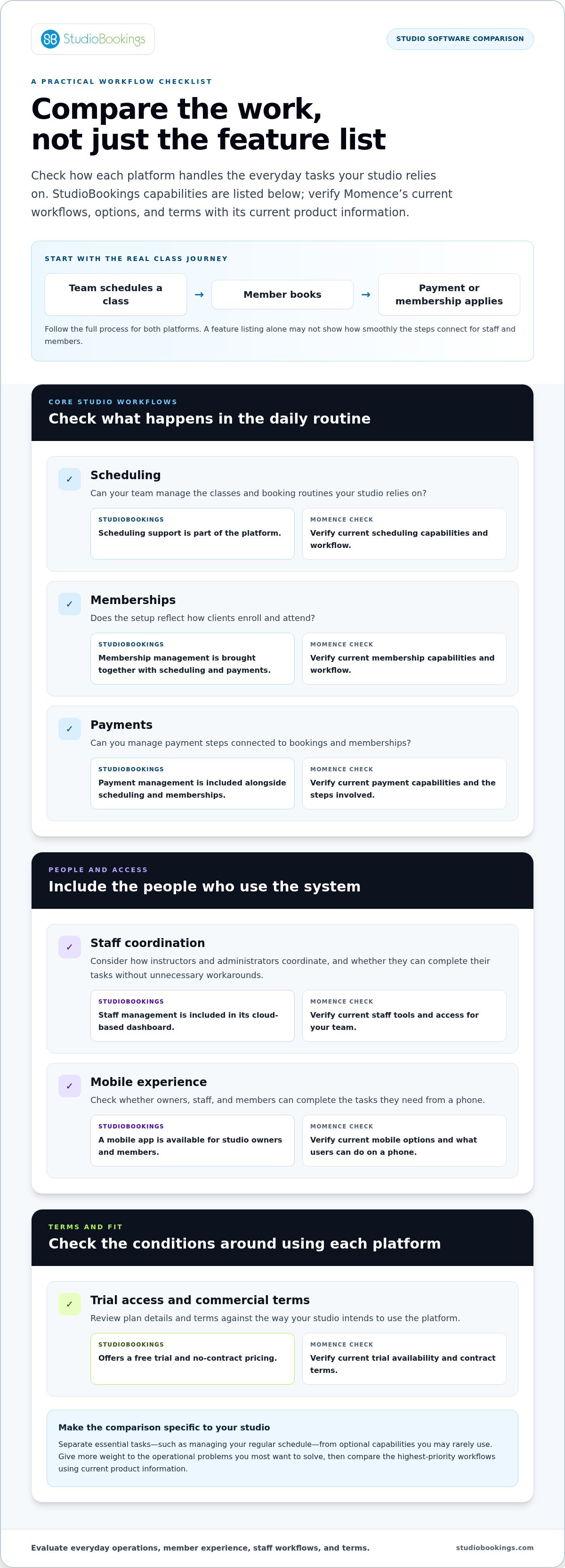
A focused evaluation helps you compare platforms on the work your studio actually needs to get done. Instead of clicking through every menu, use a consistent set of tasks in each system. This gives you a clearer picture of day-to-day fit, what feels intuitive to your team, and which requirements still need answers.
List the tasks your studio handles most often, then note where your current process creates friction. Separate must-haves from preferences so a polished extra doesn’t distract from a core operational need.
Try representative workflows for scheduling a class, managing a membership, handling a payment, and coordinating staff. Use scenarios that reflect your real class formats and team responsibilities.
Note how easily staff complete each task, how the member booking experience feels, and whether the workflow suits your team’s routines. Apply the same checklist to both platforms for a fair comparison.
StudioBookings offers a free trial, giving you a practical way to evaluate its fit. Use the trial to work through priority tasks, not just browse features. Can staff complete the steps they need without unnecessary workarounds? Can members find and book sessions clearly through the mobile experience? Record your observations as you go, including what feels smooth and where you have questions.
Record whether staff can finish priority scheduling, membership, payment, and coordination tasks.
Check how clear the session-finding and booking steps feel on a mobile device.
List unanswered questions or needed capabilities. Don’t assume either platform includes something just because it appears in a general feature comparison.
At the end, compare your notes with the priorities you ranked first. If StudioBookings handles your essential workflows well and feels natural for your team and members, it may be a better fit than Momence for your studio. Yoga-focused owners can also explore this small-studio yoga software guide for more tailored considerations.
Ready to put the checklist into practice? Start evaluating StudioBookings with the workflows your studio relies on most.
The right choice isn’t the platform with the broadest feature list. It’s the one that supports your studio’s priority workflows and gives members a booking experience that works for them. A focused evaluation can help you decide whether StudioBookings is a better fit than Momence based on what your team actually needs.
StudioBookings is cloud-based management software for yoga, fitness, Pilates, barre, dance, and cycling studios. It brings scheduling, memberships, payments, and staff management together in one dashboard, with a mobile app for studio owners and members. The platform serves studios in over 40 countries, but the practical question for your evaluation is whether it suits your studio’s routines.
Think about the work you want to bring together. If your team regularly moves between class schedules, membership administration, payments, and staff coordination, assess how those tasks fit into one system. Then consider the member experience, including how clients access the mobile app and manage their studio activities.
Choose a short list of workflows to test before you begin. For example, include creating a class, handling a membership, managing a payment routine, and completing a staff task. Use scenarios that reflect your actual operations, and note where the process feels clear or raises questions.
StudioBookings offers a free trial and no-contract pricing, so you can assess the software against your studio’s needs before deciding. Try the same essential workflows you used to evaluate Momence. Pay attention to how the tasks fit together, how your team responds, and whether the member experience aligns with your expectations. Make your decision based on demonstrated fit, not a broad claim that one platform is best for every studio.
Ready to put your comparison into practice? Start evaluating StudioBookings with the workflows that matter most to your studio.
The best choice isn’t decided by a feature count. It comes down to how well a platform supports your essential workflows, your staff, and the experience members expect. Compare scheduling, memberships, payments, and day-to-day team tasks, then weigh the effort of switching against the problems you want to solve. That’s how to decide whether StudioBookings could be Better than Momence for your studio.
Founded in 2012 by studio owners, StudioBookings serves studios in over 40 countries. Its cloud-based management software brings core studio tasks together, with a mobile app for owners and members. A free trial and no-contract pricing give you room to assess the fit against your real routines before making a decision.
Start with a short list of workflows to test, then see how they work in practice. Start your free StudioBookings trial and compare the software with confidence. The right next step is the one that helps your studio move forward.
StudioBookings may be a better fit if its workflows match your yoga studio’s needs. It provides cloud-based studio management software with class scheduling, memberships, payments, and staff management in one dashboard, plus a mobile app for owners and members. Compare how each platform handles your typical class and membership routines, then consider the member booking experience and commercial terms. The best choice depends on your priorities, not a blanket feature comparison.
No platform change should be assumed to happen without disruption. Before switching, document upcoming classes, membership arrangements, payment routines, staff responsibilities, and the steps members use to book. Plan how you’ll communicate changes and test key workflows before moving your team and members to a new process. Data export or migration steps depend on the platforms’ current processes, so establish those details rather than assuming records transfer automatically.
Compare the tasks your studio depends on: scheduling, memberships, payments, staff management, mobile access, and trial or contract terms. Test realistic examples, such as creating a class, handling a membership, and completing a staff task. StudioBookings supports these core management workflows and offers a mobile app for owners and members. For Momence, review current product information for specific capabilities and terms, since details can change over time.
Yes, StudioBookings offers a free trial. Use it to assess the platform with the workflows your studio actually relies on, rather than browsing features in isolation. Try representative scheduling, membership, payment, and staff tasks, and note how they fit your team’s routines. You can also assess the mobile app experience for owners and members. StudioBookings has no-contract pricing, so you can evaluate practical fit before making a decision.
Yes. StudioBookings supports membership management, payment processing, and staff management, alongside class scheduling in one dashboard. That brings these connected responsibilities into the same cloud-based platform. During a trial, test tasks that reflect how your studio works, such as managing a membership alongside a class schedule or reviewing staff responsibilities. This helps you judge whether the workflows suit your operation instead of relying only on a feature list.
Yes. StudioBookings serves studios in over 40 countries and has offices in the United States, United Kingdom, Canada, and Australia. Its cloud-based studio management software is used by yoga, fitness, Pilates, barre, dance, and cycling studios. Consider your studio’s day-to-day workflows and member needs, then use the free trial to assess how the platform fits your operation.