A yoga membership management system should do more than collect payments. It should support the full member relationship, from sign-up and billing to class bookings and renewals. When member records, payments, and class administration sit in separate places, routine follow-up can take time away from...

A yoga membership management system should do more than collect payments. It should support the full member relationship, from sign-up and billing to class bookings and renewals. When member records, payments, and class administration sit in separate places, routine follow-up can take time away from teaching and running your studio.
Clear workflows help members manage their accounts and give your team a practical view of what’s happening across the studio. This guide explains what to look for in software, how to compare platforms, and how to prepare your membership information before getting started. You’ll also see how bringing memberships, scheduling, payments, and staff management into one workspace can reduce repetitive admin. StudioBookings brings these tools together in one dashboard, with a mobile app for studio owners and members. Use the steps below to assess your options from sign-up through renewal.
• A yoga membership management system should organize member relationships and recurring plans, not just process payments.
• Map the journey from sign-up to renewal to spot where member details, payment steps, or account updates need clearer workflows.
• Compare platforms across membership records, payments, class scheduling, staff access, reporting, and member usability.
• Prepare for software setup by documenting your plans, policies, payment processes, and common member questions.
• Bringing memberships and studio operations into one dashboard can reduce repetitive admin while keeping day-to-day activity visible.
A yoga membership management system organizes member records, recurring plans, payments, and the workflows that connect them. It gives staff a clearer way to see who has an active plan, what that plan includes, and where a member is in their relationship with the studio. When membership information connects with class schedules and payment activity, staff can handle common account questions with less searching.
Memberships, class bookings, and class packs are related, but they serve different purposes. A recurring membership records an ongoing agreement, such as a monthly plan. A class booking reserves a place in a particular session. A one-off booking may be a single class purchase, while a prepaid class pack lets someone use a set number of classes over time. Keeping these categories distinct helps staff understand what a member has purchased and what they can book.
Booking tools handle reservations. Membership workflows organize the ongoing relationship behind those visits, including a member’s plan and payment status. The two functions work best together: when a member books a class, staff can refer to their plan or pass to understand what the booking relates to. Connecting those details can reduce manual checks and make booking easier to manage.
For example, a member books a morning flow class. The booking records the reservation, while the membership record shows which plan the member holds. If those details are stored separately, staff may need to consult a spreadsheet, payment history, or message thread to answer a question. When the information is connected, it’s easier to see the account context and decide whether any follow-up is needed.
A solo instructor with a small roster may need a straightforward way to organize plans and payments. A studio with multiple instructors or a growing member list may benefit from shared records that help staff coordinate class administration without relying on one person’s memory. To identify the right setup, consider how you sell memberships, who handles member questions, and where account information currently lives. This yoga studio software guide for small studios offers a closer look at tools for leaner operations.
Disconnected records create small but repeated tasks: confirming whether a payment was recorded, checking which plan a member holds, or updating the same detail in multiple places. Software won’t replace thoughtful member service, but it can make information easier to find and workflows easier to follow. That gives staff more time to focus on the people in the studio and the practice itself. For context on the history and philosophy of yoga, explore how the practice extends beyond a class booking or payment record.
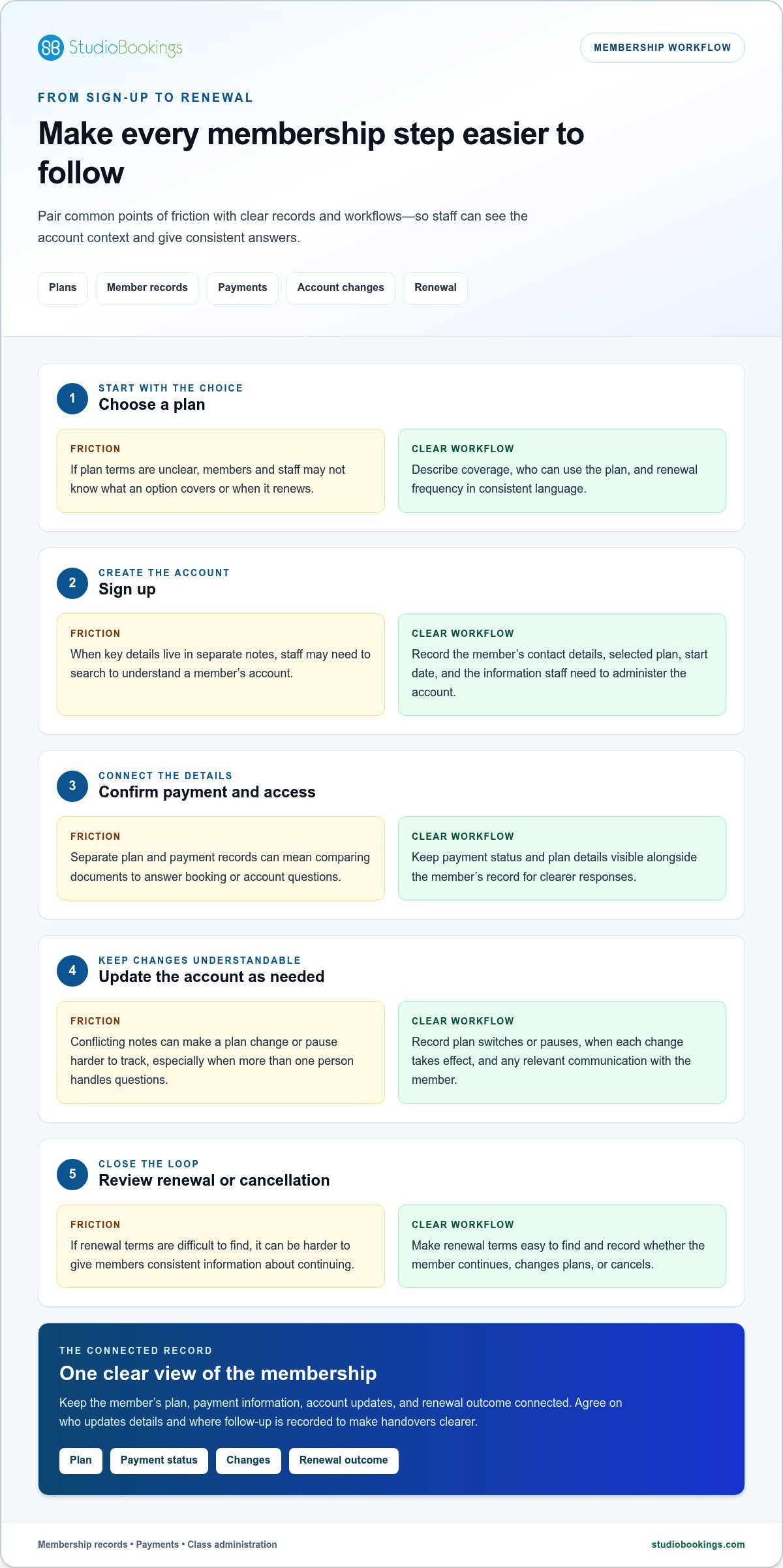
A clear membership journey helps your team give each person consistent information, from choosing a plan to deciding whether to continue. A yoga membership management system can keep the steps and related records organized, so staff don’t have to search through separate notes whenever a member has a question.
Make it easy for prospective members to understand what each option covers, who can use it, and how often it renews.
Record the member’s contact details, selected plan, start date, and other information staff need to administer the account.
Keep payment status and plan details visible alongside the member’s record, so staff can respond clearly to booking or account questions.
Record changes such as a plan switch or pause, including when the change takes effect and any relevant communication with the member.
Make renewal terms easy to find and record whether the member continues, changes plans, or cancels.
Before enrolling members, document each plan’s name, access rules, renewal terms, and eligibility in consistent language. Keep recurring memberships separate from prepaid class packs and introductory offers. A class pack has a defined number of visits, while an introductory offer may have its own conditions. Describing either as an ongoing membership can confuse members and staff about what the purchase includes.
Clear wording gives your team a reliable reference when explaining a plan or a change. It also helps members compare options and make an informed choice at sign-up. For broader context on the benefits of membership management software for organizations, consider how consistent records and processes support everyday administration.
Connecting a member’s plan with their payment information helps staff understand the account before responding to questions. If someone asks whether a payment has been recorded or which plan they hold, staff can refer to the relevant details together instead of comparing separate documents. Keep records current when a payment is missed, a plan changes, or an account is paused or cancelled.
Agree on who updates these details and where to record follow-up. That simple routine reduces conflicting notes and makes handovers clearer, especially when more than one person handles membership questions.
Managing sign-up, plan changes, payments, and renewal in one workflow gives staff a clearer view of each membership and helps members receive consistent answers. If you’re reviewing your current process, explore StudioBookings studio management software to see how membership administration can sit alongside studio operations.
Start with your studio’s actual routines, not the longest feature list. Write down what staff handle each week, where information is difficult to find, and which tasks members need to do themselves. Then compare systems against those needs. A yoga membership management system should make important workflows easier to follow, not add tools or steps your team won’t use.
| Criteria | Why it matters | Question to answer |
|---|---|---|
| Membership records | Staff need a clear view of each member’s plan and account status. | Can authorized staff quickly understand a member’s current plan and any changes? |
| Payment handling | Connected payment information can make account questions easier to resolve. | Can staff see relevant payment details alongside membership information? |
| Class scheduling | Scheduling and membership rules affect how members use studio offerings. | Can members reserve classes in a way that reflects their plan or pass? |
| Staff access | Instructors and administrators may need different information for their roles. | Can your team find what it needs without relying on one person to manage every task? |
| Reporting | Useful summaries help owners see membership and studio activity. | Can you review information that supports the decisions you make regularly? |
| Member usability | Clear self-service tools can make routine interactions more convenient. | Can members easily access the account and booking options they use? |
Test a realistic account scenario. Find an active plan, locate its payment status, and consider how you would record a change or explain an account question. Look for clear labels and a logical path through the information. If routine answers require switching between notes, spreadsheets, and payment records, the workflow may not address the administrative friction you want to reduce.
Check how the system distinguishes current plans from changed, paused, or cancelled accounts. Clear status information helps staff understand what action is relevant instead of guessing or relying on memory.
Review the system from both sides of the studio. Owners may need operational information on desktop or mobile, while members need a straightforward way to interact with the studio. Consider whether instructors can learn the tools they need and whether account and booking tasks are easy to hand over between staff.
For a broader view of how studio software can support business operations as you grow, explore this yoga studio software growth guide.
Separate must-haves from optional capabilities. A small studio may prioritize clear records, payments, and class scheduling. A larger team may place more weight on staff access and reporting. Choose based on the work your studio needs to manage, and favor a connected, easy-to-follow workflow over features that don’t fit your model.
A smoother start with membership software begins with organized information and agreed staff routines. Before setting up a yoga membership management system, take stock of how your studio handles plans, member records, payments, and common questions. This preparation helps you keep useful practices and resolve unclear processes before they become part of a new workflow.
List every current recurring plan, class pack, and introductory offer. Note what each includes, who is eligible, when access starts, and how renewals or changes are handled.
Gather the wording staff use for payment questions, pauses, plan changes, and cancellations. Identify any policy that team members describe differently.
Look for duplicate profiles, outdated contact details, inconsistent plan names, and accounts with unclear status. Resolve what you can and note anything that needs follow-up.
Decide who records sign-ups, handles payment questions, updates account changes, and responds to member concerns. Give each task a clear owner.
Use one consistent label for each membership option. If the same plan appears under different names in staff notes, payment records, or member communications, it can be harder to identify its terms. Keep an up-to-date reference for each plan’s access rules and renewal details. Also gather the member information staff need for daily administration, such as contact details and current plan status.
Keep record-keeping practical. Agree on where staff document account changes and what details to include, such as the change made and its effective date. That makes it easier for another team member to understand the account history without relying on informal messages or memory.
Walk through realistic situations with instructors and administrators. For example, decide who should respond when a member says a payment status looks incorrect, wants to pause a plan, or asks which option they’re enrolled in. Clarify when to update the record and when to pass the question to the person responsible for membership administration.
Gather common member questions and prepare concise answers based on your studio’s policies. After staff have used the workflow, ask which steps felt unclear, where information was difficult to find, and what guidance needs updating. Small adjustments can prevent recurring confusion in the member experience.
With plans, records, and team responsibilities organized, your studio is better prepared to put membership software to practical use. Explore StudioBookings for yoga studio membership management and see how membership administration can sit alongside other studio operations.
Membership records are most useful when they sit alongside the studio activity they relate to. StudioBookings brings memberships, class scheduling, payments, and staff management together in one dashboard. Your team can manage membership administration as part of day-to-day studio operations instead of treating it as a separate task.
Consider a member who asks about their plan before booking a class. Staff can use the dashboard to access membership and payment information alongside the class schedule, giving them a more connected view of the situation. Team members can work from a shared workspace for studio operations rather than leaving details scattered across separate records.
This connected approach gives owners and staff a clearer reference point for day-to-day activity. It doesn’t replace your studio’s policies or the personal support members value. It gives your team one place to manage membership administration alongside scheduling and payments, reducing the need to switch between unrelated tools.
Members can use StudioBookings’ mobile app, and studio owners have mobile access too. The app gives both sides a convenient way to engage with studio operations beyond the front desk.
Before choosing a yoga membership management system, identify your plans, policies, member information, and staff workflows. Use those requirements to assess how StudioBookings fits your studio. During the free trial, explore the dashboard and mobile app with your everyday tasks in mind. For example, see whether your team can find the information it needs and whether the member experience feels straightforward.
StudioBookings has no long-term contracts, so you can explore the platform without committing to an extended agreement. Assess the workflows that matter to your studio, from membership administration to scheduling, payments, and staff management. The goal is a setup your team can use in everyday practice, not a collection of features that don’t fit your needs.
See how the platform fits your studio’s routines: Explore StudioBookings for yoga studio management.
Your next step doesn’t need to be a full operational overhaul. Choose one recurring task that slows your team down, then consider how a yoga membership management system could make it clearer for staff and members. A focused change can help you build more consistent routines while keeping your attention on the studio community.
StudioBookings is a cloud-based platform serving studios in over 40 countries. Its dashboard brings memberships, scheduling, payments, and staff management together, with a mobile app for studio owners and members. Explore how those tools could support your studio’s current priorities and future growth.
Explore StudioBookings and simplify your studio operations.
Yes. Booking software focuses on reserving a place in a class, while membership software helps manage ongoing plan details and member accounts. A studio might use booking tools to see who’s attending Tuesday’s class, then membership records to understand which plan each person has. Studio platforms can bring both functions together, helping staff see how class reservations relate to membership information without treating a booking as proof of an active plan.
A system for studio memberships should help you organize multiple plans, such as unlimited access and a limited monthly option. Check that each plan is clearly distinguished by its name, eligibility, and access terms. Staff should be able to identify whether a member’s plan includes a particular class or has defined limits, rather than relying on shorthand labels or memory.
Use consistent plan names and keep each member’s contact details, current plan, account status, and relevant changes together. Review records regularly for duplicate profiles or outdated information. If someone changes plans, update the main account record and note when the new terms take effect. Assign responsibility for updates to help prevent conflicting versions.
Membership software can help staff keep payment activity connected with member accounts and process payments through the studio’s software. The handling of recurring charges depends on the platform’s payment capabilities and setup, so distinguish payment processing from automatic billing. A useful test is whether staff can identify a payment issue, see which member account it relates to, and record the action taken without searching through unrelated notes.
Gather a current list of plans, access terms, renewal and cancellation policies, payment processes, and common member questions. Review member records for duplicates, outdated contact details, and inconsistent plan labels. Decide who handles sign-ups and account changes, and agree on where staff record updates. Preparing examples, such as a plan change or a missed payment question, helps the team practice a consistent response.
Yes. StudioBookings offers a free trial, so you can explore the platform against your studio’s actual needs before deciding whether to continue. Try common tasks, such as finding a member account or reviewing payment information, and consider whether the experience works for staff and members. StudioBookings also has no long-term contracts.